去年分享过一次,今年又开始了,发现了一个可以刷课时的插件,之前我用的时候还是去年的版本,但是今天发现更新了,自带账号自动登录功能
使用方法:
浏览器+tampermonkey+插件
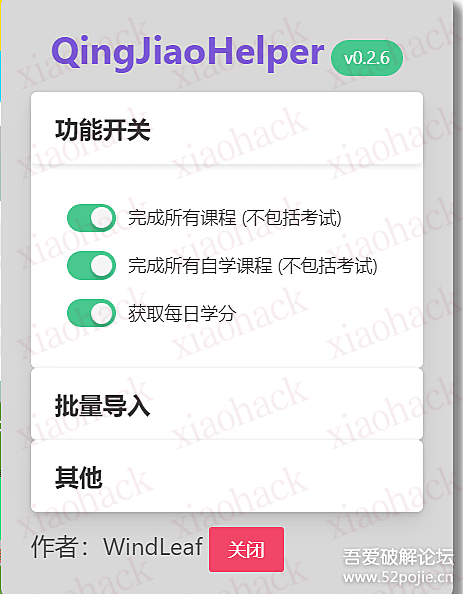

GitHub:https://github.com/WindLeaf233/QingJiaoHelper
代码:
// ==UserScript==
// @name                 QingJiaoHelper
// @namespace            http://tampermonkey.net/
// @version              0.2.6
// @description          青骄第二课堂小助手: 自动完成所有课程 + 每日领取学分
// @author               WindLeaf
// @match                *://www.2-class.com/*
// @grant                GM_addStyle
// @grant                GM_getResourceText
// @grant                GM_registerMenuCommand
// @grant                GM_getValue
// @grant                GM_setValue
// @license              GPL-3.0
// @supportURL           https://github.com/WindLeaf233/QingJiaoHelper
// @require              http://cdn.staticfile.org/jquery/3.6.1/jquery.min.js
// @require              https://cdn.bootcdn.net/ajax/libs/toastify-js/1.12.0/toastify.js
// @require              https://unpkg.com/vue@2
// @require              https://unpkg.com/buefy/dist/components/tag
// @require              https://unpkg.com/buefy/dist/components/collapse
// @require              https://unpkg.com/buefy/dist/components/switch
// @require              https://unpkg.com/buefy/dist/components/button
// @require              https://unpkg.com/buefy/dist/components/dialog
// @require              https://unpkg.com/buefy/dist/components/upload
// @require              https://unpkg.com/buefy/dist/components/field
// @require              https://cdn.bootcdn.net/ajax/libs/xlsx/0.18.5/xlsx.full.min.js
// @resource toastifycss https://cdn.jsdelivr.net/npm/toastify-js/src/toastify.min.css
// @resource buefycss    https://unpkg.com/buefy/dist/buefy.min.css
// @resource menuhtml    https://fqj.pages.dev/menu.html
// ==/UserScript==

'use strict';

if (isNone($.ajax) || isNone($.isNumeric)) {
  showMessage('无法找到脚本所需的 jQuery 函数!', 'red');
  return;
}

function isNone(anyObj) {
  return anyObj == undefined || anyObj == null;
}

function showMessage(text, color) {
  Toastify({
    text,
    duration: 3 * 1000,
    newWindow: true,
    gravity: 'top',
    position: 'left',
    stopOnFocus: true,
    style: { background: color }
  }).showToast();
}

const error = err => {
  showMessage(`在请求的时候发生了个错误, 错误代码 [${err.status}], 具体响应内容在控制台中`, 'red')
  console.error(`[${err.status}]`, err.responseText);
  return;
}

function request(method, api, success, data={}) {
  let url = `https://www.2-class.com/api${api}`;
  console.debug(`[${method}] ${url}`, data);
  if (method === 'GET') {
    return $.ajax({ method: 'GET', url, success, error });
  } else {
    return $.ajax({
      method: 'POST', url, success, error,
      contentType: 'application/json;charset=UTF-8',
      dataType: 'json',
      data: JSON.stringify(data)
    });
  }
}

function processSiteScript() {
  for (let script of document.getElementsByTagName('script')) {
    if (script.innerText.indexOf('window.__DATA__') != -1) {
      eval(script.innerText);
    }
  }
}

processSiteScript();
const reqtoken = window.__DATA__.reqtoken;
const location = document.location;
const pathname = location.pathname;

function changeReactValue(element, value) {
  let lastValue = element.value;
  element.value = value;
  let event = new Event('input', { bubbles: true });
  event.simulated = true;
  let tracker = element._valueTracker;
  if (tracker) {
    tracker.setValue(lastValue);
  }
  element.dispatchEvent(event);
}

function runWhenReady(readySelector, callback) {
  var numAttempts = 0;
  var tryNow = function() {
    var elem = document.querySelector(readySelector);
    if (elem) {
      callback(elem);
    } else {
      numAttempts++;
      if (numAttempts >= 34) {
        console.warn(`无法找到元素 [${readySelector}],已放弃!`)
      } else {
        setTimeout(tryNow, 250 * Math.pow(1.1, numAttempts));
      }
    }
  };
  tryNow();
}

function startCourse(courseId, successCallback) {
  request('GET', `/exam/getTestPaperList?courseId=${courseId}`, resp => {
    let data = resp.data;
    let title = data.papaerTitle; // typo xD
    let testPaperList = data.testPaperList;
    if (!isNone(testPaperList)) {
      let answers = testPaperList.map(column => column.answer);
      console.debug(`成功获取到课程 [${courseId}] 的数据: ${title}`);
      console.debug('成功获取到答案', answers);
      commit(answers);
    } else {
      let errorMsg = data.errorMsg;
      if (errorMsg !== '该课程课时考试已经完成') {
        startCourse(courseId);
      }
    }
  });

  function commit(answers) {
    console.debug(`正在提交课程 [${courseId}] 答案...`);
    let data = {
      courseId,
      examCommitReqDataList: answers.map((answer, index) => {
        return {
          examId: index + 1, // examId = index + 1
          answer: $.isNumeric(answer) ? Number(answer) : answer // single answer must be a number
        }
      }),
      reqtoken
    };
    request('POST', '/exam/commit', resp => {
      let flag = resp.data;
      if (flag) {
        console.debug(`成功提交课程 [${courseId}] 答案!`);
        successCallback();
      } else {
        console.error(`无法提交课程 [${courseId}] 答案!`, resp);
      }
    }, data);
  }
}

function checkDone(getCommittedCallBack, allDoneCallBack) {
  let committed = getCommittedCallBack();
  let beforeCommitted = committed;
  let checkCommitUpdate = setInterval(() => {
    if (committed != 0) {
      if (committed == beforeCommitted) {
        showMessage(`成功完成了 ${committed} 个课程!`, 'green');
        allDoneCallBack(committed);
        clearInterval(checkCommitUpdate);
      } else {
        beforeCommitted = committed;
      }
    }
  }, 500);
}

function getGMValue(name, defaultValue) {
  let value = GM_getValue(name);
  if (value === undefined) {
    value = defaultValue;
    GM_setValue(defaultValue);
  }
  return value;
}

let course = getGMValue('course', true);
let selfCourse = getGMValue('selfCourse', true);
let credits = getGMValue('credits', true);
let isLogined = getGMValue('isLogined', null);
let loginedAccount = getGMValue('loginedAccount', '');
let accounts = getGMValue('accounts', []);
let autoCompleteCourseDone = getGMValue('autoCompleteCourseDone', false);
let autoCompleteSelfCourseDone = getGMValue('autoCompleteSelfCourseDone', false);
let autoCompleteCreditsDone = getGMValue('autoCompleteCreditsDone', false);

let notAvailable = name => showMessage(`[${name}] 当前功能不可用,请刷新重试!`, 'red');

let autoComplete = () => notAvailable('autoComplete');
let startFromDatas = (_) => notAvailable('startFromDatas');
let resetStartFromDatas = () => {
  isLogined = null;
  GM_setValue('isLogined', null);
  showMessage('重置成功!', 'green');
  location.pathname = '/';
};

function showMenu() {
  let menucss = `.fqj-menu-container{position:fixed;z-index:9999;right:20px;top:10px}`;
  GM_addStyle(menucss);

  let menuhtml = GM_getResourceText('menuhtml');
  let container = document.createElement('div');
  container.classList.add('fqj-menu-container');
  container.innerHTML = menuhtml;
  document.body.appendChild(container);

  new Vue({
    el: '#fqj-app',
    data() {
      return {
        isOpen: -1,
        version: 'v0.2.6',
        collapses: [
          { title: '功能开关' },
          { title: '批量导入' },
          { title: '其他' }
        ],
        file: null
      }
    },
    computed: {
      course: {
        set(value) {
          GM_setValue('course', value);
          course = value;
        },
        get() {
          return course;
        }
      },
      selfCourse: {
        set(value) {
          GM_setValue('selfCourse', value);
          selfCourse = value;
        },
        get() {
          return selfCourse;
        }
      },
      credits: {
        set(value) {
          GM_setValue('credits', value);
          credits = value;
        },
        get() {
          return credits;
        }
      }
    },
    methods: {
      autoComplete() {
        autoComplete();
      },

      startFromDatas() {
        const file = this.file;
        if (file != null) {
          const fileReader = new FileReader();
          fileReader.onload = event => {
            try {
              const { result } = event.target;
              const workbook = XLSX.read(result, { type: 'binary' });
              let data = [];
              for (const sheet in workbook.Sheets) {
                if (workbook.Sheets.hasOwnProperty(sheet)) {
                  data = data.concat(XLSX.utils.sheet_to_json(workbook.Sheets[sheet]));
                  break;
                }
              }
              startFromDatas(data);
            } catch (e) {
              showMessage('在读取 xls 文件的过程中发生了个错误,请检查文件格式是否正确');
              console.error(e);
            }
          }
          fileReader.readAsBinaryString(file);
        } else {
          showMessage('无法读取文件对象,请检查文件格式是否正确!', 'red');
        }
      },

      reset() {
        resetStartFromDatas();
      },

      closeMenu() {
        document.body.removeChild(container);
      }
    }
  });
}

function login(account, password) {
  if (pathname !== '/') {
    // jump to main page
    location.pathname = '/';
    return;
  }

  // todo
}

function logout() {
  runWhenReady('#app > div > div > div > header > div > div.header-right-panel.hover-black > div.header-user-info > div > div > ul > li:nth-child(6) > a', logoutButton => {
    GM_setValue('isLogined', false);
    GM_setValue('account', '');
    logoutButton.click(); // logout
  });
}


(function() {
  // script pre-loads
  GM_addStyle(GM_getResourceText('toastifycss')); // apply toastifycss style file
  GM_addStyle(GM_getResourceText('buefycss')); // apply buefy style file
  GM_registerMenuCommand('菜单', showMenu); // register menu

  // if (isLogined === true) {
  //   autoComplete();
  //   let waiting = setInterval(() => {
  //     if (autoCompleteCourseDone && autoCompleteSelfCourseDone && autoCompleteCreditsDone) {
  //       showMessage(`账号 [${loginedAccount}] 已完成!`, 'green');
  //       clearInterval(waiting);
  //       logout();
  //     }
  //   }, 500);
  //   return;
  // } else if (isLogined === false) {
  //   let nextAccount = accounts[0];
  //   if (!isNone(nextAccount)) {
  //     login(nextAccount.account, nextAccount.password);
  //   } else {
  //     showMessage('全部账号 (除出错误的) 已完成!', 'green');
  //   }
  //   return;
  // }

  // add vue@2
  let vueScript = document.createElement('script');
  vueScript.setAttribute('src', 'https://unpkg.com/vue@2');
  document.body.appendChild(vueScript);

  const features = [
    { path: ['/courses', '/drugControlClassroom/courses'], title: '自动完成所有课程 (不包括考试)', func: taskCourses, enabled: course },
    { path: ['/selfCourse', '/drugControlClassroom/selfCourse'], title: '自动完成所有课程 (自学) (不包括考试)', func: taskSelfCourses, enabled: selfCourse },
    { path: ['/admin/creditCenter'], title: '自动获取每日学分', func: taskCredit, enabled: credits }
  ];

  for (let feature of features) {
    if (feature.path.indexOf(pathname) != -1 && feature.enabled) {
      showMessage(`激活功能: ${feature.title}`, 'green');
      feature.func();
    }
  }

  function taskCourses() {
    request('GET', '/course/getHomepageGrade', resp1 => {
      let grades = resp1.data.map(it => it.value);
      console.debug('获取年级列表', grades);
      for (let grade of grades) {
        // get courses
        request('GET', `/course/getHomepageCourseList?grade=${grade}&pageSize=24&pageNo=1`, resp2 => {
          let courses = resp2.data.list
            .filter(k => !k.isFinish && k.title != '期末考试') // skip finished and final exam
            .map(j => j.courseId); // courseId => list
          console.debug(`年级 [${grade}] 可用的课程 (没学过的):`, courses);
          if (courses.length === 0) {
            console.debug(`[!] 年级 [${grade}] 所有课程都是完成状态, 已跳过!`);
            return;
          }

          let committed = 0;
          for (let courseId of courses) {
            // [skip final exam]
            if (courseId == 'finalExam') {
              console.debug('已跳过期末考试!');
              return;
            }
            // start course
            if (!isNone(courseId)) {
              startCourse(courseId, () => {
                committed++;
              });
            } else {
              console.debug('[!] 无法找到 `courseId`, 已跳过!');
            }
          }

          checkDone(() => committed, _ => {
            autoCompleteCourseDone = true;
          });
        });
      }
    });
  }

  function taskSelfCourses() {
    // get all grades (bad method)
    let gradesTabElements = [];
    let timer = setInterval(() => {
      gradesTabElements = document.getElementsByClassName('ant-tabs-tab');
      if (gradesTabElements.length != 0) {
        resolveGrades();
      }
    }, 500);

    function resolveGrades() {
      clearInterval(timer);
      console.debug('获取年级列表 (自学)', gradesTabElements);
      for (let element of gradesTabElements) {
        let grade = element.innerText;
        request('GET', `/course/getHomepageCourseList?grade=自学&pageNo=1&pageSize=500&sort=&type=${grade}`, resp => {
          let courses = resp.data.list
            .filter(k => !k.isFinish && k.title != '期末考试') // skip finished and final exam
            .map(j => j.courseId); // courseId => list
            console.debug(`年级 [${grade}] 可用的课程 (自学) (没学过的):`, courses);
          if (courses.length === 0) {
            showMessage(`年级 [${grade}] 所有课程都是完成状态, 已跳过!`, 'blue');
            return;
          }

          let committed = 0;
          for (let courseId of courses) {
            // [skip final exam]
            if (courseId == 'finalExam') {
              console.debug('已跳过期末考试!'); // seems that selfCourses don't have final exam
              return;
            }
            // start course
            if (!isNone(courseId)) {
              startCourse(courseId, () => {
                committed++;
              });
            } else {
              console.debug('[!] 无法找到 `courseId`, 已跳过!');
            }
          }

          checkDone(() => committed, _ => {
            autoCompleteSelfCourseDone = true;
          });
        });
      }
    }
  }

  function taskCredit() {
    // medal: 领取禁毒学子勋章
    request('GET', '/medal/addMedal', medalResp => {
      let data = medalResp.data;
      let status = data.status;
      let num = data.medalNum;
      if (status) {
        showMessage(`成功领取禁毒徽章 [${num}]!`, 'green');
      } else {
        console.debug(`[!] 无法领取徽章 (可能已领取过), 已跳过!`)
      }
    });

    // resources: 心理减压, 耕读学堂 [耕读, 电影, 音乐, 体育, 美术, 自然, 公开课], 校园安全
    let categorys = [
      { name: 'public_good', tag: 'read' },
      { name: 'ma_yun_recommend', tag: 'labour' }, // the `ma_yun_recommend` has lots of sub-categorys
      { name: 'ma_yun_recommend', tag: 'movie' },
      { name: 'ma_yun_recommend', tag: 'music' },
      { name: 'ma_yun_recommend', tag: 'physicalEducation' },
      { name: 'ma_yun_recommend', tag: 'arts' },
      { name: 'ma_yun_recommend', tag: 'natural' },
      { name: 'ma_yun_recommend', tag: 'publicWelfareFoundation' },
      { name: 'school_safe', tag: 'safeVolunteer' }
    ];
    let synced = 0;
    let liked = 0;

    for (let category of categorys) {
      request('POST', '/resource/getBeforeResourcesByCategoryName', resourcesResp => {
        let resources = resourcesResp.data.list.map(it => {
          return {
            title: it.description, resourceId: it.resourceId
          };
        });

        console.debug(`获取分类 ${category.name} 的资源`, resources);
        for (let resource of resources) {
          let resourceId = resource.resourceId;
          let data = { resourceId, reqtoken };
          // sync resource
          request('POST', '/growth/sync/resource', resourcePostResp => {
            let result = resourcePostResp.data.result;
            if (result) {
              console.debug(`成功同步资源 [${resourceId}]: ${resource.title}!`);
              synced++;
            } else {
              console.debug(`[!] 同步资源 [${resourceId}] 失败, 已跳过!`);
            }
          }, data);

          // like resource
          request('POST', '/resource/likePC', resourceLikeResp => {
            let count = resourceLikeResp.data;
            let flag = resourceLikeResp.success;
            let already_like = !$.isNumeric(count) && count.errorCode === 'ALREADY_like';
            if ($.isNumeric(count) && flag) {
              console.debug(`成功点赞资源 [${resourceId}]: ${count}!`);
              liked++;
            } else {
              console.debug(`[!] 无法点赞资源 [${resourceId}], 是否已点赞: ${already_like}, 已跳过!`);
            }
          }, data);
        }
      }, { categoryName: category.name, pageNo: 1, pageSize: 100, reqtoken, tag: category.tag });
    }

    let beforeSynced = synced;
    let checkSuccess = setInterval(() => {
      if (synced != 0) {
        if (synced == beforeSynced) {
          showMessage(`成功同步 ${synced} 个资源, 点赞 ${liked} 个!`, 'green');
          autoCompleteCreditsDone = true;
          GM_setValue('autoCompleteCreditsDone', true);
          clearInterval(checkSuccess);
        } else {
          beforeSynced = synced;
        }
      }
    }, 500);
  }

  autoComplete = () => {
    for (let feature of features) {
      showMessage(`已激活 ${feature.title}`, 'green');
      feature.func();
    }
  }

  // startFromDatas = (data) => {
  //   GM_setValue('accounts', data.map(line => {
  //     let account = line.账号;
  //     let password = line.密码;
  //     if (!isNone(account) && !isNone(password)) {
  //       return { account, password };
  //     } else {
  //       console.debug(`[!] 读取行 [${line.__rowNum__}] 时找不到账号和密码,已跳过!`, line);
  //       return;
  //     }
  //   }));
  //   GM_setValue('isLogined', false);
  //   location.pathname = '/';
  // }
})();