即梦视频去水印下载
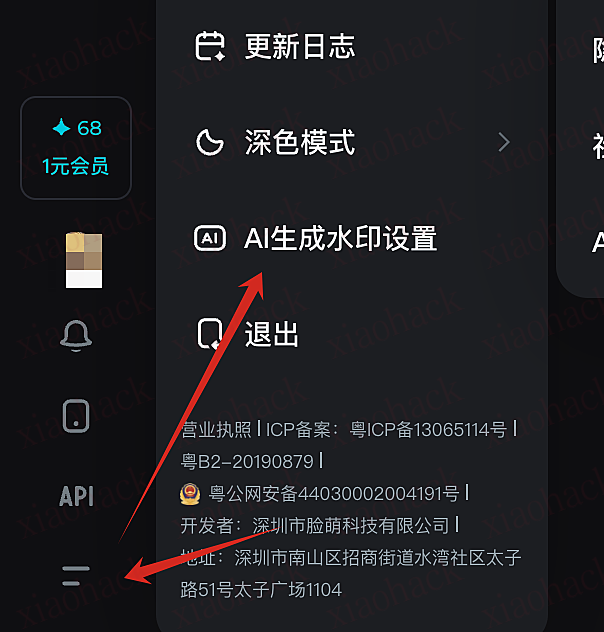
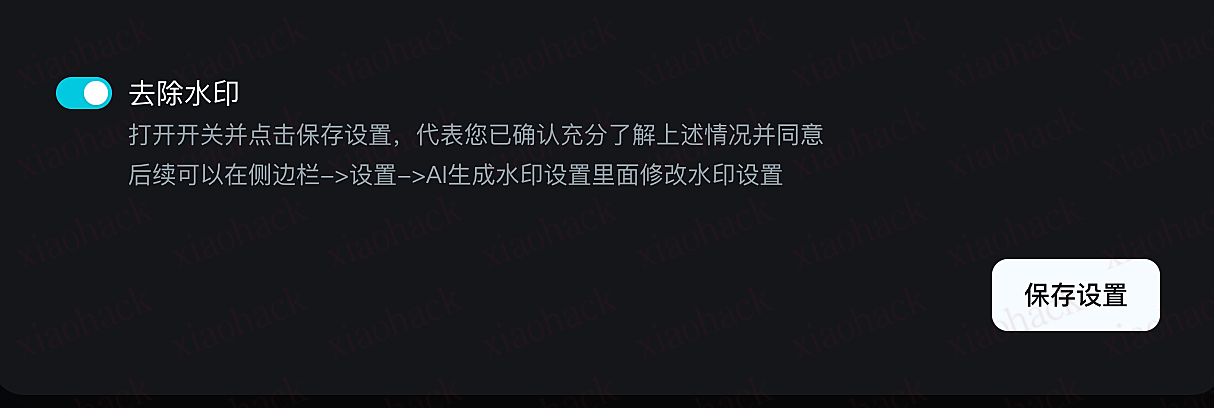
图片&视频无水印下载
// ==UserScript==
// @name 即梦AI去水印
// @namespace http://tampermonkey.net/
// @version 1.1.0
// @description 通过重写XMLHttpRequest实现即梦AI 图片&视频下载去水印!
// @author mihuc
// @match https://jimeng.jianying.com/ai-tool/*
// @icon https://www.google.com/s2/favicons?sz=64&domain=jimeng.jianying.com
// @grant GM_xmlhttpRequest
// @connect *
// ==/UserScript==
(function () {
'use strict';
// 新增:有限大小的映射表与工具函数,用于保存 history id -> 对应 data
const jimengDataMap = new Map(); // key: history id (uuid string), value: data object
const JIMENG_DATA_MAP_MAX = 500;
// 将数据写入 map(带容量控制)
function setJimengDataMap(key, value) {
if (!key || typeof key !== 'string' || value === undefined || value === null) return;
try {
jimengDataMap.set(key, value);
// 简单淘汰最旧条目
if (jimengDataMap.size > JIMENG_DATA_MAP_MAX) {
const oldestKey = jimengDataMap.keys().next().value;
if (oldestKey !== undefined) jimengDataMap.delete(oldestKey);
}
} catch (e) {
console.warn('jimeng: setJimengDataMap error', e);
}
}
// 从 map 读取数据
function getJimengData(key) {
if (!key) return null;
return jimengDataMap.has(key) ? jimengDataMap.get(key) : null;
}
// 清空缓存(可选)
function clearJimengDataMap() {
try { jimengDataMap.clear(); } catch (e) { console.warn('jimeng: clearJimengDataMap error', e); }
}
/**
* 尝试从响应中记录 get_history_by_ids 或 get_asset_list 类型的数据
* @param {object} json - 已解析的 JSON 响应
* @param {string} url - 请求 URL(可选,用于基于 URL 的判断)
*/
function tryRecordHistoryFromResponse(json, url) {
try {
if (!json || typeof json !== 'object') return;
const data = json.data;
if (!data || typeof data !== 'object') return;
// 通过 URL 判断接口类型
const isHistoryEndpoint = typeof url === 'string' && url.indexOf('get_history_by_ids') !== -1;
const isAssetEndpoint = typeof url === 'string' && url.indexOf('get_asset_list') !== -1;
// 简单 UUID-like 正则匹配
const uuidLike = /^[0-9a-fA-F]{8}-[0-9a-fA-F]{4}-[0-9a-fA-F]{4}-[0-9a-fA-F]{4}-[0-9a-fA-F]{12}$/;
// 1) 处理 get_history_by_ids 风格的响应(已有逻辑)
if (isHistoryEndpoint) {
for (const k in data) {
if (!Object.prototype.hasOwnProperty.call(data, k)) continue;
setJimengDataMap(k, data[k]);
// console.info('jimeng: recorded history key (by url)=', k);
if (data[k].item_list) {
for (const item of data[k].item_list) {
if (item.image && item.image.large_images) {
const image_item = item.image.large_images[0];
image_item["_type"] = "img"; // 标记类型,便于后续识别
setJimengDataMap(image_item.image_uri, image_item);
}
}
}
}
}
// 2) 处理 get_asset_list 风格的响应:查找 data.asset_list 中的 submit_id(与 item_list 同级)
if (isAssetEndpoint || Array.isArray(data.asset_list)) {
const list = Array.isArray(data.asset_list) ? data.asset_list : [];
for (const entry of list) {
// entry 可能是 { video: { submit_id, item_list: [...] , ... } } 或其他嵌套形式
if (!entry || typeof entry !== 'object') continue;
// 尝试常见路径:entry.video.submit_id 或 entry.submit_id
const candidates = [];
if (entry.video && typeof entry.video === 'object') candidates.push({ obj: entry.video, type: "video" });
if (entry.submit_id) candidates.push({ obj: entry, type: "video" });
if (entry.agent_conversation_session && entry.agent_conversation_session.submit_id_data_map) {
for (const key in entry.agent_conversation_session.submit_id_data_map) {
if (!Object.prototype.hasOwnProperty.call(entry.agent_conversation_session.submit_id_data_map, key)) continue;
const v = entry.agent_conversation_session.submit_id_data_map[key];
if (v.item_list) {
const image_item = v.item_list[0].image.large_images[0];
candidates.push({ obj: image_item, type: "img" });
}
}
}
// 也尝试向下查找一层含 submit_id 的对象(防止不同嵌套)
for (const key in entry) {
if (!Object.prototype.hasOwnProperty.call(entry, key)) continue;
const v = entry[key];
if (v && typeof v === 'object' && v.submit_id) {
candidates.push({ obj: v, type: "video" });
}
}
for (const c of candidates) {
const obj = c.obj;
obj["_type"] = c.type; // 标记类型,便于后续识别
const submitId = obj && obj.submit_id;
if (submitId && typeof submitId === 'string') {
// 将 submit_id 对应的整个对象记录(通常包含 item_list)
setJimengDataMap(submitId, obj);
console.info('jimeng: recorded asset submit_id=', submitId);
}
const imageUri = obj && obj.image_uri;
if (imageUri && typeof imageUri === 'string') {
setJimengDataMap(imageUri, obj);
console.info('jimeng: recorded asset image_uri=', imageUri);
}
}
}
}
// 3) 兜底:若不是明确的接口,也检测顶级 uuid-like key(旧逻辑)
for (const k in data) {
if (!Object.prototype.hasOwnProperty.call(data, k)) continue;
const val = data[k];
if (uuidLike.test(k) && val && (val.item_list || val.video || Array.isArray(val.item_list))) {
setJimengDataMap(k, val);
console.info('jimeng: recorded history key (by content)=', k);
}
}
} catch (e) {
console.warn('jimeng: tryRecordHistoryFromResponse error', e);
}
}
// 暴露查询接口到 window,便于控制台快速查看(只读查询)
try {
Object.defineProperty(window, 'getJimengData', {
value: function (id) { return getJimengData(id); },
writable: false,
configurable: true
});
// 仅供调试:暴露底层 Map(请勿在生产逻辑中修改)
Object.defineProperty(window, '_jimengDataMap', {
value: jimengDataMap,
writable: false,
configurable: true
});
} catch (e) {
// 忽略在严格 CSP/沙箱环境下的定义失败
}
function decodeBase64Safe(b64) {
if (!b64 || typeof b64 !== 'string') return null;
// 过滤掉明显不是 base64 的短串
if (b64.length < 16) return null;
try {
return atob(b64);
} catch (e) {
// 尝试 URL-safe 变体
try {
const normalized = b64.replace(/-/g, '+').replace(/_/g, '/');
return atob(normalized);
} catch (e2) {
return null;
}
}
}
// 从已缓存的响应数据(jimengDataMap)或响应对象中提取 main_url(优先返回第一个可解码的 URL)
function extractMainUrlFromData(obj) {
if (!obj || typeof obj !== 'object') return null;
const seen = new Set();
const type = obj._type || null;
function walk(o) {
if (!o || typeof o !== 'object') return null;
if (seen.has(o)) return null;
seen.add(o);
for (const k in o) {
if (!Object.prototype.hasOwnProperty.call(o, k)) continue;
const v = o[k];
try {
// 发现 main_url 字段(通常为 base64),尝试解码并返回第一个有效 URL
if ((k === 'main_url' || k === 'mainUrl') && typeof v === 'string') {
const decoded = decodeBase64Safe(v);
if (decoded && decoded.startsWith('http')) return decoded;
}
// 有些视频信息以 video_list.video_1.main_url 存在
if (k === 'video_list' && typeof v === 'object') {
// 遍历 video_list 下的各质量项
for (const q in v) {
if (!Object.prototype.hasOwnProperty.call(v, q)) continue;
const item = v[q];
if (item && typeof item === 'object' && item.main_url) {
const dec = decodeBase64Safe(item.main_url);
if (dec && dec.startsWith('http')) return dec;
}
}
}
if (k === 'image_url' && typeof v === 'string' && type == "img") {
if (v) return v;
}
// 若字段为字符串化 JSON,尝试解析并继续查找
if (typeof v === 'string') {
try {
const parsed = JSON.parse(v);
const r = walk(parsed);
if (r) return r;
} catch (e) {
// ignore
}
}
// 递归对象或数组
if (typeof v === 'object') {
const r = walk(v);
if (r) return r;
}
} catch (e) {
// ignore individual errors
}
}
return null;
}
return walk(obj);
}
// 重写 XMLHttpRequest.prototype 以拦截响应文本
function interceptXHR() {
try {
if (!window || !window.XMLHttpRequest) return;
const XProto = window.XMLHttpRequest && window.XMLHttpRequest.prototype;
if (!XProto) return;
// 防止重复打补丁
if (XProto.__jimeng_patched) return;
const _open = XProto.open;
const _send = XProto.send;
XProto.open = function (method, url, ...rest) {
try {
this.__jimeng_url = url;
} catch (e) { /* ignore */ }
return _open.apply(this, [method, url, ...rest]);
};
XProto.send = function (body) {
try {
// attach listener safely
this.addEventListener && this.addEventListener('readystatechange', function () {
try {
if (this.readyState === 4) {
// 仅在特定接口上处理,避免影响其它请求
const reqUrl = (this.__jimeng_url || '').toString();
if (!(reqUrl.indexOf('get_asset_list') !== -1 || reqUrl.indexOf('get_history_by_ids') !== -1)) {
return; // 非目标接口,直接忽略
}
const txt = this.responseText;
if (typeof txt === 'string' && txt.length > 100) {
// 尝试直接解析为 JSON
try {
const parsed = JSON.parse(txt);
// 新增:记录 get_history_by_ids 返回的顶级 key -> data
tryRecordHistoryFromResponse(parsed, this.__jimeng_url);
} catch (e) {
// 回退:查找第一个 '{' 子串并尝试解析
try {
const idx = txt.indexOf('{');
if (idx >= 0) {
const sub = txt.slice(idx);
const parsed2 = JSON.parse(sub);
// 新增回退解析时也尝试记录
tryRecordHistoryFromResponse(parsed2, this.__jimeng_url);
}
} catch (e2) {
// 忽略不可解析的文本
}
}
}
}
} catch (e) {
// 忽略单次处理错误,避免影响页面
}
});
} catch (e) {
// 忽略 attach 错误
}
return _send.apply(this, arguments);
};
// 标记已打补丁
try { XProto.__jimeng_patched = true; } catch (e) { }
console.info('jimeng: XHR interceptor installed');
} catch (e) {
console.warn('jimeng: interceptXHR failed', e);
}
}
// 替换原先注入/监听调用:直接安装 XHR 拦截器(同时保留 fetch 拦截作为回退)
try {
interceptXHR();
} catch (e) {
console.warn('jimeng: failed to install XHR interceptor', e);
}
// 优先使用 GM_xmlhttpRequest 绕过页面 CSP,回退到 fetch
function fetchBypassCSP(url, options = {}) {
// options: { method, headers, responseType, onProgress } - responseType支持 'arraybuffer' 或 'blob' 等
const method = options.method || 'GET';
const headers = options.headers || {};
const responseType = options.responseType || 'arraybuffer';
const onProgress = options.onProgress; // 进度回调函数
// 如果 Tampermonkey 提供 GM_xmlhttpRequest,则使用它(可绕过页面 CSP)
if (typeof GM_xmlhttpRequest === 'function') {
return new Promise((resolve, reject) => {
try {
GM_xmlhttpRequest({
method: method,
url: url,
headers: headers,
responseType: responseType,
onprogress(progressEvent) {
// 调用进度回调
if (typeof onProgress === 'function') {
onProgress(progressEvent);
}
},
onload(res) {
// res.response 在 responseType=arraybuffer 时是 ArrayBuffer
resolve({
ok: (res.status >= 200 && res.status < 300),
status: res.status,
statusText: res.statusText,
response: res.response,
responseHeaders: res.responseHeaders
});
},
onerror(err) {
reject(err);
},
ontimeout() {
reject(new Error('timeout'));
}
});
} catch (e) {
reject(e);
}
});
}
// 回退:普通 fetch(受 CSP 限制,但无法支持进度监控)
return (async () => {
const resp = await fetch(url, { method, headers, mode: options.mode || 'cors' });
const blob = await resp.blob();
const arrayBuffer = await blob.arrayBuffer();
return {
ok: resp.ok,
status: resp.status,
statusText: resp.statusText,
response: arrayBuffer
};
})();
}
/**
* 进度弹窗管理器 - 管理多个下载弹窗的位置和堆叠
*/
const ToastManager = {
toasts: [], // 存储所有活跃的toast
baseTop: 20, // 基础顶部距离
spacing: 10, // toast之间的间距
/**
* 添加新的toast到管理器
* @param {Object} toast - toast对象
*/
add(toast) {
this.toasts.push(toast);
this.updatePositions();
},
/**
* 从管理器中移除toast
* @param {Object} toast - toast对象
*/
remove(toast) {
const index = this.toasts.indexOf(toast);
if (index > -1) {
this.toasts.splice(index, 1);
this.updatePositions();
}
},
/**
* 更新所有toast的位置
*/
updatePositions() {
let currentTop = this.baseTop;
this.toasts.forEach(toast => {
if (toast.container && toast.container.parentNode) {
toast.container.style.top = currentTop + 'px';
// 获取toast的实际高度
const height = toast.container.offsetHeight;
currentTop += height + this.spacing;
}
});
}
};
/**
* 创建右上角进度弹窗
* @returns {Object} 包含容器元素和更新方法的对象
*/
function createProgressToast(msg = "正在下载视频...") {
const container = document.createElement('div');
container.style.cssText = `
position: fixed;
top: 20px;
right: 20px;
min-width: 300px;
max-width: 400px;
background: rgba(0, 0, 0, 0.9);
color: white;
padding: 16px 20px;
border-radius: 8px;
box-shadow: 0 4px 12px rgba(0, 0, 0, 0.3);
z-index: 99999;
font-family: -apple-system, BlinkMacSystemFont, 'Segoe UI', 'PingFang SC', sans-serif;
font-size: 14px;
line-height: 1.5;
transition: top 0.3s ease, opacity 0.3s ease;
`;
const title = document.createElement('div');
title.style.cssText = `
font-weight: 600;
margin-bottom: 8px;
font-size: 15px;
`;
title.textContent = msg;
const progressBarBg = document.createElement('div');
progressBarBg.style.cssText = `
width: 100%;
height: 4px;
background: rgba(255, 255, 255, 0.2);
border-radius: 2px;
margin: 8px 0;
overflow: hidden;
`;
const progressBar = document.createElement('div');
progressBar.style.cssText = `
width: 0%;
height: 100%;
background: linear-gradient(90deg, #4CAF50, #8BC34A);
border-radius: 2px;
transition: width 0.3s ease;
`;
progressBarBg.appendChild(progressBar);
const statusText = document.createElement('div');
statusText.style.cssText = `
font-size: 12px;
color: rgba(255, 255, 255, 0.8);
margin-top: 8px;
`;
statusText.textContent = '准备下载...';
container.appendChild(title);
container.appendChild(progressBarBg);
container.appendChild(statusText);
document.body.appendChild(container);
const toast = {
container,
title,
progressBar,
statusText,
/**
* 更新进度
* @param {number} percent - 进度百分比 (0-100)
* @param {string} status - 状态文本
*/
update(percent, status) {
progressBar.style.width = percent + '%';
if (status) statusText.textContent = status;
},
/**
* 设置为成功状态
* @param {string} message - 成功消息
*/
success(message) {
title.textContent = '✓ 下载完成';
progressBar.style.background = 'linear-gradient(90deg, #4CAF50, #66BB6A)';
statusText.textContent = message || '视频已保存';
},
/**
* 设置为错误状态
* @param {string} message - 错误消息
*/
error(message) {
title.textContent = '✗ 下载失败';
progressBar.style.background = 'linear-gradient(90deg, #f44336, #e57373)';
statusText.textContent = message || '请重试';
},
/**
* 移除弹窗
* @param {number} delay - 延迟时间(毫秒)
*/
remove(delay = 0) {
setTimeout(() => {
container.style.opacity = '0';
setTimeout(() => {
if (container.parentNode) {
container.parentNode.removeChild(container);
}
// 从管理器中移除
ToastManager.remove(toast);
}, 300);
}, delay);
}
};
// 添加到管理器
ToastManager.add(toast);
return toast;
}
/**
* 下载视频通用函数(带进度显示)
* @param {string} url - 视频URL
* @param {string} filename - 可选的文件名
*/
async function downloadVideo(url, filename) {
const toast = createProgressToast();
try {
const res = await fetchBypassCSP(url, {
responseType: 'arraybuffer',
method: 'GET',
onProgress: (event) => {
if (event.lengthComputable) {
const percent = Math.round((event.loaded / event.total) * 100);
const loadedMB = (event.loaded / 1024 / 1024).toFixed(2);
const totalMB = (event.total / 1024 / 1024).toFixed(2);
toast.update(percent, `${loadedMB} MB / ${totalMB} MB (${percent}%)`);
} else {
// 无法获取总大小时显示已下载量
const loadedMB = (event.loaded / 1024 / 1024).toFixed(2);
toast.update(50, `已下载 ${loadedMB} MB...`);
}
}
});
if (!res || !res.ok) throw new Error('请求失败,status=' + (res && res.status));
toast.update(100, '处理文件中...');
const arrayBuffer = res.response;
const blob = new Blob([arrayBuffer], { type: 'video/mp4' });
const objectUrl = URL.createObjectURL(blob);
const link = document.createElement('a');
const now = new Date();
const dateStr = now.toISOString()
.slice(0, 19)
.replace('T', '_')
.replace(/:/g, '-');
link.download = filename || `RWater_${dateStr}.mp4`;
link.href = objectUrl;
link.target = '_blank';
document.body.appendChild(link);
link.click();
document.body.removeChild(link);
URL.revokeObjectURL(objectUrl);
toast.success('视频已开始下载');
toast.remove(1000);
} catch (e) {
console.error('下载失败:', e);
toast.error(e.message || '下载失败,请重试');
toast.remove(2000);
}
}
async function downloadImage(url, filename) {
const toast = createProgressToast("正在下载图片...");
try {
const res = await fetchBypassCSP(url, {
responseType: 'arraybuffer',
method: 'GET',
onProgress: (event) => {
if (event.lengthComputable) {
const percent = Math.round((event.loaded / event.total) * 100);
const loadedMB = (event.loaded / 1024 / 1024).toFixed(2);
const totalMB = (event.total / 1024 / 1024).toFixed(2);
toast.update(percent, `${loadedMB} MB / ${totalMB} MB (${percent}%)`);
} else {
// 无法获取总大小时显示已下载量
const loadedMB = (event.loaded / 1024 / 1024).toFixed(2);
toast.update(50, `已下载 ${loadedMB} MB...`);
}
}
});
if (!res || !res.ok) throw new Error('请求失败,status=' + (res && res.status));
toast.update(100, '处理文件中...');
const arrayBuffer = res.response;
const blob = new Blob([arrayBuffer], { type: 'image/png' });
const objectUrl = URL.createObjectURL(blob);
const link = document.createElement('a');
const now = new Date();
const dateStr = now.toISOString()
.slice(0, 19)
.replace('T', '_')
.replace(/:/g, '-');
link.download = filename || `RWater_${dateStr}.png`;
link.href = objectUrl;
link.target = '_blank';
document.body.appendChild(link);
link.click();
document.body.removeChild(link);
URL.revokeObjectURL(objectUrl);
toast.success('图片已开始下载');
toast.remove(1000);
} catch (e) {
console.error('下载失败:', e);
toast.error(e.message || '下载失败,请重试');
toast.remove(2000);
}
}
/**
* 初始化即梦网站的功能
*/
function initJimengSite() {
const observer = new MutationObserver(() => {
jimeng_addVideoDownloadButton();
jimeng_addImageDownloadButton();
});
observer.observe(document.body, {
childList: true,
subtree: true,
attributes: true,
attributeFilter: ['style', 'class']
});
// Also add event listeners for mouse interactions that might trigger UI changes
document.addEventListener('mouseover', () => {
setTimeout(() => {
jimeng_addVideoDownloadButton();
jimeng_addImageDownloadButton();
}, 100);
}, true);
console.log('即梦: 初始化无水印下载工具');
jimeng_addVideoDownloadButton();
jimeng_addImageDownloadButton();
}
/**
* 创建即梦视频下载按钮
* @returns {HTMLElement} 下载按钮元素
*/
function jimeng_createVideoDownloadButton() {
const button = document.createElement('div');
button.className = 'lv-btn lv-btn-secondary lv-btn-size-default lv-btn-shape-square baseButton-LQGhrC download-btn';
const div = document.createElement('div');
div.textContent = '无水印下载';
button.appendChild(div);
button.title = '无水印下载';
button.style = '--right-padding: 14px; align-items: center;background-color: var(--bg-block-primary-default); border-radius: 8px; color: var(--text-primary, #f5fbff); display: flex; font-family: PingFang SC;font-size: 12px; font-weight: 400; gap: 4px; justify-content: center; line-height: 20px; padding: 8px var(--right-padding) 8px 12px; position: relative;'
return button;
}
function jimeng_createImageDownloadButton() {
const button = document.createElement('span');
button.className = 'download-btn';
button.textContent = "无水印下载";
button.style = 'display: block;font-size: 12px;position: absolute;top: 5px;left: 5px;background: rgba(255, 255, 255, 0.87);border-radius: 5px;padding: 3px 10px;z-index: 100;'
return button;
}
function jimeng_getVideoDataId(downloadBtn) {
console.log('即梦: 开始查找视频元素...');
const parentItem = downloadBtn.closest('[class*="item-"]');
return parentItem ? parentItem.getAttribute('data-id') : null;
}
/**
* 获取即梦视频URL
* @param {Element} downloadBtn - 下载按钮元素
* @returns {string|null} 视频URL或null
*/
function jimeng_getVideoUrl(downloadBtn) {
console.log('即梦: 开始查找视频元素...');
const parentItem = downloadBtn.closest('[class*="item-"]');
const videoWrapper = parentItem.querySelector('div[class^="video-node-wrapper-"]');
if (!videoWrapper) {
alert('未找到视频');
console.log('即梦: 未找到videoWrapper');
return null;
}
let videoElement = videoWrapper.querySelector('video');
if (!videoElement) {
alert('未找到视频');
console.log('即梦: 未找到video元素');
return null;
}
if (videoElement && videoElement.src) {
console.log('即梦: 找到视频元素:', {
src: videoElement.src,
className: videoElement.className,
width: videoElement.width,
height: videoElement.height,
naturalWidth: videoElement.naturalWidth,
naturalHeight: videoElement.naturalHeight,
attributes: Array.from(videoElement.attributes).map(attr => `${attr.name}="${attr.value}"`).join(', ')
});
return videoElement.src;
}
alert('未找到视频');
console.log('即梦: 未找到合适的视频');
return null;
}
function jimeng_getImageUrl(downloadBtn) {
console.log('即梦: 开始查找图片元素...');
const parentItem = downloadBtn.parentNode;
const imageElement = parentItem.querySelector('img[class^="image-"]');
if (!imageElement) {
alert('未找到图片');
console.log('即梦: 未找到imageElement');
return null;
}
if (imageElement && imageElement.src) {
console.log('即梦: 找到图片元素:', {
src: imageElement.src,
});
return imageElement.src;
}
alert('未找到图片');
console.log('即梦: 未找到合适的图片');
return null;
}
/**
* 添加视频下载按钮到即梦页面
*/
function jimeng_addVideoDownloadButton() {
const videoContents = document.querySelectorAll('div[class^="video-record-"]');
if (!videoContents || videoContents.length === 0) {
return;
}
for (let i = 0; i < videoContents.length; i++) {
const topActionBar = videoContents[i].querySelector('div[class^="record-bottom-slots-"]');
if (!topActionBar) {
continue;
}
if (topActionBar.querySelector('div[class^="image-record-content-"]')) {
continue;
}
if (topActionBar.querySelector('.download-btn')) {
continue;
}
jimeng_processSingleVideoButton(topActionBar);
}
}
/**
* 添加图片下载按钮到即梦页面
*/
function jimeng_addImageDownloadButton() {
const imgContents = document.querySelectorAll('div[class^="agentic-image-record-item-"]');
if (!imgContents || imgContents.length === 0) {
return;
}
for (let i = 0; i < imgContents.length; i++) {
const topActionBar = imgContents[i].querySelector('div[class^="image-card-container-"]');
if (!topActionBar) {
continue;
}
if (topActionBar.querySelector('.download-btn')) {
continue;
}
jimeng_processSingleImageButton(topActionBar);
}
}
/**
* 处理单个视频按钮(已简化:不再依赖 jimengVideoMap)
* @param {Element} topActionBar - 操作栏元素
*/
function jimeng_processSingleVideoButton(topActionBar) {
const downloadBtn = jimeng_createVideoDownloadButton();
topActionBar.insertBefore(downloadBtn, topActionBar.firstChild);
console.info('即梦: 添加视频下载按钮');
downloadBtn.addEventListener('click', async () => {
console.log('即梦: 点击视频下载按钮');
const videoDataId = jimeng_getVideoDataId(downloadBtn);
const videoUrl = jimeng_getVideoUrl(downloadBtn);
console.log('即梦: 获取到的视频URL:', videoUrl);
let finalUrl = videoUrl;
try {
// 2) 若仍然没有 finalUrl,尝试用 videoDataId 从 jimengDataMap 中查找 main_url
if (videoDataId) {
const cached = getJimengData(videoDataId);
if (cached) {
const extracted = extractMainUrlFromData(cached);
if (extracted) {
finalUrl = extracted;
console.log('即梦: 从 jimengDataMap 提取到 main_url,使用该 URL 下载', finalUrl);
}
}
}
if (!finalUrl) {
alert('未找到可下载的视频链接');
console.error('即梦: 未能解析出有效的下载 URL');
return;
}
downloadBtn.style.opacity = '0.5';
downloadBtn.style.pointerEvents = 'none';
await downloadVideo(finalUrl);
} catch (e) {
console.error('即梦: 下载过程中出错', e);
alert('下载失败,请重试(查看控制台以获得更多信息)');
} finally {
downloadBtn.style.opacity = '1';
downloadBtn.style.pointerEvents = 'auto';
}
});
}
function extractTosPath(url) {
// 方法1: 使用正则表达式
const match = url.match(/tos-[^/]+\/[a-f0-9]+/);
return match ? match[0] : null;
}
function jimeng_processSingleImageButton(topActionBar) {
const downloadBtn = jimeng_createImageDownloadButton();
topActionBar.insertBefore(downloadBtn, topActionBar.firstChild);
console.info('即梦: 添加图片下载按钮');
downloadBtn.addEventListener('click', async () => {
console.log('即梦: 点击图片下载按钮');
const imageUrl = jimeng_getImageUrl(downloadBtn);
console.log('即梦: 获取到的图片URL:', imageUrl);
if (!imageUrl) {
alert('未找到可下载的图片链接');
return;
}
let finalUrl = imageUrl;
try {
// 使用正则和分段处理规范化 imageUri:去除域名、query、尺寸、变体(~...)与扩展名,优先返回 "xxx/yyy" 或单段 id
let imageUri = extractTosPath(imageUrl);
// 2) 若仍然没有 finalUrl,尝试用 videoDataId 从 jimengDataMap 中查找 main_url
if (imageUri) {
const cached = getJimengData(imageUri);
if (cached) {
const extracted = extractMainUrlFromData(cached);
if (extracted) {
finalUrl = extracted;
console.log('即梦: 从 jimengDataMap 提取到image_url,使用该 URL 下载', finalUrl);
}
}
}
if (!finalUrl) {
alert('未找到可下载的图片链接');
console.error('即梦: 未能解析出有效的下载 URL');
return;
}
downloadBtn.style.opacity = '0.5';
downloadBtn.style.pointerEvents = 'none';
await downloadImage(finalUrl);
} catch (e) {
console.error('即梦: 下载过程中出错', e);
alert('下载失败,请重试(查看控制台以获得更多信息)');
} finally {
downloadBtn.style.opacity = '1';
downloadBtn.style.pointerEvents = 'auto';
}
});
}
initJimengSite();
})();仅视频无水印下载
// ==UserScript==
// @name 即梦AI去水印
// @namespace http://tampermonkey.net/
// @version 1.1.0
// @description 通过重写XMLHttpRequest实现即梦AI视频下载去水印!
// @author mihuc
// @match https://jimeng.jianying.com/ai-tool/*
// @icon https://www.google.com/s2/favicons?sz=64&domain=jimeng.jianying.com
// @grant GM_xmlhttpRequest
// @connect *
// ==/UserScript==
(function () {
'use strict';
// 新增:有限大小的映射表与工具函数,用于保存 history id -> 对应 data
const jimengDataMap = new Map(); // key: history id (uuid string), value: data object
const JIMENG_DATA_MAP_MAX = 500;
// 将数据写入 map(带容量控制)
function setJimengDataMap(key, value) {
if (!key || typeof key !== 'string' || value === undefined || value === null) return;
try {
jimengDataMap.set(key, value);
// 简单淘汰最旧条目
if (jimengDataMap.size > JIMENG_DATA_MAP_MAX) {
const oldestKey = jimengDataMap.keys().next().value;
if (oldestKey !== undefined) jimengDataMap.delete(oldestKey);
}
} catch (e) {
console.warn('jimeng: setJimengDataMap error', e);
}
}
// 从 map 读取数据
function getJimengData(key) {
if (!key) return null;
return jimengDataMap.has(key) ? jimengDataMap.get(key) : null;
}
// 清空缓存(可选)
function clearJimengDataMap() {
try { jimengDataMap.clear(); } catch (e) { console.warn('jimeng: clearJimengDataMap error', e); }
}
/**
* 尝试从响应中记录 get_history_by_ids 或 get_asset_list 类型的数据
* @param {object} json - 已解析的 JSON 响应
* @param {string} url - 请求 URL(可选,用于基于 URL 的判断)
*/
function tryRecordHistoryFromResponse(json, url) {
try {
if (!json || typeof json !== 'object') return;
const data = json.data;
if (!data || typeof data !== 'object') return;
// 通过 URL 判断接口类型
const isHistoryEndpoint = typeof url === 'string' && url.indexOf('get_history_by_ids') !== -1;
const isAssetEndpoint = typeof url === 'string' && url.indexOf('get_asset_list') !== -1;
// 简单 UUID-like 正则匹配
const uuidLike = /^[0-9a-fA-F]{8}-[0-9a-fA-F]{4}-[0-9a-fA-F]{4}-[0-9a-fA-F]{4}-[0-9a-fA-F]{12}$/;
// 1) 处理 get_history_by_ids 风格的响应(已有逻辑)
if (isHistoryEndpoint) {
for (const k in data) {
if (!Object.prototype.hasOwnProperty.call(data, k)) continue;
setJimengDataMap(k, data[k]);
console.info('jimeng: recorded history key (by url)=', k);
}
}
// 2) 处理 get_asset_list 风格的响应:查找 data.asset_list 中的 submit_id(与 item_list 同级)
if (isAssetEndpoint || Array.isArray(data.asset_list)) {
const list = Array.isArray(data.asset_list) ? data.asset_list : [];
for (const entry of list) {
// entry 可能是 { video: { submit_id, item_list: [...] , ... } } 或其他嵌套形式
if (!entry || typeof entry !== 'object') continue;
// 尝试常见路径:entry.video.submit_id 或 entry.submit_id
const candidates = [];
if (entry.video && typeof entry.video === 'object') candidates.push({ obj: entry.video, parent: entry });
if (entry.submit_id) candidates.push({ obj: entry, parent: entry });
// 也尝试向下查找一层含 submit_id 的对象(防止不同嵌套)
for (const key in entry) {
if (!Object.prototype.hasOwnProperty.call(entry, key)) continue;
const v = entry[key];
if (v && typeof v === 'object' && v.submit_id) {
candidates.push({ obj: v, parent: entry });
}
}
for (const c of candidates) {
const obj = c.obj;
const submitId = obj && obj.submit_id;
if (submitId && typeof submitId === 'string') {
// 将 submit_id 对应的整个对象记录(通常包含 item_list)
setJimengDataMap(submitId, obj);
console.info('jimeng: recorded asset submit_id=', submitId);
}
}
}
}
// 3) 兜底:若不是明确的接口,也检测顶级 uuid-like key(旧逻辑)
for (const k in data) {
if (!Object.prototype.hasOwnProperty.call(data, k)) continue;
const val = data[k];
if (uuidLike.test(k) && val && (val.item_list || val.video || Array.isArray(val.item_list))) {
setJimengDataMap(k, val);
console.info('jimeng: recorded history key (by content)=', k);
}
}
} catch (e) {
console.warn('jimeng: tryRecordHistoryFromResponse error', e);
}
}
// 暴露查询接口到 window,便于控制台快速查看(只读查询)
try {
Object.defineProperty(window, 'getJimengData', {
value: function (id) { return getJimengData(id); },
writable: false,
configurable: true
});
// 仅供调试:暴露底层 Map(请勿在生产逻辑中修改)
Object.defineProperty(window, '_jimengDataMap', {
value: jimengDataMap,
writable: false,
configurable: true
});
} catch (e) {
// 忽略在严格 CSP/沙箱环境下的定义失败
}
function getVideoUrlPrams(url) {
const urlObj = new URL(url);
const params = {};
urlObj.searchParams.forEach((value, key) => {
params[key] = value;
});
return params;
}
function decodeBase64Safe(b64) {
if (!b64 || typeof b64 !== 'string') return null;
// 过滤掉明显不是 base64 的短串
if (b64.length < 16) return null;
try {
return atob(b64);
} catch (e) {
// 尝试 URL-safe 变体
try {
const normalized = b64.replace(/-/g, '+').replace(/_/g, '/');
return atob(normalized);
} catch (e2) {
return null;
}
}
}
// 从已缓存的响应数据(jimengDataMap)或响应对象中提取 main_url(优先返回第一个可解码的 URL)
function extractMainUrlFromData(obj) {
if (!obj || typeof obj !== 'object') return null;
const seen = new Set();
function walk(o) {
if (!o || typeof o !== 'object') return null;
if (seen.has(o)) return null;
seen.add(o);
for (const k in o) {
if (!Object.prototype.hasOwnProperty.call(o, k)) continue;
const v = o[k];
try {
// 发现 main_url 字段(通常为 base64),尝试解码并返回第一个有效 URL
if ((k === 'main_url' || k === 'mainUrl') && typeof v === 'string') {
const decoded = decodeBase64Safe(v);
if (decoded && decoded.startsWith('http')) return decoded;
}
// 有些视频信息以 video_list.video_1.main_url 存在
if (k === 'video_list' && typeof v === 'object') {
// 遍历 video_list 下的各质量项
for (const q in v) {
if (!Object.prototype.hasOwnProperty.call(v, q)) continue;
const item = v[q];
if (item && typeof item === 'object' && item.main_url) {
const dec = decodeBase64Safe(item.main_url);
if (dec && dec.startsWith('http')) return dec;
}
}
}
// 若字段为字符串化 JSON,尝试解析并继续查找
if (typeof v === 'string') {
try {
const parsed = JSON.parse(v);
const r = walk(parsed);
if (r) return r;
} catch (e) {
// ignore
}
}
// 递归对象或数组
if (typeof v === 'object') {
const r = walk(v);
if (r) return r;
}
} catch (e) {
// ignore individual errors
}
}
return null;
}
return walk(obj);
}
// 重写 XMLHttpRequest.prototype 以拦截响应文本
function interceptXHR() {
try {
if (!window || !window.XMLHttpRequest) return;
const XProto = window.XMLHttpRequest && window.XMLHttpRequest.prototype;
if (!XProto) return;
// 防止重复打补丁
if (XProto.__jimeng_patched) return;
const _open = XProto.open;
const _send = XProto.send;
XProto.open = function (method, url, ...rest) {
try {
this.__jimeng_url = url;
} catch (e) { /* ignore */ }
return _open.apply(this, [method, url, ...rest]);
};
XProto.send = function (body) {
try {
// attach listener safely
this.addEventListener && this.addEventListener('readystatechange', function () {
try {
if (this.readyState === 4) {
// 仅在特定接口上处理,避免影响其它请求
const reqUrl = (this.__jimeng_url || '').toString();
if (!(reqUrl.indexOf('get_asset_list') !== -1 || reqUrl.indexOf('get_history_by_ids') !== -1)) {
return; // 非目标接口,直接忽略
}
const txt = this.responseText;
if (typeof txt === 'string' && txt.length > 100) {
// 尝试直接解析为 JSON
try {
const parsed = JSON.parse(txt);
// 新增:记录 get_history_by_ids 返回的顶级 key -> data
tryRecordHistoryFromResponse(parsed, this.__jimeng_url);
} catch (e) {
// 回退:查找第一个 '{' 子串并尝试解析
try {
const idx = txt.indexOf('{');
if (idx >= 0) {
const sub = txt.slice(idx);
const parsed2 = JSON.parse(sub);
// 新增回退解析时也尝试记录
tryRecordHistoryFromResponse(parsed2, this.__jimeng_url);
}
} catch (e2) {
// 忽略不可解析的文本
}
}
}
}
} catch (e) {
// 忽略单次处理错误,避免影响页面
}
});
} catch (e) {
// 忽略 attach 错误
}
return _send.apply(this, arguments);
};
// 标记已打补丁
try { XProto.__jimeng_patched = true; } catch (e) { }
console.info('jimeng: XHR interceptor installed');
} catch (e) {
console.warn('jimeng: interceptXHR failed', e);
}
}
// 替换原先注入/监听调用:直接安装 XHR 拦截器(同时保留 fetch 拦截作为回退)
try {
interceptXHR();
} catch (e) {
console.warn('jimeng: failed to install XHR interceptor', e);
}
// 优先使用 GM_xmlhttpRequest 绕过页面 CSP,回退到 fetch
function fetchBypassCSP(url, options = {}) {
// options: { method, headers, responseType, onProgress } - responseType支持 'arraybuffer' 或 'blob' 等
const method = options.method || 'GET';
const headers = options.headers || {};
const responseType = options.responseType || 'arraybuffer';
const onProgress = options.onProgress; // 进度回调函数
// 如果 Tampermonkey 提供 GM_xmlhttpRequest,则使用它(可绕过页面 CSP)
if (typeof GM_xmlhttpRequest === 'function') {
return new Promise((resolve, reject) => {
try {
GM_xmlhttpRequest({
method: method,
url: url,
headers: headers,
responseType: responseType,
onprogress(progressEvent) {
// 调用进度回调
if (typeof onProgress === 'function') {
onProgress(progressEvent);
}
},
onload(res) {
// res.response 在 responseType=arraybuffer 时是 ArrayBuffer
resolve({
ok: (res.status >= 200 && res.status < 300),
status: res.status,
statusText: res.statusText,
response: res.response,
responseHeaders: res.responseHeaders
});
},
onerror(err) {
reject(err);
},
ontimeout() {
reject(new Error('timeout'));
}
});
} catch (e) {
reject(e);
}
});
}
// 回退:普通 fetch(受 CSP 限制,但无法支持进度监控)
return (async () => {
const resp = await fetch(url, { method, headers, mode: options.mode || 'cors' });
const blob = await resp.blob();
const arrayBuffer = await blob.arrayBuffer();
return {
ok: resp.ok,
status: resp.status,
statusText: resp.statusText,
response: arrayBuffer
};
})();
}
/**
* 进度弹窗管理器 - 管理多个下载弹窗的位置和堆叠
*/
const ToastManager = {
toasts: [], // 存储所有活跃的toast
baseTop: 20, // 基础顶部距离
spacing: 10, // toast之间的间距
/**
* 添加新的toast到管理器
* @param {Object} toast - toast对象
*/
add(toast) {
this.toasts.push(toast);
this.updatePositions();
},
/**
* 从管理器中移除toast
* @param {Object} toast - toast对象
*/
remove(toast) {
const index = this.toasts.indexOf(toast);
if (index > -1) {
this.toasts.splice(index, 1);
this.updatePositions();
}
},
/**
* 更新所有toast的位置
*/
updatePositions() {
let currentTop = this.baseTop;
this.toasts.forEach(toast => {
if (toast.container && toast.container.parentNode) {
toast.container.style.top = currentTop + 'px';
// 获取toast的实际高度
const height = toast.container.offsetHeight;
currentTop += height + this.spacing;
}
});
}
};
/**
* 创建右上角进度弹窗
* @returns {Object} 包含容器元素和更新方法的对象
*/
function createProgressToast() {
const container = document.createElement('div');
container.style.cssText = `
position: fixed;
top: 20px;
right: 20px;
min-width: 300px;
max-width: 400px;
background: rgba(0, 0, 0, 0.9);
color: white;
padding: 16px 20px;
border-radius: 8px;
box-shadow: 0 4px 12px rgba(0, 0, 0, 0.3);
z-index: 99999;
font-family: -apple-system, BlinkMacSystemFont, 'Segoe UI', 'PingFang SC', sans-serif;
font-size: 14px;
line-height: 1.5;
transition: top 0.3s ease, opacity 0.3s ease;
`;
const title = document.createElement('div');
title.style.cssText = `
font-weight: 600;
margin-bottom: 8px;
font-size: 15px;
`;
title.textContent = '正在下载视频...';
const progressBarBg = document.createElement('div');
progressBarBg.style.cssText = `
width: 100%;
height: 4px;
background: rgba(255, 255, 255, 0.2);
border-radius: 2px;
margin: 8px 0;
overflow: hidden;
`;
const progressBar = document.createElement('div');
progressBar.style.cssText = `
width: 0%;
height: 100%;
background: linear-gradient(90deg, #4CAF50, #8BC34A);
border-radius: 2px;
transition: width 0.3s ease;
`;
progressBarBg.appendChild(progressBar);
const statusText = document.createElement('div');
statusText.style.cssText = `
font-size: 12px;
color: rgba(255, 255, 255, 0.8);
margin-top: 8px;
`;
statusText.textContent = '准备下载...';
container.appendChild(title);
container.appendChild(progressBarBg);
container.appendChild(statusText);
document.body.appendChild(container);
const toast = {
container,
title,
progressBar,
statusText,
/**
* 更新进度
* @param {number} percent - 进度百分比 (0-100)
* @param {string} status - 状态文本
*/
update(percent, status) {
progressBar.style.width = percent + '%';
if (status) statusText.textContent = status;
},
/**
* 设置为成功状态
* @param {string} message - 成功消息
*/
success(message) {
title.textContent = '✓ 下载完成';
progressBar.style.background = 'linear-gradient(90deg, #4CAF50, #66BB6A)';
statusText.textContent = message || '视频已保存';
},
/**
* 设置为错误状态
* @param {string} message - 错误消息
*/
error(message) {
title.textContent = '✗ 下载失败';
progressBar.style.background = 'linear-gradient(90deg, #f44336, #e57373)';
statusText.textContent = message || '请重试';
},
/**
* 移除弹窗
* @param {number} delay - 延迟时间(毫秒)
*/
remove(delay = 0) {
setTimeout(() => {
container.style.opacity = '0';
setTimeout(() => {
if (container.parentNode) {
container.parentNode.removeChild(container);
}
// 从管理器中移除
ToastManager.remove(toast);
}, 300);
}, delay);
}
};
// 添加到管理器
ToastManager.add(toast);
return toast;
}
/**
* 下载视频通用函数(带进度显示)
* @param {string} url - 视频URL
* @param {string} filename - 可选的文件名
*/
async function downloadVideo(url, filename) {
const toast = createProgressToast();
try {
const res = await fetchBypassCSP(url, {
responseType: 'arraybuffer',
method: 'GET',
onProgress: (event) => {
if (event.lengthComputable) {
const percent = Math.round((event.loaded / event.total) * 100);
const loadedMB = (event.loaded / 1024 / 1024).toFixed(2);
const totalMB = (event.total / 1024 / 1024).toFixed(2);
toast.update(percent, `${loadedMB} MB / ${totalMB} MB (${percent}%)`);
} else {
// 无法获取总大小时显示已下载量
const loadedMB = (event.loaded / 1024 / 1024).toFixed(2);
toast.update(50, `已下载 ${loadedMB} MB...`);
}
}
});
if (!res || !res.ok) throw new Error('请求失败,status=' + (res && res.status));
toast.update(100, '处理文件中...');
const arrayBuffer = res.response;
const blob = new Blob([arrayBuffer], { type: 'video/mp4' });
const objectUrl = URL.createObjectURL(blob);
const link = document.createElement('a');
const now = new Date();
const dateStr = now.toISOString()
.slice(0, 19)
.replace('T', '_')
.replace(/:/g, '-');
link.download = filename || `RWater_${dateStr}.mp4`;
link.href = objectUrl;
link.target = '_blank';
document.body.appendChild(link);
link.click();
document.body.removeChild(link);
URL.revokeObjectURL(objectUrl);
toast.success('视频已开始下载');
toast.remove(1000);
} catch (e) {
console.error('下载失败:', e);
toast.error(e.message || '下载失败,请重试');
toast.remove(2000);
}
}
/**
* 初始化即梦网站的功能
*/
function initJimengSite() {
const observer = new MutationObserver(() => {
jimeng_addVideoDownloadButton();
});
observer.observe(document.body, {
childList: true,
subtree: true,
attributes: true,
attributeFilter: ['style', 'class']
});
// Also add event listeners for mouse interactions that might trigger UI changes
document.addEventListener('mouseover', () => {
setTimeout(() => {
jimeng_addVideoDownloadButton();
}, 100);
}, true);
console.log('即梦: 初始化无水印下载工具');
jimeng_addVideoDownloadButton();
}
/**
* 创建即梦视频下载按钮
* @returns {HTMLElement} 下载按钮元素
*/
function jimeng_createVideoDownloadButton() {
const button = document.createElement('div');
button.className = 'lv-btn lv-btn-secondary lv-btn-size-default lv-btn-shape-square baseButton-LQGhrC download-btn';
const div = document.createElement('div');
div.textContent = '下载无水印视频';
button.appendChild(div);
button.title = '无水印下载';
button.style = '--right-padding: 14px; align-items: center;background-color: var(--bg-block-primary-default); border-radius: 8px; color: var(--text-primary, #f5fbff); display: flex; font-family: PingFang SC;font-size: 12px; font-weight: 400; gap: 4px; justify-content: center; line-height: 20px; padding: 8px var(--right-padding) 8px 12px; position: relative;'
return button;
}
function jimeng_getVideoDataId(downloadBtn) {
console.log('即梦: 开始查找视频元素...');
const parentItem = downloadBtn.closest('[class*="item-"]');
return parentItem ? parentItem.getAttribute('data-id') : null;
}
/**
* 获取即梦视频URL
* @param {Element} downloadBtn - 下载按钮元素
* @returns {string|null} 视频URL或null
*/
function jimeng_getVideoUrl(downloadBtn) {
console.log('即梦: 开始查找视频元素...');
const parentItem = downloadBtn.closest('[class*="item-"]');
const videoWrapper = parentItem.querySelector('div[class^="video-node-wrapper-"]');
if (!videoWrapper) {
alert('未找到视频');
console.log('即梦: 未找到videoWrapper');
return null;
}
let videoElement = videoWrapper.querySelector('video');
if (!videoElement) {
alert('未找到视频');
console.log('即梦: 未找到video元素');
return null;
}
if (videoElement && videoElement.src) {
console.log('即梦: 找到视频元素:', {
src: videoElement.src,
className: videoElement.className,
width: videoElement.width,
height: videoElement.height,
naturalWidth: videoElement.naturalWidth,
naturalHeight: videoElement.naturalHeight,
attributes: Array.from(videoElement.attributes).map(attr => `${attr.name}="${attr.value}"`).join(', ')
});
return videoElement.src;
}
alert('未找到视频');
console.log('即梦: 未找到合适的视频');
return null;
}
/**
* 添加视频下载按钮到即梦页面
*/
function jimeng_addVideoDownloadButton() {
const videoContents = document.querySelectorAll('div[class^="video-record-"]');
if (!videoContents || videoContents.length === 0) {
return;
}
for (let i = 0; i < videoContents.length; i++) {
const topActionBar = videoContents[i].querySelector('div[class^="record-bottom-slots-"]');
if (!topActionBar) {
continue;
}
if (topActionBar.querySelector('div[class^="image-record-content-"]')) {
continue;
}
if (topActionBar.querySelector('.download-btn')) {
continue;
}
jimeng_processSingleVideoButton(topActionBar);
}
}
/**
* 处理单个视频按钮(已简化:不再依赖 jimengVideoMap)
* @param {Element} topActionBar - 操作栏元素
*/
function jimeng_processSingleVideoButton(topActionBar) {
const downloadBtn = jimeng_createVideoDownloadButton();
topActionBar.insertBefore(downloadBtn, topActionBar.firstChild);
console.info('即梦: 添加视频下载按钮');
downloadBtn.addEventListener('click', async () => {
console.log('即梦: 点击视频下载按钮');
const videoDataId = jimeng_getVideoDataId(downloadBtn);
const videoUrl = jimeng_getVideoUrl(downloadBtn);
console.log('即梦: 获取到的视频URL:', videoUrl);
let finalUrl = videoUrl;
try {
// 2) 若仍然没有 finalUrl,尝试用 videoDataId 从 jimengDataMap 中查找 main_url
if (videoDataId) {
const cached = getJimengData(videoDataId);
if (cached) {
const extracted = extractMainUrlFromData(cached);
if (extracted) {
finalUrl = extracted;
console.log('即梦: 从 jimengDataMap 提取到 main_url,使用该 URL 下载', finalUrl);
}
}
}
if (!finalUrl) {
alert('未找到可下载的视频链接');
console.error('即梦: 未能解析出有效的下载 URL');
return;
}
downloadBtn.style.opacity = '0.5';
downloadBtn.style.pointerEvents = 'none';
await downloadVideo(finalUrl);
} catch (e) {
console.error('即梦: 下载过程中出错', e);
alert('下载失败,请重试(查看控制台以获得更多信息)');
} finally {
downloadBtn.style.opacity = '1';
downloadBtn.style.pointerEvents = 'auto';
}
});
}
initJimengSite();
})();
有空试下。