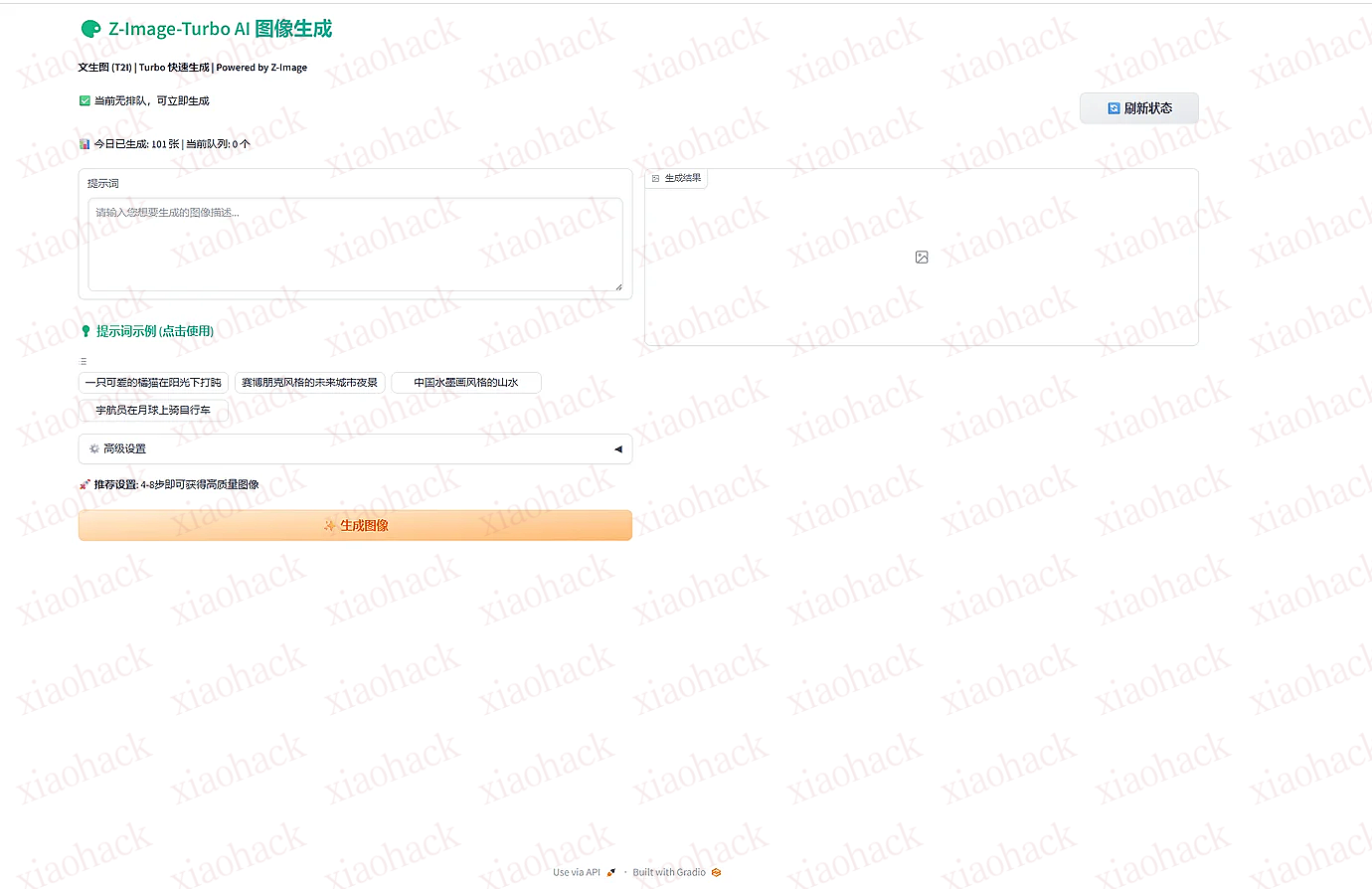
【MODAL】发个简洁版的modal z-image-turbo 部署脚本
账号密码需要自己改下,搜索xxx改为你想设置的,首次加载网页的时候会有点慢,我没写成两个容器
注意:部署完别大量分享
# =============================================================================
# Z-Image-Turbo Gradio Web UI (文生图) - Gradio + ComfyUI 后端
# =============================================================================
# 部署命令: modal deploy z_image_turbo_gradio_deploy.py
# =============================================================================

import modal
import json
import os
import subprocess
from pathlib import Path

# =============================================================================
# 镜像配置 - 强制重建: 2025-12-02-v15 (参考wan2简洁风格)
# =============================================================================
comfy_image = (
    modal.Image.debian_slim(python_version="3.11")
    .apt_install("git", "wget", "curl")
    .pip_install(
        "fastapi[standard]==0.115.4",
        "comfy-cli==1.5.3",
        "requests==2.32.3",
        "huggingface_hub[hf_transfer]==0.34.4",
        "pillow",
        "websocket-client",
    )
    .env({"HF_HUB_ENABLE_HF_TRANSFER": "1"})
    .run_commands(
        "comfy --skip-prompt install --fast-deps --nvidia",
        # 更新到最新 master 代码
        "cd /root/comfy/ComfyUI && git fetch origin && git reset --hard origin/master",
        # 添加 z_image 到 DualCLIPLoader 类型列表 (nodes.py)
        "sed -i 's/\"hunyuan_video_15\"\\]/\"hunyuan_video_15\", \"z_image\"]/g' /root/comfy/ComfyUI/nodes.py",
        # 添加 Z_IMAGE 到 CLIPType 枚举 (sd.py)
        "sed -i 's/CHROMA = 15/CHROMA = 15\\n    Z_IMAGE = 16/g' /root/comfy/ComfyUI/comfy/sd.py",
        # 添加 z_image 处理逻辑到 load_dual_clip
        "sed -i 's/elif clip_type == CLIPType.HUNYUAN_IMAGE:/elif clip_type == CLIPType.Z_IMAGE:\\n            clip_target.clip = comfy.text_encoders.z_image.te(**llama_detect(clip_data))\\n            clip_target.tokenizer = comfy.text_encoders.z_image.ZImageTokenizer\\n        elif clip_type == CLIPType.HUNYUAN_IMAGE:/g' /root/comfy/ComfyUI/comfy/sd.py",
    )
    .pip_install("gradio==3.41.0")
)

app = modal.App(name="z-image-turbo-gradio", image=comfy_image)
vol = modal.Volume.from_name("z-image-turbo-gradio-cache", create_if_missing=True)


# =============================================================================
# 模型下载函数
# =============================================================================
def download_models():
    """下载 Z-Image-Turbo 模型"""
    from huggingface_hub import hf_hub_download

    hf_token = os.getenv("HF_TOKEN")
    repo_id = "Comfy-Org/z_image_turbo"

    print(f"? 从 {repo_id} 下载模型...")

    models = [
        {
            "filename": "split_files/diffusion_models/z_image_turbo_bf16.safetensors",
            "target_dir": "/root/comfy/ComfyUI/models/diffusion_models",
            "target_name": "z_image_turbo_bf16.safetensors",
            "desc": "主扩散模型"
        },
        {
            "filename": "split_files/text_encoders/qwen_3_4b.safetensors",
            "target_dir": "/root/comfy/ComfyUI/models/text_encoders",
            "target_name": "qwen_3_4b.safetensors",
            "desc": "Qwen3 文本编码器"
        },
        {
            "filename": "split_files/vae/ae.safetensors",
            "target_dir": "/root/comfy/ComfyUI/models/vae",
            "target_name": "ae.safetensors",
            "desc": "VAE 解码器"
        }
    ]

    for model in models:
        target_path = f"{model['target_dir']}/{model['target_name']}"

        if os.path.exists(target_path) or os.path.islink(target_path):
            print(f"   ✅ {model['desc']} 已存在,跳过")
            continue

        print(f"? 下载 {model['desc']}: {model['target_name']}...")

        cached_path = hf_hub_download(
            repo_id=repo_id,
            filename=model["filename"],
            cache_dir="/cache",
            token=hf_token
        )

        Path(model["target_dir"]).mkdir(parents=True, exist_ok=True)
        subprocess.run(f"ln -sf {cached_path} {target_path}", shell=True, check=True)
        print(f"   ✅ {model['desc']} 完成")

    print("? 所有模型准备就绪!")


# =============================================================================
# Gradio 应用
# =============================================================================
@app.function(
    max_containers=1,
    gpu="L40S",
    volumes={"/cache": vol},
    timeout=86400,
    scaledown_window=600,
)
@modal.web_server(7860, startup_timeout=600)
def serve():
    """Z-Image-Turbo Gradio Web UI"""

    # 下载模型
    download_models()

    # 启动 ComfyUI 后端 (端口 8188)
    print("? 启动 ComfyUI 后端...")
    subprocess.Popen(
        "comfy launch -- --listen 127.0.0.1 --port 8188",
        shell=True
    )

    # 等待 ComfyUI 启动
    import time
    time.sleep(30)

    # 写入 Gradio 脚本
    gradio_script = '''
import gradio as gr
import requests
import json
import uuid
import time
import os
import io
import threading
from PIL import Image
import websocket

COMFYUI_URL = "http://127.0.0.1:8188"

# 队列管理 - 使用文件持久化统计
STATS_FILE = "/cache/stats.json"
queue_lock = threading.Lock()
queue_count = 0

# 内存缓存,避免频繁读取文件
_stats_cache = {'total': 0, 'date': ''}

def get_today():
    """获取今天日期 (UTC+8)"""
    import datetime
    # 使用 UTC+8 时区
    return (datetime.datetime.utcnow() + datetime.timedelta(hours=8)).strftime('%Y-%m-%d')

def load_stats():
    """从文件加载统计"""
    global _stats_cache
    try:
        if os.path.exists(STATS_FILE):
            with open(STATS_FILE, 'r') as f:
                data = json.load(f)
                _stats_cache['total'] = data.get('total_generated', 0)
                _stats_cache['date'] = data.get('date', '')
                print(f"[STATS] 加载统计: {_stats_cache}", flush=True)
                return _stats_cache['total'], _stats_cache['date']
    except Exception as e:
        print(f"[STATS] 加载失败: {e}", flush=True)
    return 0, ''

def save_stats(total):
    """保存统计到文件"""
    global _stats_cache
    try:
        today = get_today()
        _stats_cache = {'total': total, 'date': today}
        with open(STATS_FILE, 'w') as f:
            json.dump({'total_generated': total, 'date': today}, f)
            f.flush()
            os.fsync(f.fileno())  # 强制刷新到磁盘
        print(f"[STATS] 保存统计: total={total}, date={today}", flush=True)
    except Exception as e:
        print(f"[STATS] 保存失败: {e}", flush=True)

def get_total_generated():
    """获取今日生成总数"""
    global _stats_cache
    today = get_today()
    # 优先使用内存缓存
    if _stats_cache['date'] == today and _stats_cache['total'] > 0:
        return _stats_cache['total']
    # 否则从文件加载
    total, date = load_stats()
    if date != today:
        return 0  # 新的一天重置
    return total

def increment_total():
    """增加生成计数"""
    global _stats_cache
    today = get_today()
    # 使用内存缓存
    if _stats_cache['date'] == today:
        total = _stats_cache['total']
    else:
        total, date = load_stats()
        if date != today:
            total = 0
    total += 1
    save_stats(total)
    print(f"[STATS] 生成计数+1, 今日总计: {total}", flush=True)
    return total

def get_queue_status():
    """获取当前队列状态"""
    with queue_lock:
        if queue_count == 0:
            return "✅ 当前无排队,可立即生成"
        else:
            return f"⏳ 当前排队: {queue_count} 个任务等待中"

def get_stats():
    """获取统计信息"""
    with queue_lock:
        total = get_total_generated()
        return f"? 今日已生成: {total} 张 | 当前队列: {queue_count} 个"

# 启动时初始化加载统计
print("[STATS] 初始化加载统计...", flush=True)
load_stats()
print(f"[STATS] 初始化完成, 缓存: {_stats_cache}", flush=True)

# 分辨率选项
RESOLUTIONS = {
    "1:1 (1024x1024)": (1024, 1024),
    "16:9 (1024x576)": (1024, 576),
    "9:16 (576x1024)": (576, 1024),
    "4:3 (1024x768)": (1024, 768),
}

def create_workflow(prompt, width, height, steps, seed):
    """创建 ComfyUI 工作流"""
    return {
        "1": {
            "class_type": "UNETLoader",
            "inputs": {
                "unet_name": "z_image_turbo_bf16.safetensors",
                "weight_dtype": "default"
            }
        },
        "2": {
            "class_type": "DualCLIPLoader",
            "inputs": {
                "clip_name1": "qwen_3_4b.safetensors",
                "clip_name2": "qwen_3_4b.safetensors",
                "type": "z_image"
            }
        },
        "3": {
            "class_type": "VAELoader",
            "inputs": {
                "vae_name": "ae.safetensors"
            }
        },
        "4": {
            "class_type": "CLIPTextEncode",
            "inputs": {
                "text": prompt,
                "clip": ["2", 0]
            }
        },
        "6": {
            "class_type": "EmptyLatentImage",
            "inputs": {
                "width": width,
                "height": height,
                "batch_size": 1
            }
        },
        "7": {
            "class_type": "KSampler",
            "inputs": {
                "model": ["1", 0],
                "positive": ["4", 0],
                "negative": ["4", 0],
                "latent_image": ["6", 0],
                "seed": seed if seed != -1 else int(time.time() * 1000) % (2**32),
                "steps": steps,
                "cfg": 1.0,
                "sampler_name": "euler",
                "scheduler": "simple",
                "denoise": 1.0
            }
        },
        "8": {
            "class_type": "VAEDecode",
            "inputs": {
                "samples": ["7", 0],
                "vae": ["3", 0]
            }
        },
        "9": {
            "class_type": "SaveImage",
            "inputs": {
                "filename_prefix": "z_image_turbo",
                "images": ["8", 0]
            }
        }
    }

def generate_image(prompt, resolution, steps, seed):
    """生成图像"""
    global queue_count, total_generated

    if not prompt.strip():
        raise gr.Error("请输入提示词")

    # 加入队列
    with queue_lock:
        queue_count += 1
        my_position = queue_count

    print(f"[{time.strftime('%H:%M:%S')}] 任务加入队列,当前位置: {my_position}", flush=True)

    start_time = time.time()
    width, height = RESOLUTIONS[resolution]

    print(f"[{time.strftime('%H:%M:%S')}] 开始生成: {width}x{height}, {steps}步", flush=True)

    try:
        # 创建工作流
        workflow = create_workflow(prompt, width, height, int(steps), int(seed))

        # 生成客户端 ID
        client_id = str(uuid.uuid4())

        # 提交任务
        response = requests.post(
            f"{COMFYUI_URL}/prompt",
            json={"prompt": workflow, "client_id": client_id}
        )

        if response.status_code != 200:
            raise gr.Error(f"提交任务失败: {response.text}")

        prompt_id = response.json()["prompt_id"]
        print(f"[{time.strftime('%H:%M:%S')}] 任务已提交: {prompt_id}", flush=True)

        # 等待完成
        while True:
            time.sleep(0.5)
            history_response = requests.get(f"{COMFYUI_URL}/history/{prompt_id}")

            if history_response.status_code == 200:
                history = history_response.json()
                if prompt_id in history:
                    outputs = history[prompt_id].get("outputs", {})
                    if "9" in outputs and "images" in outputs["9"]:
                        image_info = outputs["9"]["images"][0]
                        filename = image_info["filename"]
                        subfolder = image_info.get("subfolder", "")

                        # 获取图像
                        params = {"filename": filename, "subfolder": subfolder, "type": "output"}
                        img_response = requests.get(f"{COMFYUI_URL}/view", params=params)

                        if img_response.status_code == 200:
                            # 保存图像
                            image_dir = "/tmp/gradio_images"
                            os.makedirs(image_dir, exist_ok=True)
                            image_path = f"{image_dir}/{uuid.uuid4()}.png"

                            image = Image.open(io.BytesIO(img_response.content))
                            image.save(image_path)

                            elapsed = time.time() - start_time
                            print(f"[{time.strftime('%H:%M:%S')}] 生成完成! 耗时: {elapsed:.1f}秒", flush=True)

                            # 完成,减少队列并更新统计
                            with queue_lock:
                                queue_count -= 1
                            increment_total()

                            return image_path

            # 超时检查 (5分钟)
            if time.time() - start_time > 300:
                with queue_lock:
                    queue_count -= 1
                raise gr.Error("生成超时,请重试")

    except gr.Error:
        raise
    except Exception as e:
        # 出错,减少队列
        with queue_lock:
            queue_count -= 1
        elapsed = time.time() - start_time
        print(f"[{time.strftime('%H:%M:%S')}] 错误: {e}")
        raise gr.Error(f"生成失败 ({elapsed:.0f}秒): {str(e)[:200]}")

# 示例提示词
example_prompts = [
    ["一只可爱的橘猫在阳光下打盹"],
    ["赛博朋克风格的未来城市夜景"],
    ["中国水墨画风格的山水"],
    ["宇航员在月球上骑自行车"],
]

# CSS - 参考 wan2 简洁风格
custom_css = """
html, body {
    background: linear-gradient(135deg, #f5f7fa 0%, #e4e8ec 100%) !important;
    min-height: 100vh !important;
}
.gradio-container {
    background: transparent !important;
}
h1, h2, h3 {
    background: linear-gradient(90deg, #10b981, #3b82f6);
    -webkit-background-clip: text;
    -webkit-text-fill-color: transparent;
}
/* 圆角样式 */
.gr-button, .gr-input, .gr-textbox textarea, .gr-box {
    border-radius: 8px !important;
}
.gr-image {
    border-radius: 12px !important;
    background: #fff !important;
}
"""

with gr.Blocks(css=custom_css, title="Z-Image-Turbo") as demo:
    gr.Markdown("# ? Z-Image-Turbo AI 图像生成")
    gr.Markdown("**文生图 (T2I) | Turbo 快速生成 | Powered by Z-Image**")

    # 队列状态显示
    with gr.Row():
        queue_status = gr.Markdown(value=get_queue_status())
        refresh_btn = gr.Button("? 刷新状态", scale=0)

    with gr.Row():
        stats_display = gr.Markdown(value=get_stats())

    with gr.Row():
        with gr.Column():
            prompt = gr.Textbox(
                label="提示词",
                lines=5,
                value="",
                placeholder="请输入您想要生成的图像描述..."
            )

            gr.Markdown("### ? 提示词示例 (点击使用)")
            gr.Examples(
                examples=example_prompts,
                inputs=prompt,
                label=""
            )

            with gr.Accordion("⚙️ 高级设置", open=False):
                resolution = gr.Dropdown(
                    choices=list(RESOLUTIONS.keys()),
                    value="1:1 (1024x1024)",
                    label="分辨率"
                )
                steps = gr.Slider(
                    minimum=4,
                    maximum=20,
                    value=4,
                    step=1,
                    label="采样步数"
                )
                seed = gr.Number(value=-1, label="种子 (-1 为随机)")

            gr.Markdown("? **推荐设置**: 4-8步即可获得高质量图像")
            btn = gr.Button("✨ 生成图像", variant="primary")

        with gr.Column():
            output = gr.Image(label="生成结果", type="filepath")

    # 刷新状态按钮 - 不走队列,立即执行
    def refresh_status():
        return get_queue_status(), get_stats()

    refresh_btn.click(
        refresh_status,
        outputs=[queue_status, stats_display],
        queue=False,  # 不走队列,避免等待
        api_name=False  # 不创建 API 端点
    )

    # 生成按钮 - 生成后自动刷新状态
    def generate_and_refresh(prompt, resolution, steps, seed):
        result = generate_image(prompt, resolution, steps, seed)
        return result, get_queue_status(), get_stats()

    btn.click(generate_and_refresh, [prompt, resolution, steps, seed], [output, queue_status, stats_display])

print("? 启动 Gradio 界面...")
demo.launch(
    server_name="0.0.0.0",
    server_port=7860,
    share=False,
    auth=("xxx", "xxx"), // 账号密码自己改下
    allowed_paths=["/tmp/gradio_images", "/tmp/gradio", "/tmp"]
)

import time
while True:
    time.sleep(1)
'''

    script_path = "/tmp/gradio_app.py"
    with open(script_path, "w") as f:
        f.write(gradio_script)

    subprocess.Popen(["python", script_path])


# =============================================================================
# 本地入口
# =============================================================================
@app.local_entrypoint()
def main():
    print("=" * 60)
    print("Z-Image-Turbo Gradio Web UI")
    print("=" * 60)
    print("\n? 模型: Comfy-Org/z_image_turbo")
    print("\n? GPU: L40S")
    print("\n? 特点:")
    print("   - Gradio 前端界面")
    print("   - ComfyUI 后端推理")
    print("   - 支持多种分辨率")
    print("   - 4-20步快速生成")
    print("\n? 部署命令: modal deploy z_image_turbo_gradio_deploy.py")
    print("=" * 60)