分享个香蕉 Pro 提示词 —— 看看佬友们家乡的摩天大楼长啥样
把城市名替换成你所在的城市,或者你想去的城市,期待看到你们的作品
第一弹
Present a clear, side miniature 3D cartoon view of [YOUR CITY] tallest buildings. Use minimal textures with realistic materials and soft, lifelike lighting and shadows. Use a clean, minimalistic composition showing exactly the three tallest buildings in Sopot, arranged from LEFT to RIGHT in STRICT descending height order. The tallest must appear visibly tallest, the second must be clearly shorter than the first, and the third must be clearly shorter than the second.
All buildings must follow accurate relative proportions: if a building is taller in real life, it MUST be taller in the image by the same approximate ratio. No building may be visually stretched or compressed.
Each building should stand separately on a thin, simple ceramic base. Below each base, centered text should display:
Height in meters — semibold sans-serif, medium size
Year built — lighter-weight sans-serif, smaller size, directly beneath the height text
Provide consistent padding, spacing, leading, and kerning. Write "YOUR CITY NAME" centered above the buildings, using a medium
第二弹
Create a high-detail 3D isometric diorama of the entire China, where each state is represented as its own miniature platform. Inside each state, place a stylized, small-scale 3D model of that state's most iconic landmark. Use the same visual style as a cute, polished 3D city diorama: soft pastel colors, clean materials, smooth rounded forms, gentle shadows, and subtle reflections. Each landmark should look like a miniature model, charming, simplified, but clearly recognizable. Arrange the states in accurate geographical layout, with consistent lighting and perspective. Include state labels and landmark labels in a clean, modern font, floating above or near each model.
在 cherry studio 的助手配置里面加上自定义参数,关闭流式输出开关,cs 版本升级到最新
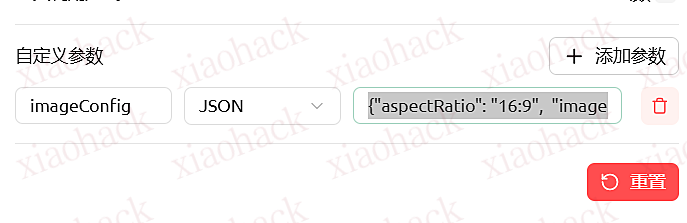
{"aspectRatio": "16:9", "imageSize": "4K"} 4K 高清大图,17M,放在了 cf 的存储桶里
https://img.0rzz.ggff.net/china.png 20M