记录 JetBrains IDEs 使用 opencode 配置过程
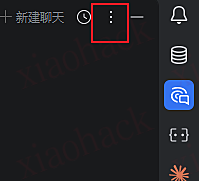

1. 点击 JetBraisns 右上角的 3 个点
2. 然后选择 config acp agent
3. 会在编辑其中打开一个 acp.json
4. 将 opencode 的配置写进去
{ "agent_servers": { "OpenCode": { "command": "/absolute/path/bin/opencode", "args": ["acp"] } } } 5. 注意 command 要换成你自己的
6. 由于我使用的 windows 并且我使用 npm i -g opencode-ai 安装 opencode , 佬有可以在 shell 使用这两个命令查看$root = (npm root -g)Get-ChildItem $root -Recurse -Filter opencode.exe -ErrorAction SilentlyContinue | Select-Object -First 5 FullName
将 exe 的路径写入 command
7. 然后就可以使用了,也可以使用中转站的模型

