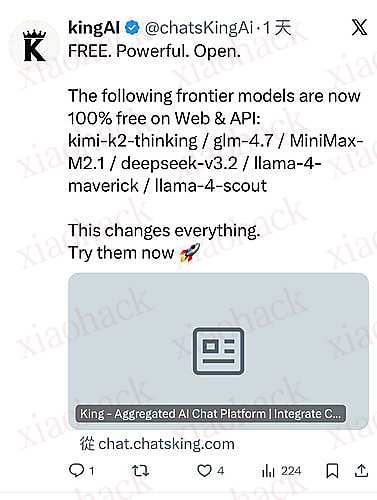
说是单 key 能用十次具体自己研究
注册机源码如下
import requests
import random
import string
import re
import time
import urllib.parse
def generate_random_email():
"""生成随机8位前缀的邮箱"""
prefix = ''.join(random.choices(string.ascii_lowercase + string.digits, k=8))
return f"{prefix}@rccg-clf.org" def send_passwordless_init(email):
"""第一步:发送验证码"""
url = "https://auth.privy.io/api/v1/passwordless/init"
headers = {
"accept": "application/json",
"accept-language": "zh-CN,zh;q=0.9,en;q=0.8,en-GB;q=0.7,en-US;q=0.6",
"cache-control": "no-cache",
"content-type": "application/json",
"origin": "https://beta.gatewayz.ai",
"pragma": "no-cache",
"priority": "u=1, i",
"privy-app-id": "cmg8fkib300g3l40dbs6autqe",
"privy-ca-id": ,
"privy-client": "react-auth:3.0.1",
"privy-ui": "t",
"referer": "https://beta.gatewayz.ai/",
"sec-ch-ua": '"Microsoft Edge";v="143", "Chromium";v="143", "Not A(Brand";v="24"',
"sec-ch-ua-mobile": "?0",
"sec-ch-ua-platform": '"Windows"',
"sec-fetch-dest": "empty",
"sec-fetch-mode": "cors",
"sec-fetch-site": "cross-site",
"sec-fetch-storage-access": "active",
"user-agent": "Mozilla/5.0 (Windows NT 10.0; Win64; x64) AppleWebKit/537.36 (KHTML, like Gecko) Chrome/143.0.0.0 Safari/537.36 Edg/143.0.0.0"
}
data = {"email": email}
try:
response = requests.post(url, headers=headers, json=data)
return response.json()
except Exception as e:
return {"error": str(e)}
def check_email(email):
"""查询邮箱收到的邮件"""
encoded_email = urllib.parse.quote(email, safe='')
url = f"https://mail.chatgpt.org.uk/api/emails?email={encoded_email}"
headers = {
"accept": "*/*",
"accept-language": "zh-CN,zh;q=0.9,en;q=0.8,en-GB;q=0.7,en-US;q=0.6",
"cache-control": "no-cache",
"pragma": "no-cache",
"priority": "u=1, i",
"referer": f"https://mail.chatgpt.org.uk/{email}",
"sec-ch-ua": '"Microsoft Edge";v="143", "Chromium";v="143", "Not A(Brand";v="24"',
"sec-ch-ua-mobile": "?0",
"sec-ch-ua-platform": '"Windows"',
"sec-fetch-dest": "empty",
"sec-fetch-mode": "cors",
"sec-fetch-site": "same-origin",
"user-agent": "Mozilla/5.0 (Windows NT 10.0; Win64; x64) AppleWebKit/537.36 (KHTML, like Gecko) Chrome/143.0.0.0 Safari/537.36 Edg/143.0.0.0"
}
try:
response = requests.get(url, headers=headers)
return response.json()
except Exception as e:
return {"error": str(e)}
def extract_code(email_content):
"""从邮件内容中提取验证码""" match = re.search(r'\b(\d{6})\b', email_content)
if match:
return match.group(1)
return None def wait_for_code(email, max_attempts=10, interval=2):
"""第二步:循环查询邮件直到获取验证码""" print(f"\n[2] 开始查询邮件 (最多{max_attempts}次,间隔{interval}秒)...")
for attempt in range(1, max_attempts + 1):
print(f" 第{attempt}次查询...", end=" ")
mail_result = check_email(email)
if mail_result.get("success"):
emails = mail_result.get("data", {}).get("emails", [])
if emails:
for mail in emails:
if "privy" in mail.get("from_address", "").lower():
content = mail.get("content", "")
code = extract_code(content)
if code:
print(f"成功!")
return code
print("未找到验证码邮件")
else:
print("暂无邮件")
else:
print(f"查询失败")
if attempt < max_attempts:
time.sleep(interval)
return None def authenticate(email, code):
"""第三步:使用验证码登录获取token"""
url = "https://auth.privy.io/api/v1/passwordless/authenticate"
headers = {
"accept": "application/json",
"accept-language": "zh-CN,zh;q=0.9,en;q=0.8,en-GB;q=0.7,en-US;q=0.6",
"cache-control": "no-cache",
"content-type": "application/json",
"origin": "https://beta.gatewayz.ai",
"pragma": "no-cache",
"priority": "u=1, i",
"privy-app-id": "cmg8fkib300g3l40dbs6autqe",
"privy-ca-id": ,
"privy-client": "react-auth:3.0.1",
"referer": "https://beta.gatewayz.ai/",
"sec-ch-ua": '"Microsoft Edge";v="143", "Chromium";v="143", "Not A(Brand";v="24"',
"sec-ch-ua-mobile": "?0",
"sec-ch-ua-platform": '"Windows"',
"sec-fetch-dest": "empty",
"sec-fetch-mode": "cors",
"sec-fetch-site": "cross-site",
"sec-fetch-storage-access": "active",
"user-agent": "Mozilla/5.0 (Windows NT 10.0; Win64; x64) AppleWebKit/537.36 (KHTML, like Gecko) Chrome/143.0.0.0 Safari/537.36 Edg/143.0.0.0"
}
data = {
"email": email,
"code": code,
"mode": "login-or-sign-up"
}
try:
response = requests.post(url, headers=headers, json=data)
return response.json()
except Exception as e:
return {"error": str(e)}
def create_api_key(auth_result, max_retries=3):
"""第四步:使用token创建API Key"""
url = "https://beta.gatewayz.ai/api/auth"
headers = {
"accept": "*/*",
"accept-language": "zh-CN,zh;q=0.9,en;q=0.8,en-GB;q=0.7,en-US;q=0.6",
"cache-control": "no-cache",
"content-type": "application/json",
"origin": "https://beta.gatewayz.ai",
"pragma": "no-cache",
"priority": "u=1, i",
"referer": "https://beta.gatewayz.ai/onboarding",
"sec-ch-ua": '"Microsoft Edge";v="143", "Chromium";v="143", "Not A(Brand";v="24"',
"sec-ch-ua-mobile": "?0",
"sec-ch-ua-platform": '"Windows"',
"sec-fetch-dest": "empty",
"sec-fetch-mode": "cors",
"sec-fetch-site": "same-origin",
"user-agent": "Mozilla/5.0 (Windows NT 10.0; Win64; x64) AppleWebKit/537.36 (KHTML, like Gecko) Chrome/143.0.0.0 Safari/537.36 Edg/143.0.0.0"
}
cookies = {
"privy-token": auth_result.get("token", ""),
"privy-session": "t"
}
data = {
"user": auth_result.get("user", {}),
"token": auth_result.get("token", ""),
"auto_create_api_key": True,
"is_new_user": auth_result.get("is_new_user", True),
"has_referral_code": False,
"referral_code": None,
"privy_user_id": auth_result.get("user", {}).get("id", ""),
"trial_credits": 10
}
for attempt in range(1, max_retries + 1):
try:
response = requests.post(url, headers=headers, cookies=cookies, json=data, timeout=30)
result = response.json()
if result.get("success") or "api_key" in result:
return result
if "error" in result and "timeout" not in result.get("error", "").lower():
return result
if attempt < max_retries:
print(f" 尝试 {attempt}/{max_retries} 失败,3秒后重试...")
time.sleep(3)
except requests.exceptions.Timeout:
if attempt < max_retries:
print(f" 请求超时 ({attempt}/{max_retries}),3秒后重试...")
time.sleep(3)
else:
return {"error": "Request timeout after retries"}
except Exception as e:
if attempt < max_retries:
print(f" 请求失败 ({attempt}/{max_retries}): {str(e)},3秒后重试...")
time.sleep(3)
else:
return {"error": str(e)}
return {"error": "Max retries reached"}
def run():
"""运行完整流程""" print("=" * 50)
print("Gatewayz 自动注册/登录")
print("=" * 50)
email = generate_random_email()
print(f"\n[1] 生成邮箱: {email}")
result = send_passwordless_init(email)
if not result.get("success"):
print(f" 发送验证码失败: {result}")
return None print(f" 发送验证码成功!")
code = wait_for_code(email, max_attempts=10, interval=2)
if not code:
print(f"\n获取验证码失败,请手动查看: https://mail.chatgpt.org.uk/{email}")
return None print(f" 验证码: {code}")
print(f"\n[3] 正在登录认证...")
auth_result = authenticate(email, code)
if "error" in auth_result:
print(f" 登录失败: {auth_result}")
return None if "token" not in auth_result:
print(f" 登录失败: {auth_result}")
return None print(f" 登录成功!")
print(f"\n[4] 正在创建API Key...")
api_result = create_api_key(auth_result)
if "error" in api_result:
print(f" 创建API Key失败: {api_result}")
return None if not api_result.get("success"):
print(f" 创建API Key失败: {api_result}")
return None
api_key = api_result.get("api_key", "")
if not api_key:
print(f" 创建API Key失败: 未返回API Key")
return None print(f" 创建成功!")
with open("api_keys.txt", "a", encoding="utf-8") as f:
f.write(f"{api_key}\n")
print("\n" + "=" * 50)
print("账号创建成功!")
print("=" * 50)
print(f"邮箱: {email}")
print(f"用户ID: {api_result.get('user_id', 'N/A')}")
print(f"Privy用户ID: {api_result.get('privy_user_id', 'N/A')}")
print(f"试用积分: {api_result.get('credits', 'N/A')}")
print(f"订阅状态: {api_result.get('subscription_status', 'N/A')}")
print(f"试用到期时间: {api_result.get('trial_expires_at', 'N/A')}")
print(f"\nAPI Key:\n{api_key}")
print(f"\n已保存到: api_keys.txt")
print("=" * 50)
return {
"email": email,
"user_id": api_result.get('user_id'),
"privy_user_id": api_result.get('privy_user_id'),
"api_key": api_key,
"credits": api_result.get('credits'),
"subscription_status": api_result.get('subscription_status'),
"trial_expires_at": api_result.get('trial_expires_at')
}
if __name__ == "__main__":
run()
📌 转载信息
原作者:
ZeroLiya
转载时间:
2025/12/27 20:48:40



![【开源新版】[已支持 CodeX] ccNexus: Claude Code 专用,你的 CC 效率增强工具,多端点同时启用自动无感切换1](https://xiaohack.oss-cn-zhangjiakou.aliyuncs.com/typecho/images/2026/01/15/20260115180609_6968bc111f9e7.jpeg!mark)
![【开源新版】[已支持 CodeX] ccNexus: Claude Code 专用,你的 CC 效率增强工具,多端点同时启用自动无感切换2](https://xiaohack.oss-cn-zhangjiakou.aliyuncs.com/typecho/images/2026/01/15/20260115180615_6968bc172414a.jpeg!mark)
![【开源新版】[已支持 CodeX] ccNexus: Claude Code 专用,你的 CC 效率增强工具,多端点同时启用自动无感切换3](https://xiaohack.oss-cn-zhangjiakou.aliyuncs.com/typecho/images/2026/01/15/20260115180617_6968bc19c7cc1.jpeg!mark)
![【开源新版】[已支持 CodeX] ccNexus: Claude Code 专用,你的 CC 效率增强工具,多端点同时启用自动无感切换4](https://xiaohack.oss-cn-zhangjiakou.aliyuncs.com/typecho/images/2026/01/15/20260115180620_6968bc1c6243a.png!mark)
![【开源新版】[已支持 CodeX] ccNexus: Claude Code 专用,你的 CC 效率增强工具,多端点同时启用自动无感切换5](https://xiaohack.oss-cn-zhangjiakou.aliyuncs.com/typecho/images/2026/01/15/20260115180623_6968bc1fa586c.png!mark)