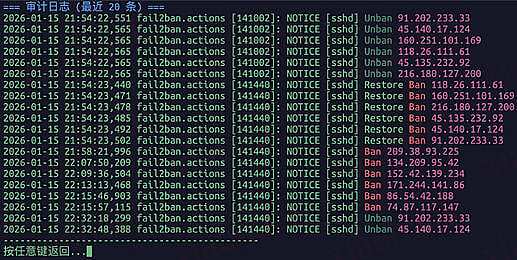
分享下我的 nas 安全方案
- 物理机直接安装 ubuntu, 所有应用都部署在 docker
- ssh 只允许密钥登录, 禁止 root 用户登录
- 所有访问( http, tcp)都通过 nginx 代理, ufw 只暴露固定的几个端口, nginx 开启 https 证书
- nginx 配置 geolite2, 禁止任何 国外 ip 访问, 异常访问基本都是国外 ip
- fail2ban 自动封禁所有 nginx 日志里面国外 ip
- 不安装 1panel,宝塔等任何 web 管理工具, 直接 ssh 到机器上命令行管理
分享下我的 nginx 配置
load_module "modules/ngx_http_geoip2_module.so";
load_module "modules/ngx_stream_geoip2_module.so";

worker_processes 4;

error_log /var/log/nginx/nginx_error.log;
error_log /var/log/nginx/nginx_error.log notice;
error_log /var/log/nginx/nginx_error.log info;

pid /var/log/nginx/nginx.pid;

events {
    worker_connections 1024;
}


http {
    include /etc/nginx/mime.types;
    default_type application/octet-stream;

    geoip2 /etc/nginx/geoip/GeoLite2-Country.mmdb {
      auto_reload 24h;
      $geoip_country_code  default=Unknown source=$remote_addr country iso_code;
      $geoip_country_name  country  names  en;
    }
    geoip2 /etc/nginx/geoip/GeoLite2-City.mmdb {
      auto_reload 24h;
      $geoip_city   default=Unknown city names en;
    }

    map $geoip_country_code $allowed_country {
        default no;
        CN yes;
    }

    map $remote_addr $allowed {
        default $allowed_country;
        127.0.0.1 yes;
        ~^192\.168\.\\d+\.\\d+$ yes;
        ~^172\.16\.0\.\\d+$ yes;
        ~^172\.17\.\\d+\.\\d+$ yes;
    }

    map $http_upgrade $connection_upgrade {
        default upgrade;
        '' "";
    }

    log_format json_analytics escape=json '{'
    '"timestamp": "$msec", ' # request unixtime in seconds with a milliseconds resolution
    '"request_id": "$request_id", ' # the unique request id
    '"request_length": "$request_length", ' # request length (including headers and body)
    '"body_bytes_sent": "$body_bytes_sent", '
    '"remote_addr": "$remote_addr", ' # client IP
    '"time_iso8601": "$time_iso8601", '
    '"request_uri": "$request_uri", ' # full path and arguments if the request
    '"code": "$status", ' # response status code
    '"http_host": "$http_host", ' # the request Host: header
    '"server_name": "$server_name", ' # the name of the vhost serving the request
    '"request_time": "$request_time", ' # request processing time in seconds with msec resolution
    '"upstream": "$upstream_addr", ' # upstream backend server for proxied requests
    '"request_method": "$request_method", ' # request method
    '"allowed": "$allowed", '
    '"geoip_country_code": "$geoip_country_code", '
    '"geoip_country_name": "$geoip_country_name", '
    '"geoip_city": "$geoip_city"'
    '}';

    access_log /var/log/nginx/access.log json_analytics;
    error_log /var/log/nginx/error.log warn;

    set_real_ip_from 0.0.0.0/0;
    real_ip_header X-Real-IP;
    real_ip_recursive on;

    sendfile on;
    server_tokens off;
    keepalive_timeout 65;

    gzip on;
    gzip_vary on;
    gzip_comp_level 4;
    gzip_min_length 256;
    gzip_proxied expired no-cache no-store private no_last_modified no_etag auth;
    gzip_types application/atom+xml application/javascript application/json application/ld+json application/manifest+json application/rss+xml application/vnd.geo+json application/vnd.ms-fontobject application/x-font-ttf application/x-web-app-manifest+json application/xhtml+xml application/xml font/opentype image/bmp image/svg+xml image/x-icon text/cache-manifest text/css text/plain text/vcard text/vnd.rim.location.xloc text/vtt text/x-component text/x-cross-domain-policy;

    proxy_buffering off;
    proxy_buffers 4 128k;
    proxy_buffer_size 256k;
    proxy_busy_buffers_size 256k;


    ssl_session_timeout 5m;
    ssl_protocols TLSv1 TLSv1.1 TLSv1.2;
    ssl_ciphers ALL:!DH:!EXPORT:!RC4:+HIGH:+MEDIUM:-LOW:!aNULL:!eNULL;

    ssl_certificate /etc/nginx/ssl/fullchain.cer;
    ssl_certificate_key /etc/nginx/ssl/xxx.cc.key;


    include /etc/nginx/conf.d/*.conf;

}


stream {

    geoip2 /etc/nginx/geoip/GeoLite2-Country.mmdb {
      auto_reload 24h;
      $geoip_country_code  default=Unknown source=$remote_addr country iso_code;
      $geoip_country_name  country  names  en;
    }
    geoip2 /etc/nginx/geoip/GeoLite2-City.mmdb {
      auto_reload 24h;
      $geoip_city   default=Unknown city names en;
    }


    map $geoip_country_code $allowed_country {
        default no;
        CN yes;
    }

    map $remote_addr $allowed {
        default $allowed_country;
        127.0.0.1 yes;
        ~^192\.168\.\\d+\.\\d+$ yes;
        ~^172\.16\.0\.\\d+$ yes;
        ~^172\.17\.\\d+\.\\d+$ yes;
    }

    log_format json_analytics escape=json '{'
    '"timestamp": "$msec", ' # request unixtime in seconds with a milliseconds resolution
    '"connection": "$connection", ' # connection serial number
    '"pid": "$pid", ' # process pid
    '"remote_addr": "$remote_addr", ' # client IP
    '"remote_port": "$remote_port", ' # client port
    '"time_iso8601": "$time_iso8601", ' # local time in the ISO 8601 standard format
    '"upstream": "$upstream_addr", '
    '"protocol": "$protocol", '
    '"allowed": "$allowed", '
    '"request_method": "STREAM", '
    '"geoip_country_code": "$geoip_country_code", '
    '"geoip_country_name": "$geoip_country_name", '
    '"geoip_city": "$geoip_city"'
    '}';

    access_log /var/log/nginx/access.log json_analytics;
    error_log /var/log/nginx/error.log warn;

    include /etc/nginx/stream.d/*.conf;
}
ssh 代理
map $allowed $ssh_server {
    yes ssh;
}

upstream ssh {
    server  192.168.5.1:1234;
}

server {
    listen    5678;
    listen [::]:5678;
    proxy_pass $ssh_server;
    proxy_connect_timeout 30s;
    proxy_timeout 60s;

    ssl_preread on;
}
http 代理
server {
    server_name x.x.com;
    listen 1233 ssl;
    listen [::]:1233 ssl;

    http2 on;
    charset "utf-8";

    if ($allowed != yes) {
        return 404;
    }

    error_page 497 =307 https://$host:$server_port$request_uri;

    client_max_body_size 512M;
    proxy_buffering off;


    set $backend "http://192.168.5.1:1234";
    include /etc/nginx/conf.d/basic/no_log.conf;

    location / {
        proxy_redirect off;
        proxy_set_header Host $host:$server_port;
        proxy_set_header X-Real-IP $remote_addr;
        proxy_set_header X-Forwarded-For $proxy_add_x_forwarded_for;
        proxy_set_header X-Forwarded-Proto $scheme;

        proxy_pass $backend;
    }

}