标签 Obsidian Web Clipper 下的文章

之前一直当作一个把网页保存到本地的剪辑工具
今天配置了一下里面的 AI 感觉用起来还不错推荐给大家

1 chrome 插件下载地址

2. 使用 AI 功能 对网页内容进行总结或者打标签

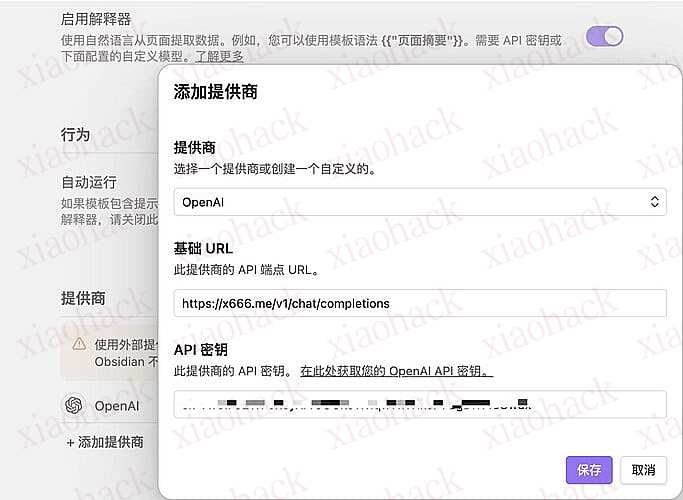
  1. 配置模型供应商 这里使用了薄荷佬的公益站

配置模型

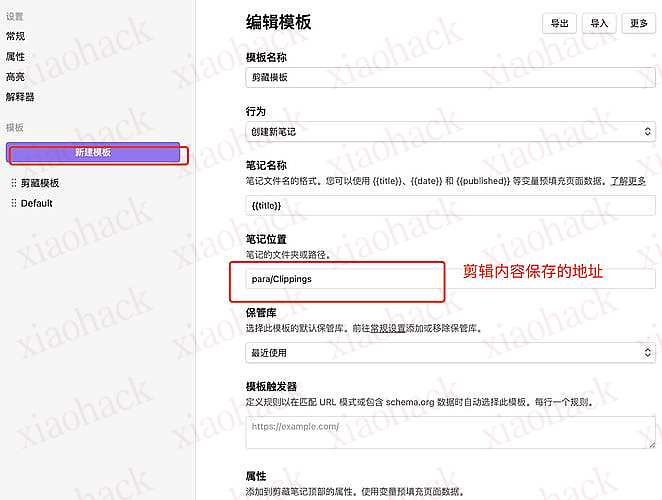
  1. 新建一个模版

  2. 配置属性

tags 这里配置的是 可以自己写自己需要的提示词

{{"Analyze the article and create up to 5 tags in comma-separated format. Tags should be in Chinese unless necessary for company names, person names or abbreviations. One tag must be selected from: "资源, AI编程, AI画图 , 工具, 产品". Other tags should be based on the article's topic, mentioned people, companies or products."}}

描述

{{"One-sentence summary of the article content,translated to Chinese"}}
  1. 然后可以把模版进行导入导出

刚刚的模版复制出的 json 直接导入 就可以快速编辑了

{
  "schemaVersion": "0.1.0",
  "name": "剪藏模板",
  "behavior": "create",
  "noteContentFormat": "{{content}}",
  "properties": [
    {
      "name": "标题",
      "value": "{{title}}",
      "type": "text"
    },
    {
      "name": "来源",
      "value": "{{url}} ",
      "type": "text"
    },
    {
      "name": "创建时间",
      "value": "{{date}}",
      "type": "text"
    },
    {
      "name": "tags",
      "value": "{{\\\"Analyze the article and create up to 5 tags in comma-separated format. Tags should be in Chinese unless necessary for company names, person names or abbreviations. One tag must be selected from: \\\"UI设计, AI, 编程, 经济, 效率, 产品\\\". Other tags should be based on the article's topic, mentioned people, companies or products.\\\"}}",
      "type": "multitext"
    },
    {
      "name": "简单描述",
      "value": "{{\\\"One-sentence summary of the article content,translated to Chinese\\\"}}",
      "type": "text"
    }
  ],
  "triggers": [],
  "noteNameFormat": "{{title}}",
  "path": "para/Clippings"
}

  1. 其余属性自行探索,有小伙伴做出好用的模版 可以导出来进行交流

📌 转载信息
原作者:
mocheng
转载时间:
2026/1/24 06:57:22

之前一直当作一个把网页保存到本地的剪辑工具
今天配置了一下里面的 AI 感觉用起来还不错推荐给大家

1 chrome 插件下载地址

2. 使用 AI 功能 对网页内容进行总结或者打标签

  1. 配置模型供应商 这里使用了薄荷佬的公益站

配置模型

  1. 新建一个模版

  2. 配置属性

tags 这里配置的是 可以自己写自己需要的提示词

{{"Analyze the article and create up to 5 tags in comma-separated format. Tags should be in Chinese unless necessary for company names, person names or abbreviations. One tag must be selected from: "资源, AI编程, AI画图 , 工具, 产品". Other tags should be based on the article's topic, mentioned people, companies or products."}}

描述

{{"One-sentence summary of the article content,translated to Chinese"}}
  1. 然后可以把模版进行导入导出

刚刚的模版复制出的 json 直接导入 就可以快速编辑了

{
  "schemaVersion": "0.1.0",
  "name": "剪藏模板",
  "behavior": "create",
  "noteContentFormat": "{{content}}",
  "properties": [
    {
      "name": "标题",
      "value": "{{title}}",
      "type": "text"
    },
    {
      "name": "来源",
      "value": "{{url}} ",
      "type": "text"
    },
    {
      "name": "创建时间",
      "value": "{{date}}",
      "type": "text"
    },
    {
      "name": "tags",
      "value": "{{\\\"Analyze the article and create up to 5 tags in comma-separated format. Tags should be in Chinese unless necessary for company names, person names or abbreviations. One tag must be selected from: \\\"UI设计, AI, 编程, 经济, 效率, 产品\\\". Other tags should be based on the article's topic, mentioned people, companies or products.\\\"}}",
      "type": "multitext"
    },
    {
      "name": "简单描述",
      "value": "{{\\\"One-sentence summary of the article content,translated to Chinese\\\"}}",
      "type": "text"
    }
  ],
  "triggers": [],
  "noteNameFormat": "{{title}}",
  "path": "para/Clippings"
}

  1. 其余属性自行探索,有小伙伴做出好用的模版 可以导出来进行交流

📌 转载信息
原作者:
mocheng
转载时间:
2026/1/24 06:54:31