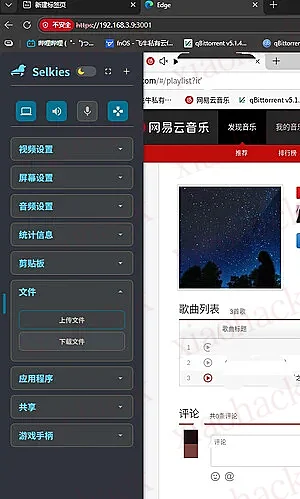
docker + 浏览器 + 油猴 - 网易云定时自动播放 暂停
在 github 等找到网易云自动刷量的都是好久之前的了,还有封号的风险
于是弄了这个方便网易云音乐人完成听歌任务
项目部署在 docker 里,借助浏览器播放网易云播放实现刷量
docker 的浏览器是通过 vnc 实现可用网页打开
脚本是用到油猴插件
推荐用小号收藏要刷的歌曲在一个歌单,浏览器打开这个歌单试一下播放
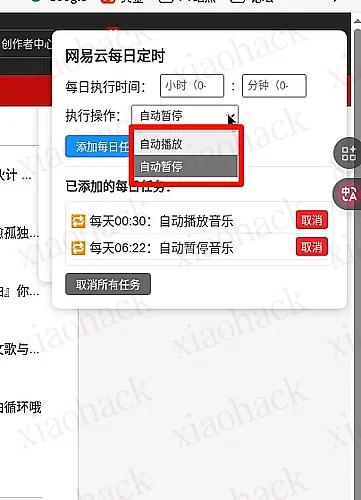
再设置脚本定时播放
注意:端口请改成自己合适的,还有 config 路径
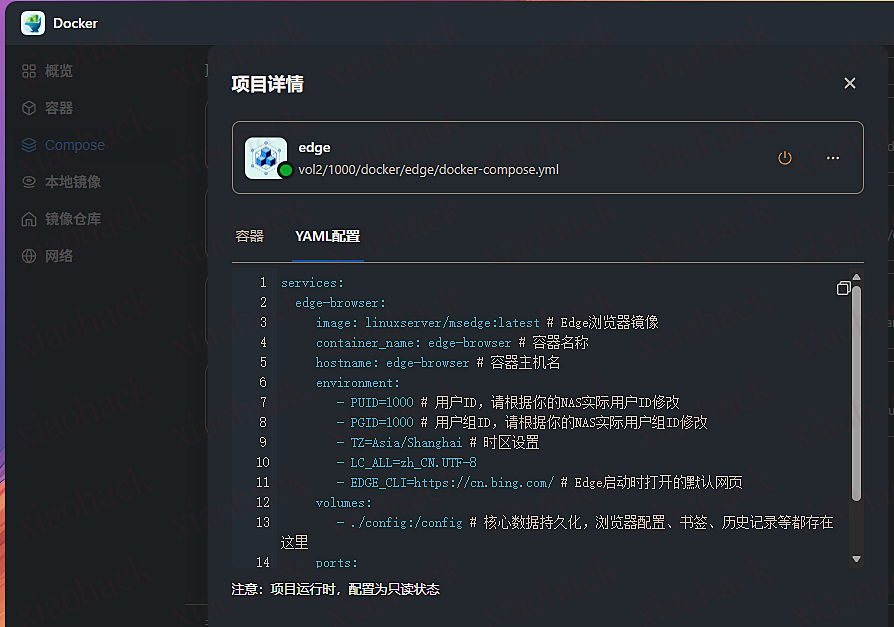
Docker Compose
services: edge-browser: linuxserver/msedge:latest # Edge浏览器镜像 container_name: edge-browser # 容器名称 hostname: edge-browser # 容器主机名 environment: - PUID=1000 # 用户ID,请根据你的NAS实际用户ID修改 - PGID=1000 # 用户组ID,请根据你的NAS实际用户组ID修改 - TZ=Asia/Shanghai # 时区设置 - LC_ALL=zh_CN.UTF-8 #- CUSTOM_USER=admin #配置访问用户名 已注释 #- PASSWORD=password #配置访问密码 已注释 - EDGE_CLI=https://music.163.com/ # Edge启动时打开的默认网页 volumes: - ./config:/config # 核心数据持久化,浏览器配置、书签、历史记录等都存在这里 ports: - 3000:3000 # 内部 HTTP 端口。默认为 3000 - 3001:3001 # 内部 HTTPS 端口。默认为 3001,修改冒号左边的端口号。 shm_size: "1gb" # /dev/shm 大小,建议至少 1GB,避免浏览器崩溃 restart: unless-stopped # 除非手动停止,否则容器异常退出后自动重启 油猴脚本 js
// ==UserScript==
// @name         网易云音乐定时播放暂停(每日重复+无弹窗自动执行)
// @namespace    https://shuffle.com/
// @version      3.0
// @description  适配.btns容器按钮,每日固定时间自动播放/暂停,无弹窗、任务持久化
// @author       You
// @match        *://music.163.com/*
// @grant        none
// @run-at       document-end
// ==/UserScript==

(function() {
    'use strict';

    // ========== 核心配置 ==========
    const PLAY_PAUSE_SELECTOR = '.btns [data-action="play"].ply.j-flag';
    const BACKUP_SELECTOR = '.btns .ply.j-flag';
    const STORAGE_KEY = 'neteaseMusicTimedTasks'; // 本地存储键名

    // 全局变量:存储重复任务的定时器ID(key: 任务ID, value: intervalId)
    let intervalTasks = {};

    // ========== 工具函数 ==========
    // 1. 等待播放按钮加载
    function waitForPlayBtn() {
        return new Promise(resolve => {
            const findBtn = () => {
                let btn = document.querySelector(PLAY_PAUSE_SELECTOR);
                if (!btn) btn = document.querySelector(BACKUP_SELECTOR);
                return btn;
            };
            const btn = findBtn();
            if (btn) return resolve(btn);

            const observer = new MutationObserver(() => {
                const btn = findBtn();
                if (btn) {
                    observer.disconnect();
                    resolve(btn);
                }
            });
            observer.observe(document.body, { childList: true, subtree: true });
        });
    }

    // 2. 无弹窗执行播放/暂停(仅控制台输出日志)
    async function togglePlayPause(action) {
        try {
            const playBtn = await waitForPlayBtn();
            if (!playBtn) {
                console.error('[网易云定时] 未找到播放/暂停按钮');
                return;
            }

            // 状态判断:data-action=pause → 播放中;data-action=play → 暂停中
            const currentAction = playBtn.getAttribute('data-action');
            const isPlaying = currentAction === 'pause';
            const actionText = action === 'play' ? '播放' : '暂停';

            // 自动执行点击,无弹窗
            if (action === 'play' && !isPlaying) {
                playBtn.click();
                console.log(`[网易云定时] ${new Date().toLocaleTimeString()} → 自动${actionText}成功`);
            } else if (action === 'pause' && isPlaying) {
                playBtn.click();
                console.log(`[网易云定时] ${new Date().toLocaleTimeString()} → 自动${actionText}成功`);
            } else {
                console.log(`[网易云定时] ${new Date().toLocaleTimeString()} → 无需执行${actionText}(当前:${isPlaying ? '播放中' : '已暂停'})`);
            }
        } catch (e) {
            console.error('[网易云定时] 执行失败:', e);
        }
    }

    // 3. 计算「首次执行延迟」和「每日重复间隔」
    function getDelayAndInterval(targetHour, targetMinute) {
        const now = new Date();
        const target = new Date();
        target.setHours(targetHour);
        target.setMinutes(targetMinute);
        target.setSeconds(0);
        target.setMilliseconds(0);

        // 首次执行延迟:若目标时间已过,延迟为「明天该时间 - 现在」
        let delay = target.getTime() - now.getTime();
        if (delay < 0) delay += 86400000; // 加24小时(86400000毫秒)

        return {
            firstDelay: delay, // 首次执行延迟(毫秒)
            repeatInterval: 86400000 // 每日重复间隔(24小时)
        };
    }

    // ========== 任务持久化(localStorage) ==========
    // 1. 从本地存储加载任务
    function loadTasks() {
        const tasks = localStorage.getItem(STORAGE_KEY);
        return tasks ? JSON.parse(tasks) : [];
    }

    // 2. 保存任务到本地存储
    function saveTasks(tasks) {
        localStorage.setItem(STORAGE_KEY, JSON.stringify(tasks));
    }

    // ========== 重复任务管理 ==========
    // 1. 添加每日重复任务
    function addDailyTask(hour, minute, action) {
        // 验证时间格式
        if (hour < 0 || hour > 23 || minute < 0 || minute > 59) {
            alert('时间格式错误!小时(0-23),分钟(0-59)'); // 仅添加时提示,执行时无弹窗
            return;
        }

        // 生成唯一任务ID
        const taskId = Date.now().toString();
        const { firstDelay, repeatInterval } = getDelayAndInterval(hour, minute);

        // 首次执行 + 每日重复
        const firstTimer = setTimeout(() => {
            // 执行首次操作
            togglePlayPause(action);
            // 设置每日重复
            const intervalId = setInterval(() => {
                togglePlayPause(action);
            }, repeatInterval);
            intervalTasks[taskId] = intervalId;
        }, firstDelay);

        // 存储任务信息
        const task = {
            id: taskId,
            time: `${String(hour).padStart(2, '0')}:${String(minute).padStart(2, '0')}`,
            action: action === 'play' ? '播放' : '暂停',
            firstTimerId: firstTimer // 首次执行的定时器ID
        };
        const tasks = loadTasks();
        tasks.push(task);
        saveTasks(tasks);

        // 更新UI + 提示添加成功(仅一次)
        updateTaskList();
        alert(`✅ 每日重复任务已添加:每天${task.time}自动${task.action}音乐(页面刷新不丢失)`);
    }

    // 2. 取消单个每日任务
    function cancelDailyTask(taskId) {
        const tasks = loadTasks();
        const taskIndex = tasks.findIndex(t => t.id === taskId);
        if (taskIndex === -1) return;

        // 清除定时器(首次执行+重复执行)
        clearTimeout(tasks[taskIndex].firstTimerId);
        if (intervalTasks[taskId]) clearInterval(intervalTasks[taskId]);
        delete intervalTasks[taskId];

        // 移除任务 + 保存
        tasks.splice(taskIndex, 1);
        saveTasks(tasks);
        updateTaskList();
        console.log(`[网易云定时] 已取消每日${tasks[taskIndex]?.time}的${tasks[taskIndex]?.action}任务`);
    }

    // 3. 取消所有每日任务
    function cancelAllDailyTasks() {
        const tasks = loadTasks();
        // 清除所有定时器
        tasks.forEach(task => {
            clearTimeout(task.firstTimerId);
            if (intervalTasks[task.id]) clearInterval(intervalTasks[task.id]);
        });
        intervalTasks = {};
        // 清空存储
        saveTasks([]);
        updateTaskList();
        alert('❌ 已取消所有每日重复任务');
    }

    // ========== UI面板(管理每日重复任务) ==========
    function updateTaskList() {
        const listEl = document.getElementById('taskList');
        if (!listEl) return;

        const tasks = loadTasks();
        listEl.innerHTML = '';

        if (tasks.length === 0) {
            listEl.innerHTML = '<div style="color:#999; padding:5px;">暂无每日重复任务</div>';
            return;
        }

        // 渲染所有重复任务
        tasks.forEach(task => {
            const item = document.createElement('div');
            item.style.cssText = 'padding:4px 0; border-bottom:1px solid #eee; display:flex; justify-content:space-between; align-items:center;';
            item.innerHTML = `
                <span>🔁 每天${task.time}:自动${task.action}音乐</span>
                <button class="cancelTaskBtn" data-id="${task.id}" style="padding:2px 6px; background:#f5222d; color:#fff; border:none; border-radius:3px; cursor:pointer;">取消</button>
            `;
            listEl.appendChild(item);

            // 绑定取消事件
            item.querySelector('.cancelTaskBtn').addEventListener('click', (e) => {
                cancelDailyTask(e.target.dataset.id);
            });
        });
    }

    // 创建UI面板
    function createUIPanel() {
        const panel = document.createElement('div');
        panel.style.cssText = `
            position: fixed; top: 20px; right: 20px; z-index: 99999;
            background: #fff; padding: 15px; border-radius: 8px;
            box-shadow: 0 2px 10px rgba(0,0,0,0.2);
            font-size: 14px; color: #333; min-width: 300px;
        `;
        panel.innerHTML = `
            <div style="margin-bottom: 10px; font-weight: bold; font-size:16px;">网易云每日定时</div>
            <!-- 时间设置区域 -->
            <div style="margin-bottom: 10px; padding-bottom:10px; border-bottom:1px solid #eee;">
                <div style="margin-bottom: 8px; display:flex; align-items:center; gap:8px;">
                    <label>每日执行时间:</label>
                    <input type="number" id="taskHour" placeholder="小时(0-23)" min="0" max="23" style="padding:4px; width:60px;">
                    <span>:</span>
                    <input type="number" id="taskMinute" placeholder="分钟(0-59)" min="0" max="59" style="padding:4px; width:60px;">
                </div>
                <div style="margin-bottom: 8px;">
                    <label>执行操作:</label>
                    <select id="taskAction" style="padding:4px; width:120px;">
                        <option value="play">自动播放</option>
                        <option value="pause">自动暂停</option>
                    </select>
                </div>
                <button id="addTaskBtn" style="padding:4px 12px; background:#1890ff; color:#fff; border:none; border-radius:4px; cursor:pointer;">添加每日任务</button>
            </div>
            <!-- 任务列表区域 -->
            <div>
                <div style="margin-bottom:8px; font-weight:bold;">已添加的每日任务:</div>
                <div id="taskList" style="max-height:200px; overflow-y:auto; padding:5px; border:1px solid #eee; border-radius:4px;">
                    <div style="color:#999; padding:5px;">暂无每日重复任务</div>
                </div>
                <button id="cancelAllBtn" style="margin-top:8px; padding:4px 12px; background:#666; color:#fff; border:none; border-radius:4px; cursor:pointer;">取消所有任务</button>
            </div>
        `;
        document.body.appendChild(panel);

        // 绑定添加任务事件
        document.getElementById('addTaskBtn').addEventListener('click', () => {
            const hour = Number(document.getElementById('taskHour').value);
            const minute = Number(document.getElementById('taskMinute').value);
            const action = document.getElementById('taskAction').value;

            if (isNaN(hour) || isNaN(minute)) {
                alert('请输入有效的小时和分钟!');
                return;
            }

            addDailyTask(hour, minute, action);
            // 清空输入框
            document.getElementById('taskHour').value = '';
            document.getElementById('taskMinute').value = '';
        });

        // 绑定取消所有任务事件
        document.getElementById('cancelAllBtn').addEventListener('click', cancelAllDailyTasks);
    }

    // ========== 初始化:加载任务+创建UI ==========
    function init() {
        // 1. 创建UI面板
        createUIPanel();
        // 2. 加载本地存储的任务,重建定时器
        const tasks = loadTasks();
        tasks.forEach(task => {
            const [hour, minute] = task.time.split(':').map(Number);
            const action = task.action === '播放' ? 'play' : 'pause';
            const { firstDelay, repeatInterval } = getDelayAndInterval(hour, minute);

            // 重建首次执行+重复定时器
            const firstTimer = setTimeout(() => {
                togglePlayPause(action);
                const intervalId = setInterval(() => {
                    togglePlayPause(action);
                }, repeatInterval);
                intervalTasks[task.id] = intervalId;
            }, firstDelay);

            // 更新任务的首次定时器ID(防止页面刷新后无法取消)
            task.firstTimerId = firstTimer;
        });
        saveTasks(tasks);
        // 3. 更新任务列表UI
        updateTaskList();
    }

    // 页面加载完成后初始化
    if (document.readyState === 'complete') {
        init();
    } else {
        window.addEventListener('load', init);
    }

})();
效果图:
飞牛也可以用应用市场的浏览器,方便在外面访问,但是谷歌安装油猴插件有点麻烦
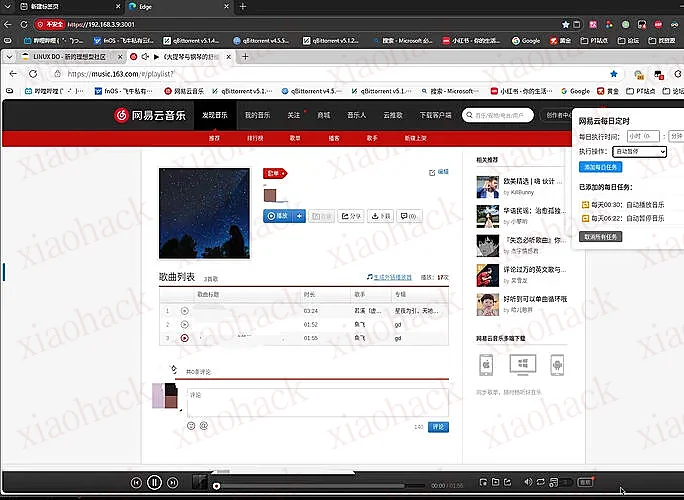
可以在电脑保存好脚本,通过 vnc 的控制栏上传文件