标签 Cloudflare Workers 下的文章

部署到 Cloudflare Workers

  1. fork 本存储库Fork xixu-me/Xget

  2. 获取 Cloudflare 凭证

  3. 配置 GitHub Secrets

    • 进入你的 GitHub 存储库 → Settings → Secrets and variables → Actions
    • 添加以下 secrets:
      • CLOUDFLARE_API_TOKEN:你的 API 令牌
      • CLOUDFLARE_ACCOUNT_ID:你的 Account ID
  4. 触发部署

    • 推送代码到 main 分支会自动触发部署
    • 仅修改文档文件(.md)、LICENSE.gitignore 等不会触发部署
    • 也可以在 GitHub Actions 页面手动触发部署
  5. 绑定自定义域名(可选):在 Cloudflare Workers 控制台中绑定你的自定义域名

部署到 Cloudflare Pages

  1. fork 本存储库Fork xixu-me/Xget

  2. 获取 Cloudflare 凭证

  3. 配置 GitHub Secrets

    • 进入你的 GitHub 存储库 → Settings → Secrets and variables → Actions
    • 添加以下 secrets:
      • CLOUDFLARE_API_TOKEN:你的 API 令牌
      • CLOUDFLARE_ACCOUNT_ID:你的 Account ID
  4. 触发部署

    • 存储库会自动将 Workers 代码转换为 Pages 兼容格式并同步到 pages 分支
    • 推送代码到 main 分支会自动触发同步和部署工作流
    • 仅修改文档文件(.md)、LICENSE.gitignore 等不会触发部署
    • 也可以在 GitHub Actions 页面手动触发部署
  5. 绑定自定义域名(可选):在 Cloudflare Pages 控制台中绑定你的自定义域名

注意pages 分支是从 main 分支自动生成的。请勿手动编辑 pages 分支,因为它会被同步工作流覆盖。

部署到 EdgeOne Pages

  1. fork 本存储库Fork xixu-me/Xget

  2. 获取 EdgeOne Pages API Token

  3. 配置 GitHub Secrets

    • 进入你的 GitHub 存储库 → Settings → Secrets and variables → Actions
    • 添加以下 secret:
      • EDGEONE_API_TOKEN:你的 API Token
  4. 触发部署

    • 存储库会自动将 Workers 代码转换为 Pages 兼容格式并同步到 pages 分支
    • 推送代码到 main 分支会自动触发同步和部署工作流
    • 仅修改文档文件(.md)、LICENSE.gitignore 等不会触发部署
    • 也可以在 GitHub Actions 页面手动触发部署
  5. 绑定自定义域名(可选):在 EdgeOne Pages 控制台中绑定你的自定义域名

注意pages 分支是从 main 分支自动生成的。请勿手动编辑 pages 分支,因为它会被同步工作流覆盖。

部署到 Vercel

  1. fork 本存储库Fork xixu-me/Xget

  2. 获取 Vercel 凭证

    • 访问 Vercel Account Settings 创建并记录 Access Token
    • 访问 Team Settings 记录 Team ID
    • 新建项目后访问项目的 Settings 记录 Project ID
  3. 配置 GitHub Secrets

    • 进入你的 GitHub 存储库 → Settings → Secrets and variables → Actions
    • 添加以下 secrets:
      • VERCEL_TOKEN:你的 Access Token
      • VERCEL_ORG_ID:你的 Team ID
      • VERCEL_PROJECT_ID:你的 Project ID
  4. 触发部署

    • 存储库会自动将 Workers 代码转换为 Functions 兼容格式并同步到 functions 分支
    • 推送代码到 main 分支会自动触发同步和部署工作流
    • 仅修改文档文件(.md)、LICENSE.gitignore 等不会触发部署
    • 也可以在 GitHub Actions 页面手动触发部署
  5. 绑定自定义域名(可选):在 Vercel 控制台中绑定你的自定义域名

注意functions 分支是从 main 分支自动生成的。请勿手动编辑 functions 分支,因为它会被同步工作流覆盖。

部署到 Netlify

  1. fork 本存储库Fork xixu-me/Xget

  2. 获取 Netlify 凭证

    • 访问 Netlify User Settings 创建并记录 personal access token
    • 新建项目后访问 Project configuration 记录 Project ID
  3. 配置 GitHub Secrets

    • 进入你的 GitHub 存储库 → Settings → Secrets and variables → Actions
    • 添加以下 secrets:
      • NETLIFY_AUTH_TOKEN:你的 personal access token
      • NETLIFY_SITE_ID:你的 Project ID
  4. 触发部署

    • 存储库会自动将 Workers 代码转换为 Functions 兼容格式并同步到 functions 分支
    • 推送代码到 main 分支会自动触发同步和部署工作流
    • 仅修改文档文件(.md)、LICENSE.gitignore 等不会触发部署
    • 也可以在 GitHub Actions 页面手动触发部署
  5. 绑定自定义域名(可选):在 Netlify 控制台中绑定你的自定义域名

注意functions 分支是从 main 分支自动生成的。请勿手动编辑 functions 分支,因为它会被同步工作流覆盖。

部署到 Deno Deploy

  1. fork 本存储库Fork xixu-me/Xget

  2. 切换默认分支

    • 进入你的 GitHub 存储库 → Settings → General → Default branch
    • 将默认分支从 main 切换到 functions
  3. 部署到 Deno Deploy

  4. 绑定自定义域名(可选):在 Deno Deploy 控制台中绑定你的自定义域名

注意functions 分支是从 main 分支自动生成的。请勿手动编辑 functions 分支,因为它会被同步工作流覆盖。

自托管部署

如果你希望在自己的服务器上运行 Xget,可以使用 Docker 或 Podman 部署:

使用预构建镜像

从 GitHub Container Registry 拉取并运行预构建的镜像:

使用 Docker:

# 拉取最新镜像
docker pull ghcr.io/xixu-me/xget:latest

# 运行容器
docker run -d \
  --name xget \
  -p 8080:8080 \
  ghcr.io/xixu-me/xget:latest

使用 Podman:

# 拉取最新镜像
podman pull ghcr.io/xixu-me/xget:latest

# 运行容器
podman run -d \
  --name xget \
  -p 8080:8080 \
  ghcr.io/xixu-me/xget:latest

本地构建

从源码构建容器镜像:

使用 Docker:

# 克隆存储库
git clone https://github.com/xixu-me/Xget.git
cd Xget

# 构建镜像
docker build -t xget:local .

# 运行容器
docker run -d \
  --name xget \
  -p 8080:8080 \
  xget:local 

使用 Podman:

# 克隆存储库
git clone https://github.com/xixu-me/Xget.git
cd Xget

# 构建镜像
podman build -t xget:local .

# 运行容器
podman run -d \
  --name xget \
  -p 8080:8080 \
  xget:local 

使用 Docker Compose / Podman Compose

创建 docker-compose.yml 文件:

version: '3.8' services: xget:  ghcr.io/xixu-me/xget:latest container_name: xget ports: - "8080:8080" restart: unless-stopped 

使用 Docker Compose:

docker compose up -d

使用 Podman Compose:

podman compose up -d

部署完成后,Xget 将在 8080 端口运行。

注意:自托管部署不包括全球边缘网络加速,性能取决于你的服务器配置和网络环境。


📌 转载信息
原作者: xixu-me
转载时间: 2026/1/25 23:15:14

从底层引擎优化角度,深入剖析 Hono 路由器的极致性能奥秘

引言

在众多 JavaScript Web 框架中,Hono 以其极致的性能表现脱颖而出。特别是在 Cloudflare Workers、Deno 等边缘计算环境中,Hono 的路由匹配速度在同类框架中名列前茅。这背后的秘密是什么?答案就藏在它的 RegExpRouter 实现中。

⚠️ 重要提示:本文重点讨论 RegExpRouter 的核心原理。在实际应用中,Hono 使用 SmartRouter 自动组合多种路由器(RegExpRouter、TrieRouter、LinearRouter)以达到最佳性能。

本文将通过一个精简的实现,深入剖析 Hono 路由器的核心原理,帮助你理解:

  • 为什么 RegExp 路由比传统路由快
  • 路由是如何预编译的
  • 参数提取的巧妙设计

📌 关键要点

项目说明
核心原理将路由预编译为正则表达式,利用引擎底层优化
性能优势减少 JS 层开销,一次原生调用完成匹配
最佳环境Cloudflare Workers、Deno 等边缘计算平台
实际架构SmartRouter + RegExpRouter + TrieRouter 组合
权衡考虑Node.js 环境性能打折扣,路由注册较慢

传统路由的性能瓶颈

在理解 Hono 的优化之前,我们先看看传统路由的处理方式:

// 传统路由的典型实现
function matchRoute(path, routes) {
  for (const route of routes) {
    // 1. 字符串分割
    const pathParts = path.split('/');
    const routeParts = route.path.split('/');

    // 2. 逐段比较
    if (pathParts.length !== routeParts.length) continue;

    const params = {};
    let matched = true;

    // 3. JS 层面的循环和条件判断
    for (let i = 0; i < pathParts.length; i++) {
      if (routeParts[i].startsWith(':')) {
        params[routeParts[i].slice(1)] = pathParts[i];
      } else if (pathParts[i] !== routeParts[i]) {
        matched = false;
        break;
      }
    }

    if (matched) return { route, params };
  }
  return null;
}

性能问题在哪里?

  • ❌ 大量的字符串操作(splitslice
  • ❌ 多层循环和条件判断,全在 JavaScript 层面执行
  • ❌ 每个请求都要重复这些操作

Hono 的解决方案:下沉到引擎层

Hono 的核心思想非常简单却极其巧妙:

将路由匹配逻辑从 JavaScript 层下沉到 JavaScript 引擎底层(C++ 实现的正则表达式引擎)

1. 预编译阶段(应用启动时)

在应用启动时,Hono 会将路由路径转换为正则表达式:

// 路由路径:/user/:id/posts/:postId
// 转换为正则:/^\/user\/([^/]+)\/posts\/([^/]+)$/

const paramNames: string[] = [];

const regexPath = path.replace(/:([a-zA-Z0-9_]+)/g, (_, paramName) => {
  paramNames.push(paramName); // 记录参数名
  return '([^/]+)';           // 替换为捕获组
});

const pattern = new RegExp(`^${regexPath}$`);

关键点:

  • :id([^/]+):匹配除 / 外的任意字符
  • 参数名被保存在 paramNames 数组中
  • 这个"昂贵"的编译过程只在启动时执行一次

2. 匹配阶段(请求到来时)

当请求到来时,只需要一行代码:

const match = pattern.exec(path);

这行代码的魔法:

  • exec 是 JavaScript 引擎的原生方法,由 C++ 实现
  • ✅ 正则引擎在底层进行了高度优化(状态机、JIT 编译等)
  • ✅ 无需手动分割字符串、无需 JS 层循环
  • ✅ 参数提取通过捕获组自动完成

3. 参数提取

匹配成功后,参数提取也非常简洁:

const params: Record<string, string> = {};
route.paramNames.forEach((name, index) => {
  params[name] = match[index + 1]; // match[0] 是完整匹配
});

完整实现解析

让我们看完整的简化实现,包含所有必要的类型定义:

// ============ 类型定义 ============

/**
 * 路由处理函数类型
 * @param params - 从 URL 中提取的参数对象
 */
type Handler = (params: Record<string, string>) => void;

/**
 * 路由信息接口
 */
interface Route {
  method: string;        // HTTP 方法(GET, POST, etc.)
  path: string;          // 原始路径模式(如 /user/:id)
  handler: Handler;      // 路由处理函数
  paramNames: string[];  // 参数名数组(如 ['id', 'postId'])
}

/**
 * 匹配结果接口
 */
interface MatchResult {
  handler: Handler;
  params: Record<string, string>;
}

// ============ 核心路由器实现 ============

export class DemoRegExpRouter {
  // 存储预编译的正则表达式和路由信息
  private routes: { pattern: RegExp; route: Route }[] = [];

  // 注册路由:预编译
  add(method: string, path: string, handler: Handler) {
    const paramNames: string[] = [];

    // 将 :param 转为正则捕获组
    const regexPath = path.replace(/:([a-zA-Z0-9_]+)/g, (_, paramName) => {
      paramNames.push(paramName);
      return '([^/]+)';
    });

    const pattern = new RegExp(`^${regexPath}$`);
    this.routes.push({ pattern, route: { method, path, handler, paramNames } });
  }

  // 匹配路由:执行正则
  match(method: string, path: string) {
    for (const { pattern, route } of this.routes) {
      if (route.method !== method && route.method !== 'ALL') continue;

      const match = pattern.exec(path); // 核心:原生正则匹配

      if (match) {
        const params: Record<string, string> = {};
        route.paramNames.forEach((name, index) => {
          params[name] = match[index + 1];
        });
        return { handler: route.handler, params };
      }
    }
    return null;
  }
}

实战示例

const router = new DemoRegExpRouter();

// 注册路由
router.add('GET', '/user/:id', (params) => {
  console.log(`获取用户详情,ID: ${params.id}`);
});

router.add('GET', '/user/:id/posts/:postId', (params) => {
  console.log(`获取用户 ${params.id} 的文章 ${params.postId}`);
});

// 匹配请求
const result = router.match('GET', '/user/123/posts/456');
if (result) {
  result.handler(result.params);
  // 输出: 获取用户 123 的文章 456
}

性能优势分析

为什么 RegExpRouter 更快?

  1. 减少 JS 执行开销:从多层循环降到一次原生调用
  2. 引擎优化:正则引擎经过数十年优化,包含 JIT、状态机等技术
  3. 减少内存分配:无需频繁创建数组、对象
  4. 一次性编译:预编译阶段完成所有准备工作,请求时零额外开销

性能对比概览

方案实现层次执行效率适用场景
传统路由JavaScript 层中等通用场景
RegExpRouter引擎底层极快边缘计算、高并发
📊 实际 Benchmark:根据 Hono 官方测试,在 Cloudflare Workers 和 Deno 环境中,Hono 是同类框架中最快的。但在 Node.js 环境中,由于适配器开销,性能优势会打折扣。

Hono 真实实现的进一步优化

本文的简化版每个路由都是独立的正则表达式。而 Hono 的真实实现采用了多路由器协同的策略:

1. SmartRouter(智能路由器)

Hono 默认使用 SmartRouter,它会:

  • 根据路由特征自动选择最快的路由器
  • 动态组合 RegExpRouter、TrieRouter、LinearRouter
  • 检测路由模式并持续使用最优方案

2. 路由器分工

路由器适用场景特点
RegExpRouter动态参数路由最快,但不支持所有模式
TrieRouter复杂路由模式支持所有模式,性能优秀
LinearRouter少量路由简单可靠,路由少时够用

3. 实际优化策略

  • 静态路由优先/about/contact 等使用 Map 快速查找
  • 路由预分组:按 HTTP 方法分组,减少匹配次数
  • 延迟编译:RegExpRouter 编译较慢,适合应用启动时初始化,不适合无服务器环境的冷启动

这些优化使得 Hono 在处理数百个路由时仍然保持极高性能。

局限性与权衡

RegExpRouter 并非银弹,在使用时需要注意以下限制:

RegExpRouter 的局限

  • 不支持所有路由模式:某些复杂的路由规则无法用简单正则表示
  • 注册阶段较慢:路由编译需要时间,不适合每次请求都重新初始化的环境(如某些无服务器冷启动场景)
  • 调试难度:编译后的正则表达式可读性较差,出错时难以定位
  • 模式约束:如带严格约束的参数 /:id(\\d+) 需要额外处理

运行环境差异

环境性能表现原因
Cloudflare Workers⭐⭐⭐⭐⭐ 极快原生 Web 标准 API
Deno⭐⭐⭐⭐⭐ 极快原生 Web 标准 API
Bun⭐⭐⭐⭐ 很快高性能 JS 运行时
Node.js⭐⭐⭐ 中等需要适配器转换
💡 选型建议:如果你的应用运行在边缘计算环境(Cloudflare Workers、Vercel Edge Functions 等),Hono 是绝佳选择。如果是传统 Node.js 服务器,Fastify 可能是更好的选择。

但对于大多数 Web 应用场景,RegExpRouter 的性能与功能平衡已经足够优秀。

总结

Hono 的 RegExpRouter 通过"预编译 + 引擎下沉"的策略,在特定环境中将路由匹配性能提升到极致:

核心优势

  1. 预编译:启动时一次性将路由转为正则,摊销成本
  2. 引擎下沉:利用 C++ 实现的正则引擎,避免 JS 层开销
  3. 参数捕获:巧妙利用正则捕获组,无需手动解析
  4. 智能组合:SmartRouter 自动选择最优路由器,兼顾性能与功能

设计哲学

这种设计哲学值得我们思考:性能优化的终极目标,往往是让"热路径"代码尽可能多地运行在更底层的优化环境中

对于 Web 框架来说,路由匹配就是最热的路径之一。Hono 在边缘计算环境中找到了这个问题的最优解,同时通过多路由器架构保证了广泛的适用性。

最佳实践

  • 边缘计算/Serverless:Hono 是首选(Cloudflare Workers、Deno Deploy)
  • 高并发场景:充分发挥 RegExpRouter 性能优势
  • ⚠️ Node.js 环境:考虑性能权衡,或选择 Fastify 等专门优化的框架
  • ⚠️ 复杂路由规则:了解 RegExpRouter 的限制,必要时使用 TrieRouter

延伸阅读:

技术资源:


📝 文章说明

本文基于对 Hono 框架的学习和研究编写,代码示例为简化版实现,用于教学目的。实际的 Hono RegExpRouter 实现更加复杂和优化。

性能数据和对比来自 Hono 官方文档和社区测试,具体数值会因测试环境、负载类型、运行时版本等因素而异。实际使用时请根据自己的场景进行测试。

如果您发现文中有任何不准确之处,欢迎指正。

一个基于 Hono 的全栈 Web 框架,结合了 Islands 架构和边缘计算的强大能力

引言

在现代 Web 开发中,我们面临着一个永恒的挑战:如何在提供丰富交互体验的同时,保持快速的加载速度和优秀的性能?传统的单页应用(SPA)虽然交互流畅,但首屏加载慢、SEO 困难;而传统的服务端渲染(SSR)虽然首屏快,但缺乏现代前端框架的开发体验。

HonoX 的出现,为这个问题提供了一个优雅的解决方案。它是基于超快的 Hono Web 框架构建的全栈框架,采用 Islands 架构,完美平衡了性能和开发体验。

什么是 HonoX?

HonoX 是一个全栈 Web 框架,它建立在 Hono 之上。Hono 是一个轻量级、超快速的 Web 框架,可以运行在任何 JavaScript 运行时(Cloudflare Workers、Deno、Bun、Node.js 等)。

核心特性

  1. Islands 架构 - 渐进式水合,只在需要的地方加载 JavaScript
  2. 文件路由系统 - 基于文件系统的直观路由
  3. 边缘优先 - 为 Cloudflare Workers 等边缘运行时优化
  4. 类型安全 - 完整的 TypeScript 支持
  5. 零配置 - 开箱即用的最佳实践
  6. 极致性能 - 继承 Hono 的超快性能

Islands 架构:重新思考前端水合

什么是 Islands 架构?

Islands 架构是一种现代前端架构模式,最早由 Etsy 的前端架构师 Katie Sylor-Miller 提出,后来被 Astro、Fresh 等框架采用。

想象一个网页是一片海洋,而需要交互的组件是海洋中的"岛屿":

┌─────────────────────────────────┐
│  静态 HTML(服务端渲染)          │
│                                 │
│  ┌─────────┐      ┌─────────┐  │
│  │ Island  │      │ Island  │  │
│  │ (交互)  │      │ (交互)  │  │
│  └─────────┘      └─────────┘  │
│                                 │
│         ┌─────────┐             │
│         │ Island  │             │
│         │ (交互)  │             │
│         └─────────┘             │
└─────────────────────────────────┘

这种架构的优势在于:

  • 减少 JavaScript 负载 - 只加载真正需要的 JavaScript
  • 提升首屏性能 - 静态内容立即可见
  • 渐进式增强 - 交互组件逐步加载和激活
  • 更好的 SEO - 完整的服务端渲染内容

HonoX 中的 Islands

在 HonoX 中使用 Islands 非常简单:

// app/islands/Counter.tsx
import { useState } from 'hono/jsx'

export default function Counter({ initialCount = 0 }) {
  const [count, setCount] = useState(initialCount)

  return (
    <div class="counter">
      <button onClick={() => setCount(count - 1)}>-</button>
      <span>{count}</span>
      <button onClick={() => setCount(count + 1)}>+</button>
    </div>
  )
}

只需将组件放在 app/islands/ 目录下,HonoX 会自动处理:

  • 服务端渲染
  • 客户端代码分割
  • 按需水合

在页面中使用:

// app/routes/index.tsx
import Counter from '../islands/Counter'

export default function Home() {
  return (
    <div>
      <h1>我的页面</h1>
      <p>这段文字是纯静态的,不需要 JavaScript</p>
      <Counter initialCount={0} />
    </div>
  )
}

文件路由系统:约定优于配置

HonoX 采用基于文件的路由系统,让路由管理变得直观:

app/routes/
├── index.tsx           → /
├── about.tsx           → /about
├── blog/
│   ├── index.tsx       → /blog
│   └── [slug].tsx      → /blog/:slug
└── api/
    ├── users.ts        → /api/users
    └── users/
        └── [id].ts     → /api/users/:id

动态路由

使用方括号定义动态路由参数:

// app/routes/blog/[slug].tsx
import { createRoute } from 'honox/factory'

export default createRoute((c) => {
  const { slug } = c.req.param()

  return c.render(
    <article>
      <h1>文章:{slug}</h1>
    </article>
  )
})

API 路由

API 路由返回 JSON 数据:

// app/routes/api/users/[id].ts
import { Hono } from 'hono'
import { zValidator } from '@hono/zod-validator'
import { z } from 'zod'

const app = new Hono()

// GET /api/users/:id
app.get('/:id', (c) => {
  const id = c.req.param('id')
  return c.json({ id, name: 'User ' + id })
})

// POST /api/users/:id
const schema = z.object({
  name: z.string().min(1),
  email: z.string().email(),
})

app.post('/:id', zValidator('json', schema), (c) => {
  const data = c.req.valid('json')
  const id = c.req.param('id')

  return c.json({
    id,
    ...data,
    updated: true
  })
})

export default app

中间件系统:强大且灵活

HonoX 继承了 Hono 的中间件系统,让你可以轻松处理横切关注点:

// app/routes/_middleware.tsx
import { createRoute } from 'honox/factory'
import { compress } from 'hono/compress'
import { logger } from 'hono/logger'
import { secureHeaders } from 'hono/secure-headers'

export default createRoute((c, next) => {
  // 日志记录
  logger()(c, next)

  // 安全头
  secureHeaders()(c, next)

  // 响应压缩
  compress()(c, next)

  return next()
})

自定义中间件

创建自定义中间件也很简单:

// 性能计时中间件
export const timing = createMiddleware(async (c, next) => {
  const start = Date.now()
  await next()
  const end = Date.now()

  c.header('Server-Timing', `total;dur=${end - start}`)
})

// 认证中间件
export const auth = createMiddleware(async (c, next) => {
  const token = c.req.header('Authorization')

  if (!token) {
    return c.json({ error: 'Unauthorized' }, 401)
  }

  // 验证 token...
  await next()
})

性能优化:从框架层面开始

HonoX 内置了多种性能优化:

1. 自动代码分割

每个 Island 组件自动分割成独立的 chunk:

// 自动生成类似这样的输出
dist/
├── client/
│   ├── island-Counter.js    (3KB)
│   ├── island-Search.js     (5KB)
│   └── island-Modal.js      (4KB)
└── server/
    └── index.js

2. 流式 SSR

使用 Suspense 实现流式渲染:

import { Suspense } from 'hono/jsx'
import AsyncData from '../islands/AsyncData'

export default function Page() {
  return (
    <div>
      <h1>立即显示的标题</h1>

      <Suspense fallback={<div>加载中...</div>}>
        <AsyncData />
      </Suspense>
    </div>
  )
}

页面渲染流程:

  1. 立即发送 HTML 头部和静态内容
  2. 异步组件准备好后流式发送
  3. 最后发送激活脚本

3. 智能缓存策略

// 静态资源长期缓存
app.get('/static/*', async (c) => {
  c.header('Cache-Control', 'public, max-age=31536000, immutable')
  return c.next()
})

// API 响应 ETag 缓存
app.get('/api/data', async (c) => {
  const data = await fetchData()
  const etag = generateETag(data)

  if (c.req.header('If-None-Match') === etag) {
    return c.body(null, 304)
  }

  c.header('ETag', etag)
  return c.json(data)
})

类型安全:端到端的 TypeScript

HonoX 提供完整的类型安全,从路由到 API:

// 定义 API 类型
type User = {
  id: string
  name: string
  email: string
}

// API 路由自动推断类型
const app = new Hono<{ Variables: { user: User } }>()

app.get('/api/user', (c) => {
  const user = c.get('user') // 类型:User
  return c.json(user)
})

// 在客户端使用类型
const response = await fetch('/api/user')
const user: User = await response.json()

部署:边缘优先

HonoX 针对边缘运行时优化,特别是 Cloudflare Workers:

Cloudflare Pages 部署

# 构建
npm run build

# 部署
npm run deploy

优势:

  • 全球 CDN - 300+ 个边缘节点
  • 零冷启动 - Workers 即时响应
  • 自动扩展 - 无需配置
  • 低成本 - 免费层每天 100,000 请求

其他平台

HonoX 也支持部署到:

  • Vercel - 使用 Node.js 适配器
  • Netlify - Edge Functions
  • Deno Deploy - 原生支持
  • 传统服务器 - Node.js

实战案例:构建一个博客

让我们用 HonoX 构建一个完整的博客系统:

1. 文章列表页

// app/routes/blog/index.tsx
import { createRoute } from 'honox/factory'
import { getPosts } from '../../lib/posts'

export default createRoute(async (c) => {
  const posts = await getPosts()

  return c.render(
    <div class="blog">
      <h1>博客文章</h1>
      <ul>
        {posts.map(post => (
          <li key={post.slug}>
            <a href={`/blog/${post.slug}`}>
              <h2>{post.title}</h2>
              <time>{post.date}</time>
            </a>
          </li>
        ))}
      </ul>
    </div>
  )
})

2. 文章详情页

// app/routes/blog/[slug].tsx
import { createRoute } from 'honox/factory'
import { getPost } from '../../lib/posts'
import CommentSection from '../../islands/CommentSection'

export default createRoute(async (c) => {
  const { slug } = c.req.param()
  const post = await getPost(slug)

  if (!post) {
    return c.notFound()
  }

  return c.render(
    <article>
      <header>
        <h1>{post.title}</h1>
        <time>{post.date}</time>
        <div>{post.author}</div>
      </header>

      <div dangerouslySetInnerHTML={{ __html: post.content }} />

      {/* 评论区使用 Island 实现交互 */}
      <CommentSection postId={slug} />
    </article>,
    {
      title: post.title,
      description: post.excerpt,
    }
  )
})

3. 交互式评论组件

// app/islands/CommentSection.tsx
import { useState } from 'hono/jsx'

type Comment = {
  id: string
  author: string
  content: string
  createdAt: string
}

export default function CommentSection({ postId }: { postId: string }) {
  const [comments, setComments] = useState<Comment[]>([])
  const [loading, setLoading] = useState(false)

  const loadComments = async () => {
    setLoading(true)
    const res = await fetch(`/api/comments/${postId}`)
    const data = await res.json()
    setComments(data.comments)
    setLoading(false)
  }

  const submitComment = async (e: Event) => {
    e.preventDefault()
    const form = e.target as HTMLFormElement
    const formData = new FormData(form)

    await fetch(`/api/comments/${postId}`, {
      method: 'POST',
      headers: { 'Content-Type': 'application/json' },
      body: JSON.stringify({
        author: formData.get('author'),
        content: formData.get('content'),
      }),
    })

    form.reset()
    loadComments()
  }

  return (
    <section class="comments">
      <h2>评论</h2>

      <button onClick={loadComments}>
        {loading ? '加载中...' : '加载评论'}
      </button>

      {comments.map(comment => (
        <div key={comment.id} class="comment">
          <strong>{comment.author}</strong>
          <p>{comment.content}</p>
          <time>{comment.createdAt}</time>
        </div>
      ))}

      <form onSubmit={submitComment}>
        <input name="author" placeholder="您的名字" required />
        <textarea name="content" placeholder="评论内容" required />
        <button type="submit">提交评论</button>
      </form>
    </section>
  )
}

4. 评论 API

// app/routes/api/comments/[postId].ts
import { Hono } from 'hono'
import { zValidator } from '@hono/zod-validator'
import { z } from 'zod'

const app = new Hono()

const commentSchema = z.object({
  author: z.string().min(1).max(50),
  content: z.string().min(1).max(1000),
})

// 获取评论
app.get('/:postId', async (c) => {
  const { postId } = c.req.param()

  // 从数据库获取评论
  const comments = await db.comments
    .where('postId', postId)
    .orderBy('createdAt', 'desc')
    .get()

  return c.json({ comments })
})

// 添加评论
app.post('/:postId', zValidator('json', commentSchema), async (c) => {
  const { postId } = c.req.param()
  const data = c.req.valid('json')

  const comment = await db.comments.create({
    postId,
    ...data,
    createdAt: new Date().toISOString(),
  })

  return c.json(comment, 201)
})

export default app

与其他框架对比

HonoX vs Next.js

HonoX 的优势:

  • 更轻量(核心更小)
  • 边缘优先设计
  • 更简单的学习曲线
  • 更快的冷启动

Next.js 的优势:

  • 更成熟的生态系统
  • 更多的官方集成
  • React Server Components
  • 更强大的图像优化

HonoX vs Astro

相似点:

  • 都使用 Islands 架构
  • 都注重性能
  • 都支持多框架

HonoX 的优势:

  • 更好的 API 路由
  • 原生支持边缘运行时
  • 更轻量的运行时

Astro 的优势:

  • 可以混用多个前端框架
  • 更丰富的内容处理功能
  • 更好的静态站点生成

HonoX vs Fresh

相似点:

  • 都基于 Islands 架构
  • 都使用文件路由
  • 都注重性能

HonoX 的优势:

  • 支持更多运行时
  • 更灵活的中间件系统
  • 基于 Hono 的强大生态

Fresh 的优势:

  • Deno 原生集成
  • Preact 默认支持
  • 更简单的配置

最佳实践

1. 合理使用 Islands

✅ 好的做法:

// 只将需要交互的部分做成 Island
<article>
  <h1>{title}</h1>
  <p>{content}</p>
  <ShareButtons /> {/* Island */}
  <CommentSection /> {/* Island */}
</article>

❌ 避免:

// 不要把整个页面都做成 Island
export default function Page() {
  const [state, setState] = useState()
  // 整个页面都会在客户端水合
}

2. 优化数据获取

✅ 好的做法:

// 在服务端并行获取数据
export default createRoute(async (c) => {
  const [user, posts, comments] = await Promise.all([
    getUser(),
    getPosts(),
    getComments(),
  ])

  return c.render(<Page user={user} posts={posts} comments={comments} />)
})

❌ 避免:

// 避免串行请求
const user = await getUser()
const posts = await getPosts() // 等待上一个完成
const comments = await getComments() // 又要等待

3. 使用流式渲染

// 对于慢速数据使用 Suspense
export default function Page() {
  return (
    <>
      <Header /> {/* 快速渲染 */}

      <Suspense fallback={<Skeleton />}>
        <SlowData /> {/* 异步加载 */}
      </Suspense>

      <Footer />
    </>
  )
}

4. 实现有效缓存

// 分层缓存策略
const app = new Hono()

// 1. 边缘缓存
app.use('/api/*', cache({
  cacheName: 'api-cache',
  cacheControl: 'max-age=60',
}))

// 2. 浏览器缓存
app.use('/static/*', async (c, next) => {
  await next()
  c.header('Cache-Control', 'public, max-age=31536000, immutable')
})

// 3. 条件请求
app.use('/data/*', etag())

未来展望

HonoX 还在快速发展中,以下是一些令人期待的方向:

  1. 更多的运行时支持 - 包括 AWS Lambda、Azure Functions 等
  2. 增强的开发工具 - 更好的调试体验、性能分析工具
  3. 更丰富的生态 - 官方插件、第三方集成
  4. 框架无关的 Islands - 支持 React、Vue、Svelte 等
  5. 增量静态生成 - 类似 Next.js 的 ISR

结论

HonoX 代表了现代全栈框架的一个重要方向:

  • 性能优先 - Islands 架构和边缘计算
  • 开发体验 - 简单直观的 API
  • 灵活性 - 支持多种运行时和部署方式
  • 类型安全 - 完整的 TypeScript 支持

如果你正在寻找一个轻量、快速、现代的全栈框架,特别是需要部署到边缘运行时,HonoX 是一个值得考虑的选择。

虽然它还比较年轻,生态系统不如 Next.js 那样成熟,但它的设计理念和技术方向都非常正确。随着 Hono 生态的发展,HonoX 也将变得越来越强大。

资源链接


欢迎在评论区分享你对 HonoX 的看法和使用经验!

项目地址

V2 版本

  • 改用 KV 管理账号
  • 自带简易保活

V1 版本

一键部署

点击下方按钮快速部署:

Render 服务管理面板 V2 版本,重大更新2

Render 服务管理系统

一个现代化的 Render 服务管理面板,让你能够集中管理多个 Render 账户中的 WEB_SERVICE 服务。提供账户管理、服务监控、部署控制、环境变量管理、日志查看和实例管理等完整功能。

特性

账户管理

  • 通过 Web 界面动态添加、编辑、删除 Render 账户
  • API Key 添加前自动验证有效性
  • 账户信息安全存储在 Cloudflare KV 中
  • API Key 仅显示预览(前 8 位… 后 4 位)

安全登录

  • 提供密码保护的登录页面
  • 基于 Cookie 的会话管理(24 小时过期,滑动刷新)
  • CSRF Token 双提交 Cookie 模式保护
  • IP + 用户名双重登录失败锁定(指数退避)
  • 时序安全的密码比较(防止时序攻击)
  • HSTS 安全头强制 HTTPS
  • 登录状态持久化

服务监控面板

  • 实时显示服务状态(运行中 / 已暂停)
  • 服务统计信息(总数、运行中数量、账户数)
  • 服务搜索和账户过滤功能
  • 智能缓存机制(15 分钟新鲜 / 24 小时过期)
  • 手动刷新按钮和缓存时间显示

部署管理

  • 一键触发部署
  • 查看部署历史记录
  • 取消进行中的部署
  • 回滚到历史版本

服务控制

  • 暂停 / 恢复服务
  • 重启服务
  • 服务状态实时更新

环境变量管理

  • 查看所有环境变量
  • 在线编辑环境变量值
  • 添加新的环境变量
  • 删除现有环境变量
  • 值的复制功能

日志与监控

  • 查看服务运行日志
  • 日志级别筛选(error/warn/info/debug)
  • 终端风格深色主题日志查看器
  • 查看服务实例状态
  • 扩缩容服务实例

事件日志

  • 查看最近事件日志
  • 显示部署开始 / 结束状态
  • 部署成功 / 失败状态标识
  • 显示触发原因和用户信息

现代化 UI

  • 响应式设计,支持移动端
  • 漂亮的卡片式布局
  • 流畅的交互动画
  • 一致的设计风格

自动保活(Cron)

  • 定时 Ping 所有运行中的 Web 服务
  • 并发批处理(每批 10 个服务)
  • 指数退避重试机制
  • 智能利用缓存减少 API 调用

快速开始

方式 1: 通过 Wrangler CLI 部署(推荐)

  1. 克隆仓库

    git clone https://github.com/ssfun/render-service-manager.git
    cd render-service-manager
    
  2. 安装 Wrangler CLI

    npm install -g wrangler
    
  3. 创建 KV 命名空间

    npx wrangler kv:namespace create RENDER_KV
    

    将返回的 ID 复制备用。

  4. 配置 wrangler.toml
    编辑 wrangler.toml 文件:

    name = "render-service-manager" main = "src/index.js" compatibility_date = "2025-10-01" [observability] enabled = true [[kv_namespaces]] binding = "RENDER_KV" id = "你的KV_ID" # 替换为上一步获取的 ID [triggers] crons = ["*/5 * * * *"]  # 每5分钟执行一次保活任务 [vars] ADMIN_USERNAME = "admin" ADMIN_PASSWORD = "your-strong-password" # 请修改为强密码 
  5. 登录并部署

    npx wrangler login
    npx wrangler deploy
    
  6. 添加 Render 账户

    • 访问部署后的 URL
    • 使用配置的用户名密码登录
    • 点击右上角 "账户管理"
    • 点击 "添加账户",输入名称和 Render API Key

方式 2: 手动部署(无需 Wrangler CLI)

  1. 登录 Cloudflare 账户

  2. 创建 KV 命名空间

    • 导航到 “Workers” > “KV”。
    • 点击 “Create a namespace”。
    • 输入名称(如 “RENDER_KV”),复制生成的 ID 备用。
  3. 创建 Worker

    • 导航到 “Workers” > “Overview”。
    • 点击 “Create a Worker”。
    • 输入 Worker 名称(如 “render-service-manager”)。
  4. 上传代码

    • 在 Worker 编辑器中,上传本项目的源代码。
  5. 配置环境变量

    • 点击 “Settings” > “Variables”。
    • 添加以下环境变量:
      变量名
      ADMIN_USERNAMEadmin
      ADMIN_PASSWORDyour-strong-password
  6. 绑定 KV 命名空间

    • 在 “Settings” > “Bindings” > “KV Namespace Bindings” 部分。
    • 点击 “Add binding”。
    • 变量名称输入 RENDER_KV
    • 选择步骤 2 中创建的 KV 命名空间。
  7. 部署 Worker

    • 点击 “Save and Deploy”。
    • 通过提供的 URL 访问(例如: render-service-manager.your-subdomain.workers.dev)。
  8. 添加 Render 账户

    • 登录后点击 "账户管理" 添加你的 Render 账户。

环境变量

变量名说明必填
ADMIN_USERNAME管理员登录用户名
ADMIN_PASSWORD管理员登录密码

致谢

许可证

本项目采用 MIT 许可证. 版权所有 © 2025 sfun


📌 转载信息
转载时间:
2026/1/23 11:58:16

已经测试了一段时间,没有发现什么大问题,并且还在持续更新中,基于 Cloudflare 全生态部署。

  • 数据库使用 D1 SQL
  • 登录 token 基于 KV Workers 进行校验
  • 接口基于 Cloudflare Workers 进行构建
  • 管理后台及评论端 js 托管到 Cloudflare Pages

我已经将我的网站全面接入该程序,测试链接:

1. 评论端

2. 后台管理


功能:

功能方面足以满足多站点使用。

  • 极速响应:基于 Cloudflare 全球边缘网络
  • 安全可靠:内置管理员认证、CORS 保护等
  • 易于集成:提供完整的 REST API,支持定制前端评论组件
  • 管理后台:提供完善的后台管理界面,方便评论管理
  • 评论审核:支持手动审核评论,防止垃圾评论
  • 禁止评论:支持屏蔽 IP 和拉黑邮箱
  • 邮件通知:集成各大邮箱厂商(逐步接入),支持自定义通知模板


文档中介绍了部署的流程,感兴趣的佬友可以试试看,顺便提交一下反馈,还在不断优化。

支持从其他评论框架进行迁移,文档中均有说明。


📌 转载信息
原作者:
anghunk
转载时间:
2026/1/21 22:14:01

看了 vercel 刚发布的 react-best-practices-skill,觉得还不错,然后这周末就花两天用 Claude Code + GLM 4.7 写了个用来做在线订阅转换的工具:Clash Converter ,欢迎大家来体验或者提意见

  • 域名成本 12.99$
  • CICD 用的免费的 Github + Cloudflare Workers
  • LogoNano Banana Pro + Chatgpt生成的

看了 vercel 刚发布的 react-best-practices-skill,觉得还不错,然后这周末就花两天用 Claude Code + GLM 4.7 写了个用来做在线订阅转换的工具:Clash Converter ,欢迎大家来体验或者提意见

  • 域名成本 12.99$
  • CICD 用的免费的 Github + Cloudflare Workers
  • LogoNano Banana Pro + Chatgpt生成的

各位佬友好,分享一个自己 Vibe Coding 项目。

一句话介绍:

又一个文件传输工具,点一下按钮部署到 Cloudflare Workers 全球边缘节点(感谢赛博大善人),文件走 WebRTC 点对点传输,服务器只负责牵线,全程端到端加密,完全免费。

核心特点

传输相关:

  • 优先 WebRTC P2P 直连,连不上自动降级中继(5 秒内切换)
  • 支持传文件、发消息、发图片

安全相关:

  • AES-256-GCM 加密,密钥用 ECDH 协商
  • 房间可以设密码,双重加密
  • 服务器零知识,不存任何文件内容

部署相关:

  • 一键部署到 Cloudflare Workers,免费额度够用
  • 前端纯原生 JS,零依赖,加载快
  • 支持 PWA,可以装到桌面当 App 用

其他:

  • 支持 9 种语言(中英日韩法德西阿 + 繁体)
  • 移动端适配做了优化,底部导航栏
  • MIT 开源

技术栈

Cloudflare Workers + Durable Objects + WebRTC + Web Crypto API,前端原生 JS 零依赖。

项目链接

项目截图


欢迎各位佬友试用反馈,本项目全程 Vibe Coding 实现,有问题随时提 issue,觉得有用给个 star 就是最大支持。


📌 转载信息
转载时间:
2026/1/18 09:09:22

这两天死了么很火,作为小白的我也想试试,但是收费了,花钱不存在的。
纯小白,代码 ai 写的,我不会。简简单单的实现了功能,里面还可以加很多功能,注册用户,多用户通知,我就不为难 ai 了,交给你们这群程序员了~嘿嘿~

原理就是签到证明自己活着。

实现:每天都要充电,iPhone 用户插电运行快捷指令,访问固定域名,记录下来,然后到期没有再运行这个快捷指令就证明死了。发 bark 给接收人。

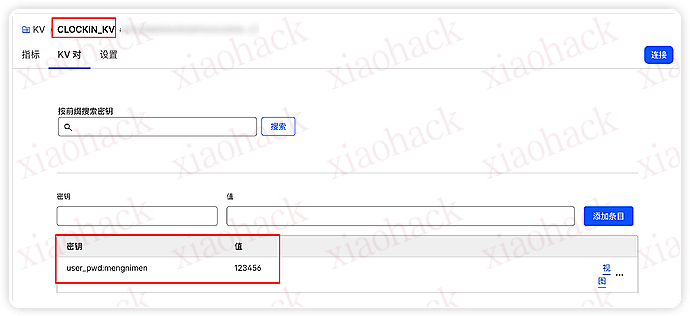
需要用到 Cloudflare 的 worker 和 kv,新建 kv 名称写 CLOCKIN_KV,里面的值是账号密码,照着抄就行。


worker 绑定要写对变量,如图:


worker 中设置运行时间,我设置的是一天两次 0 9,21 * * * 用的白嫖的域名。


iPhone 快捷指令就是一个简单的请求,我的用户名是 mengnimen 密码是 123456,到时候根据你自己在 kv 里设置的值自己改。

https://你的域名/clockin?user=mengnimen&pwd=123456

快捷新建一个 获取 URL 内容 即可。


在自动化中添加一个充电运行的,记得把立即运行打开

以后就是每次充电运行,记录你还活着,一天不记录,就会发通知给 bark 接收人

纯小白,代码 ai 写的,我不会。代码中需要添加 bark 地址,多长时间认为活着也可以改,自己看注释就行了。简简单单的实现了功能,里面还可以加很多功能,注册用户,多用户通知,我就不为难 ai 了,交给你们这群程序员了~嘿嘿

export default {
  async fetch(request, env, ctx) {
    const url = new URL(request.url);
    const path = url.pathname;

    try {
      if (path === "/" || path === "/health") return json({ ok: true });

      if (path === "/clockin") return await handleClockin(url, env);
      if (path === "/check") return await handleCheck(url, env);

      return json({ ok: false, error: "Not Found" }, 404);
    } catch (e) {
      return json({ ok: false, error: e?.message || String(e) }, 500);
    }
  },

  async scheduled(event, env, ctx) {
    ctx.waitUntil(runTimeoutCheck(env));
  },
};

const CONFIG = {
  ALERT_AFTER_DAYS: 1,
  MIN_ALERT_INTERVAL_HOURS: 6,
  DEFAULT_NOTIFY: { type: "bark", url: "" }, // 这里填默认 bark 或钉钉
  TITLE: "死了",
  NOTIFY_ON_CLOCKIN: false,
};

async function handleClockin(url, env) {
  const user = (url.searchParams.get("user") || "").trim();
  const pwd = (url.searchParams.get("pwd") || "").trim();
  if (!user || !pwd) return json({ ok: false, error: "Missing user or pwd" }, 400);

  const ok = await verifyUserPlain(user, pwd, env);
  if (!ok) return json({ ok: false, error: "Auth failed" }, 401);

  const now = Date.now();
  await env.CLOCKIN_KV.put(kLastTime(user), String(now));

  if (CONFIG.NOTIFY_ON_CLOCKIN) {
    await sendNotify(env, user, { title: "还活着", body: `已记录:${formatTime(now)}` });
  }

  return json({ ok: true, user, last_time: now, last_time_text: formatTime(now) });
}

async function handleCheck(url, env) {
  const user = (url.searchParams.get("user") || "").trim();
  const pwd = (url.searchParams.get("pwd") || "").trim();
  if (!user || !pwd) return json({ ok: false, error: "Missing user or pwd" }, 400);

  const ok = await verifyUserPlain(user, pwd, env);
  if (!ok) return json({ ok: false, error: "Auth failed" }, 401);

  const now = Date.now();
  const lastStr = await env.CLOCKIN_KV.get(kLastTime(user));
  const lastMs = lastStr ? Number(lastStr) : null;

  const thresholdMs = CONFIG.ALERT_AFTER_DAYS * 24 * 60 * 60 * 1000;
  return json({
    ok: true,
    user,
    now,
    now_text: formatTime(now),
    last_time: lastMs,
    last_time_text: lastMs ? formatTime(lastMs) : null,
    since_hours: lastMs ? round2((now - lastMs) / 3600000) : null,
    threshold_days: CONFIG.ALERT_AFTER_DAYS,
    is_timeout: lastMs ? (now - lastMs > thresholdMs) : true,
  });
}

async function runTimeoutCheck(env) {
  const now = Date.now();
  const thresholdMs = CONFIG.ALERT_AFTER_DAYS * 24 * 60 * 60 * 1000;
  const minIntervalMs = CONFIG.MIN_ALERT_INTERVAL_HOURS * 60 * 60 * 1000;

  let cursor = undefined;
  let checked = 0;
  let alerted = 0;

  while (true) {
    const listRes = await env.CLOCKIN_KV.list({ prefix: "user_pwd:", cursor });
    cursor = listRes.cursor;

    for (const k of listRes.keys) {
      const user = k.name.slice("user_pwd:".length);
      checked++;

      const lastStr = await env.CLOCKIN_KV.get(kLastTime(user));
      const lastMs = lastStr ? Number(lastStr) : 0;

      const timeout = !lastMs || (now - lastMs > thresholdMs);
      if (!timeout) continue;

      const lastAlertStr = await env.CLOCKIN_KV.get(kLastAlert(user));
      const lastAlertMs = lastAlertStr ? Number(lastAlertStr) : 0;
      if (lastAlertMs && (now - lastAlertMs < minIntervalMs)) continue;

      const hours = lastMs ? round2((now - lastMs) / 3600000) : null;
      const body = lastMs
        ? `你已超过 ${hours} 小时未进行“活着打卡”。\n上次记录:${formatTime(lastMs)}`
        : `未找到打卡记录,请连接充电器触发一次打卡。\n当前时间:${formatTime(now)}`;

      const ok = await sendNotify(env, user, { title: CONFIG.TITLE, body });
      if (ok) {
        alerted++;
        await env.CLOCKIN_KV.put(kLastAlert(user), String(now));
      }
    }

    if (listRes.list_complete) break;
  }

  await env.CLOCKIN_KV.put("meta:last_run", String(now));
  await env.CLOCKIN_KV.put("meta:last_run_summary", JSON.stringify({ now, checked, alerted }));
  return { checked, alerted, now };
}

/** 明文校验:KV 中 user_pwd:<user> 直接存明文 */
async function verifyUserPlain(user, pwd, env) {
  const stored = await env.CLOCKIN_KV.get(kUserPwd(user));
  if (!stored) return false;
  return stored === pwd;
}

async function sendNotify(env, user, msg) {
  let notify = null;
  const perUserStr = await env.CLOCKIN_KV.get(kNotify(user));
  if (perUserStr) {
    try { notify = JSON.parse(perUserStr); } catch {}
  }
  const type = notify?.type || CONFIG.DEFAULT_NOTIFY.type;
  const url = notify?.url || CONFIG.DEFAULT_NOTIFY.url;
  if (!url) return false;

  if (type === "dingtalk") return await sendDingTalk(url, msg);
  return await sendBark(url, msg);
}

async function sendBark(baseUrl, msg) {
  const title = encodeURIComponent(msg.title || "提醒");
  const body = encodeURIComponent(msg.body || "");
  const u = `${baseUrl.replace(/\/$/, "")}/${title}/${body}`;
  const r = await fetch(u, { method: "GET" });
  return r.ok;
}

async function sendDingTalk(webhookUrl, msg) {
  const payload = { msgtype: "text", text: { content: `${msg.title || "提醒"}\n\n${msg.body || ""}` } };
  const r = await fetch(webhookUrl, {
    method: "POST",
    headers: { "content-type": "application/json;charset=utf-8" },
    body: JSON.stringify(payload),
  });
  return r.ok;
}

const kUserPwd = (user) => `user_pwd:${user}`;
const kLastTime = (user) => `last_time:${user}`;
const kLastAlert = (user) => `last_alert:${user}`;
const kNotify = (user) => `notify:${user}`;

function json(obj, status = 200) {
  return new Response(JSON.stringify(obj, null, 2), {
    status,
    headers: { "content-type": "application/json; charset=utf-8" },
  });
}
function formatTime(ms) { return new Date(ms).toISOString(); }
function round2(n) { return Math.round(n * 100) / 100; }

📌 转载信息
转载时间:
2026/1/12 10:36:11

可以在这里分享需要频繁定制的个性化 clash 规则.

其实我开始是想做一个 clash 配置管理中心,不过刚刚立项,就和 RyanVan 佬的项目 https://ryan-ai.de 撞车了,然后人家完成度已经很高了,就不是很有必要再折腾一遍.

不过我这里还是有一个比较好的功能点是可以结合起来用的.

这个小功能可以按照 clash 的 rule-provider 规范 (参见规则集合内容 - 虚空终端 Docs) 定义规则提供者

比如我定义的这个:
https://cr-hub.jsonsong.top/rules/ai-us
是我目前在使用的,需要走美国家宽的路由规则.
其他规则我一般是走 hk.

使用方式是,定义 rule-provider 和指定分组


📌 转载信息
转载时间:
2026/1/12 10:03:13

之前拿到了个我觉得挺长的 dpdns 免费域名,于是有了一个想法,用 ai 写了一个长链接

灵感来源于这个,其实这个更长,但是我这再长一点 cf workers 就不工作了

原理差不多但是更进一步,而且有随机性,比如 l 站可以编码成:

https://looooooooooooooooooooooooooooooooooooooooooooooooooooooooooog.forthezero.dpdns.org/FEEEEEEEEEEFEFFEFEFEFEFEFFEFEFEFEFFEFEFEFEFEFEFEFEFEFEFEFFEFEFEFEFFFFEFEFEFEFEFEFFEEEEEEEEEEEEEEEEEEEEEEEEEEEFEFEFFEFEFFFFEFFEFFEFFEFEFFEFEFEFEFEFFEFEFEFEFEmanbal!l!l!l!l!l!l!LoremipsumdolorsitametconsecteturadipiscingelitseddoeiusmodtemporincididuntutlaboreetdoloremagnaaliquaUtenimadminimveniamquisnostrudexercitationullamcolaborioioioioioioioioioioioioioFEEEEEEEEEEFEFFEFEFEFEFEFFEFEFEFEFFEFEFEFEFEFEFEFEFEFEFEFFEFEFEFEFFFFEFEFEFEFEFEFFEEEEEEEEEEEEEEEEEEEEEEEEEEEFEFEFFEFEFFFFEFFEFFEFFEFEFFEFEFEFEFEFFEFEFEFEFEshoooooooooooooooooooooooooooooooooooortJLJLJLJLLJLJLJLJJLJJJLJLJLJLJLJLJLJLJLJLJLLJLJLLLLLJLJJJJLJJLLJLJLJLJLJLJLJLJLLJLLLLJJLJLJJLJLJLJLJLJJJLJJJLJLJLLLJJLJLLJLLJJLLJJLJLLJLJLLJLLJJLJLLLJJLLJJLLnonononononononononononononononononononononononononononononononononononononononononononononononononononononononononononononononononononononononononononononoYTYTYTYTYYTYTTTYTYTYTYTYTTYTYTYTYTYTYTYTYTYYYTYTYTYTYTYTYTYTYTYTYTYTYTYTYTYTYTYTYTYTYTYTYTYTYTYTYTYTYTYTYTYTYTYTYTYYYTYTYTYTYTYTYTYYTYTYYTYTYTYTYTYTYTYTTY010101!i!i!i!i!i!i!iyesyapyeahyoyayesahyesyapyeahyoyayesahyesyapyeahyoyayesahyesyapyeahyoyayesahyesyapyeahyoyayesahyesyapyeahyoyayesahyesyapyeahyoyayesahyesyapyeahyoyayesahyesyLoremipsumdolorsitametconsecteturadipiscingelitseddoeiusmodtemporincididuntutlaboreetdoloremagnaaliquaUtenimadminimveniamquisnostrudexercitationullamcolabornonononononononononononononononononononononononononononononononononononononononononononononononononononononononononononononononononononononononononononononoioioioioioioioioioioioioio71H7IH7IH7IH7IH71HI71IH717H71IH71IHIH71IH71IH7IHIH7IH71IH71IH71IHIH71IH71IH7IH7IH7IH1IH7IHI7171IH7HI71HI7IH1IH1I7H7IIH7I1IH7IHIIH7I7H7IHI77H7H7I1H71I7H7IH7Hl!l!l!l!l!l!l!nonononononononononononononononononononononononononononononononononononononononononononononononononononononononononononononononononononononononononononononomanbanonononononononononononononononononononononononononononononononononononononononononononononononononononononononononononononononononononononononononononononoioioioioioioioioioioioioioJLJLJLJLLJLJLJLJJLJJJLJLJLJLJLJLJLJLJLJLJLLJLJLLLLLJLJJJJLJJLLJLJLJLJLJLJLJLJLLJLLLLJJLJLJJLJLJLJLJLJJJLJJJLJLJLLLJJLJLLJLLJJLLJJLJLLJLJLLJLLJJLJLLLJJLLJJLLshoooooooooooooooooooooooooooooooooooortfuckfuckfuckfuckfuckfuckfuckfuckfuckfuckfuckfuckfuckfuckfuckfuckfuckfuckfuckfuckfuckfuckfuckfuckfuckfuckfuckfuckfuckfuckfuckfuckfuckfuckfuckfuckfuckfuckfuck!i!i!i!i!i!i!ilOlOlOlOlOlOlOlOlOlOlOlOlOnmnmnmnmnmmnmnmnnnnnnnnnnnnnnnnnnmmmmmmmmmmmmmmmmmmmmmmmmmmmmmmmmmmmmmmmmmmmmmmmmmmmmmmmmmmmmmmmnmmnmnmnmmnmnmnmnmmnmnmnmnmmnmnmnmnmnmnmnmnmnmnmnmnmnmnmlolhahhahahahahhahahahahhahahahhahahahahhahahahahahhahahahailililililililililshoooooooooooooooooooooooooooooooooooortnonononononononononononononononononononononononononononononononononononononononononononononononononononononononononononononononononononononononononononononololhahhahahahahhahahahahhahahahhahahahahhahahahahahhahahahalooooooooooooooooooooooooooooooooooooongmeowmeowmeowmeowmeowmeowmeowmeowmeowmeowmeowmeowmeowmeow~ilililililililililFEEEEEEEEEEFEFFEFEFEFEFEFFEFEFEFEFFEFEFEFEFEFEFEFEFEFEFEFFEFEFEFEFFFFEFEFEFEFEFEFFEEEEEEEEEEEEEEEEEEEEEEEEEEEFEFEFFEFEFFFFEFFEFFEFFEFEFFEFEFEFEFEFFEFEFEFEFEilililililililililbdbdbdbdbdbdbdbdbdbdbdbdbdbdbbdbdbdbdbdbdbbdbdbdbdbdbdbdbdbbdbdbdbdbdbbdbdbdbdbdbdbdbbdbdbdbdbdbobdbdbdbbdbdbdbdbdbdbdbbdbdbdbdbdbbdbdbdbdbdbdbbdbdbdbdbdbUIUIUIUIUIUIUIIUIIIIIIIIIIIIUUUUUUUUUUIUIUIUIUIUIIUIUIUIUIUIUIUIUIIUIUIIUIUIIUIUIUIUIUIUUIUIUIUIUIUIUIUIUIIUIUIUIUIUIUIUIUIUIUIUIUIIUIUIUIUIUIUIUIUIUIUIUIUIshoooooooooooooooooooooooooooooooooooortshitshitshitshitshitshitshitshitshitshitshitshitshitshitshitshitshitshitshitshitshitshitshitshitshitshitshitshitshitshitshitshitshitshitshitshitshitshitshit010101ioioioioioioioioioioioioioYTYTYTYTYYTYTTTYTYTYTYTYTTYTYTYTYTYTYTYTYTYYYTYTYTYTYTYTYTYTYTYTYTYTYTYTYTYTYTYTYTYTYTYTYTYTYTYTYTYTYTYTYTYTYTYTYTYYYTYTYTYTYTYTYTYYTYTYYTYTYTYTYTYTYTYTTYmanshoooooooooooooooooooooooooooooooooooortc0oc0oc0co0coc0oc0co0coc0oc0coc0oc0co0coc0oc0coc0oc0co0coc0co0coc0coc0oc0coc0oc0cocooccococococ0oc0co0co0coc0oc0coc0co0coc0oc0co0coccccco0cocococooccocc0cc0FEEEEEEEEEEFEFFEFEFEFEFEFFEFEFEFEFFEFEFEFEFEFEFEFEFEFEFEFFEFEFEFEFFFFEFEFEFEFEFEFFEEEEEEEEEEEEEEEEEEEEEEEEEEEFEFEFFEFEFFFFEFFEFFEFFEFEFFEFEFEFEFEFFEFEFEFEFEpqpqpppqpqqqpqpqqpqpqppqppqqpqpqpqpqppqoqpqpqpqpqppqpqpqpqpqpqppqpqoqpqpqpqpqpqpqpqqpqpqpqpqpqpqppqpqpqppqpqpqpqpqpqpqpqpqppqpqqppqpqpqpqppqppqpqpqpqqppqpqpilililililililililmannmnmnmnmnmmnmnmnnnnnnnnnnnnnnnnnnmmmmmmmmmmmmmmmmmmmmmmmmmmmmmmmmmmmmmmmmmmmmmmmmmmmmmmmmmmmmmmmnmmnmnmnmmnmnmnmnmmnmnmnmnmmnmnmnmnmnmnmnmnmnmnmnmnmnmnml!l!l!l!l!l!l!ililililililililill!l!l!l!l!l!l!71H7IH7IH7IH7IH71HI71IH717H71IH71IHIH71IH71IH7IHIH7IH71IH71IH71IHIH71IH71IH7IH7IH7IH1IH7IHI7171IH7HI71HI7IH1IH1I7H7IIH7I1IH7IHIIH7I7H7IHI77H7H7I1H71I7H7IH7Hfuckfuckfuckfuckfuckfuckfuckfuckfuckfuckfuckfuckfuckfuckfuckfuckfuckfuckfuckfuckfuckfuckfuckfuckfuckfuckfuckfuckfuckfuckfuckfuckfuckfuckfuckfuckfuckfuckfucklooooooooooooooooooooooooooooooooooooongnmnmnmnmnmmnmnmnnnnnnnnnnnnnnnnnnmmmmmmmmmmmmmmmmmmmmmmmmmmmmmmmmmmmmmmmmmmmmmmmmmmmmmmmmmmmmmmmnmmnmnmnmmnmnmnmnmmnmnmnmnmmnmnmnmnmnmnmnmnmnmnmnmnmnmnmc0oc0oc0co0coc0oc0co0coc0oc0coc0oc0co0coc0oc0coc0oc0co0coc0co0coc0coc0oc0coc0oc0cocooccococococ0oc0co0co0coc0oc0coc0co0coc0oc0co0coccccco0cocococooccocc0cc0lOlOlOlOlOlOlOlOlOlOlOlOlObdbdbdbdbdbdbdbdbdbdbdbdbdbdbbdbdbdbdbdbdbbdbdbdbdbdbdbdbdbbdbdbdbdbdbbdbdbdbdbdbdbdbbdbdbdbdbdbobdbdbdbbdbdbdbdbdbdbdbbdbdbdbdbdbbdbdbdbdbdbdbbdbdbdbdbdb!i!i!i!i!i!i!iLoremipsumdolorsitametconsecteturadipiscingelitseddoeiusmodtemporincididuntutlaboreetdoloremagnaaliquaUtenimadminimveniamquisnostrudexercitationullamcolaborbdbdbdbdbdbdbdbdbdbdbdbdbdbdbbdbdbdbdbdbdbbdbdbdbdbdbdbdbdbbdbdbdbdbdbbdbdbdbdbdbdbdbbdbdbdbdbdbobdbdbdbbdbdbdbdbdbdbdbbdbdbdbdbdbbdbdbdbdbdbdbbdbdbdbdbdb!i!i!i!i!i!i!iLoremipsumdolorsitametconsecteturadipiscingelitseddoeiusmodtemporincididuntutlaboreetdoloremagnaaliquaUtenimadminimveniamquisnostrudexercitationullamcolaborshitshitshitshitshitshitshitshitshitshitshitshitshitshitshitshitshitshitshitshitshitshitshitshitshitshitshitshitshitshitshitshitshitshitshitshitshitshitshitlooooooooooooooooooooooooooooooooooooong010101010101ilililililililililYTYTYTYTYYTYTTTYTYTYTYTYTTYTYTYTYTYTYTYTYTYYYTYTYTYTYTYTYTYTYTYTYTYTYTYTYTYTYTYTYTYTYTYTYTYTYTYTYTYTYTYTYTYTYTYTYTYYYTYTYTYTYTYTYTYYTYTYYTYTYTYTYTYTYTYTTYI!I!I!I!I!I!I!I!I!YTYTYTYTYYTYTTTYTYTYTYTYTTYTYTYTYTYTYTYTYTYYYTYTYTYTYTYTYTYTYTYTYTYTYTYTYTYTYTYTYTYTYTYTYTYTYTYTYTYTYTYTYTYTYTYTYTYYYTYTYTYTYTYTYTYYTYTYYTYTYTYTYTYTYTYTTYlOlOlOlOlOlOlOlOlOlOlOlOlOfuckfuckfuckfuckfuckfuckfuckfuckfuckfuckfuckfuckfuckfuckfuckfuckfuckfuckfuckfuckfuckfuckfuckfuckfuckfuckfuckfuckfuckfuckfuckfuckfuckfuckfuckfuckfuckfuckfuckLoremipsumdolorsitametconsecteturadipiscingelitseddoeiusmodtemporincididuntutlaboreetdoloremagnaaliquaUtenimadminimveniamquisnostrudexercitationullamcolaborYTYTYTYTYYTYTTTYTYTYTYTYTTYTYTYTYTYTYTYTYTYYYTYTYTYTYTYTYTYTYTYTYTYTYTYTYTYTYTYTYTYTYTYTYTYTYTYTYTYTYTYTYTYTYTYTYTYYYTYTYTYTYTYTYTYYTYTYYTYTYTYTYTYTYTYTTYlolhahhahahahahhahahahahhahahahhahahahahhahahahahahhahahahafuckfuckfuckfuckfuckfuckfuckfuckfuckfuckfuckfuckfuckfuckfuckfuckfuckfuckfuckfuckfuckfuckfuckfuckfuckfuckfuckfuckfuckfuckfuckfuckfuckfuckfuckfuckfuckfuckfucklOlOlOlOlOlOlOlOlOlOlOlOlOlooooooooooooooooooooooooooooooooooooongmanbaman!i!i!i!i!i!i!iyesyapyeahyoyayesahyesyapyeahyoyayesahyesyapyeahyoyayesahyesyapyeahyoyayesahyesyapyeahyoyayesahyesyapyeahyoyayesahyesyapyeahyoyayesahyesyapyeahyoyayesahyesylolhahhahahahahhahahahahhahahahhahahahahhahahahahahhahahahashitshitshitshitshitshitshitshitshitshitshitshitshitshitshitshitshitshitshitshitshitshitshitshitshitshitshitshitshitshitshitshitshitshitshitshitshitshitshitl!l!l!l!l!l!l!l!l!l!l!l!l!l!c0oc0oc0co0coc0oc0co0coc0oc0coc0oc0co0coc0oc0coc0oc0co0coc0co0coc0coc0oc0coc0oc0cocooccococococ0oc0co0co0coc0oc0coc0co0coc0oc0co0coccccco0cocococooccocc0cc0lolhahhahahahahhahahahahhahahahhahahahahhahahahahahhahahahayesyapyeahyoyayesahyesyapyeahyoyayesahyesyapyeahyoyayesahyesyapyeahyoyayesahyesyapyeahyoyayesahyesyapyeahyoyayesahyesyapyeahyoyayesahyesyapyeahyoyayesahyesy114514ililililililililillooooooooooooooooooooooooooooooooooooong114514c0oc0oc0co0coc0oc0co0coc0oc0coc0oc0co0coc0oc0coc0oc0co0coc0co0coc0coc0oc0coc0oc0cocooccococococ0oc0co0co0coc0oc0coc0co0coc0oc0co0coccccco0cocococooccocc0cc0ioioioioioioioioioioioioioLoremipsumdolorsitametconsecteturadipiscingelitseddoeiusmodtemporincididuntutlaboreetdoloremagnaaliquaUtenimadminimveniamquisnostrudexercitationullamcolaborlolhahhahahahahhahahahahhahahahhahahahahhahahahahahhahahahamanba!i!i!i!i!i!i!ilOlOlOlOlOlOlOlOlOlOlOlOlOshoooooooooooooooooooooooooooooooooooortmeowmeowmeowmeowmeowmeowmeowmeowmeowmeowmeowmeowmeowmeow~ioioioioioioioioioioioioioYTYTYTYTYYTYTTTYTYTYTYTYTTYTYTYTYTYTYTYTYTYYYTYTYTYTYTYTYTYTYTYTYTYTYTYTYTYTYTYTYTYTYTYTYTYTYTYTYTYTYTYTYTYTYTYTYTYYYTYTYTYTYTYTYTYYTYTYYTYTYTYTYTYTYTYTTYUIUIUIUIUIUIUIIUIIIIIIIIIIIIUUUUUUUUUUIUIUIUIUIUIIUIUIUIUIUIUIUIUIIUIUIIUIUIIUIUIUIUIUIUUIUIUIUIUIUIUIUIUIIUIUIUIUIUIUIUIUIUIUIUIUIIUIUIUIUIUIUIUIUIUIUIUIUIbdbdbdbdbdbdbdbdbdbdbdbdbdbdbbdbdbdbdbdbdbbdbdbdbdbdbdbdbdbbdbdbdbdbdbbdbdbdbdbdbdbdbbdbdbdbdbdbobdbdbdbbdbdbdbdbdbdbdbbdbdbdbdbdbbdbdbdbdbdbdbbdbdbdbdbdbc0oc0oc0co0coc0oc0co0coc0oc0coc0oc0co0coc0oc0coc0oc0co0coc0co0coc0coc0oc0coc0oc0cocooccococococ0oc0co0co0coc0oc0coc0co0coc0oc0co0coccccco0cocococooccocc0cc0manpqpqpppqpqqqpqpqqpqpqppqppqqpqpqpqpqppqoqpqpqpqpqppqpqpqpqpqpqppqpqoqpqpqpqpqpqpqpqqpqpqpqpqpqpqppqpqpqppqpqpqpqpqpqpqpqpqppqpqqppqpqpqpqppqppqpqpqpqqppqpqpI!I!I!I!I!I!I!I!I!FEEEEEEEEEEFEFFEFEFEFEFEFFEFEFEFEFFEFEFEFEFEFEFEFEFEFEFEFFEFEFEFEFFFFEFEFEFEFEFEFFEEEEEEEEEEEEEEEEEEEEEEEEEEEFEFEFFEFEFFFFEFFEFFEFFEFEFFEFEFEFEFEFFEFEFEFEFEmeowmeowmeowmeowmeowmeowmeowmeowmeowmeowmeowmeowmeowmeow~FEEEEEEEEEEFEFFEFEFEFEFEFFEFEFEFEFFEFEFEFEFEFEFEFEFEFEFEFFEFEFEFEFFFFEFEFEFEFEFEFFEEEEEEEEEEEEEEEEEEEEEEEEEEEFEFEFFEFEFFFFEFFEFFEFFEFEFFEFEFEFEFEFFEFEFEFEFE114514fuckfuckfuckfuckfuckfuckfuckfuckfuckfuckfuckfuckfuckfuckfuckfuckfuckfuckfuckfuckfuckfuckfuckfuckfuckfuckfuckfuckfuckfuckfuckfuckfuckfuckfuckfuckfuckfuckfucklolhahhahahahahhahahahahhahahahhahahahahhahahahahahhahahahaJLJLJLJLLJLJLJLJJLJJJLJLJLJLJLJLJLJLJLJLJLLJLJLLLLLJLJJJJLJJLLJLJLJLJLJLJLJLJLLJLLLLJJLJLJJLJLJLJLJLJJJLJJJLJLJLLLJJLJLLJLLJJLLJJLJLLJLJLLJLLJJLJLLLJJLLJJLLmeowmeowmeowmeowmeowmeowmeowmeowmeowmeowmeowmeowmeowmeow~LoremipsumdolorsitametconsecteturadipiscingelitseddoeiusmodtemporincididuntutlaboreetdoloremagnaaliquaUtenimadminimveniamquisnostrudexercitationullamcolaborioioioioioioioioioioioioiololhahhahahahahhahahahahhahahahhahahahahhahahahahahhahahahameowmeowmeowmeowmeowmeowmeowmeowmeowmeowmeowmeowmeowmeow~shoooooooooooooooooooooooooooooooooooortshitshitshitshitshitshitshitshitshitshitshitshitshitshitshitshitshitshitshitshitshitshitshitshitshitshitshitshitshitshitshitshitshitshitshitshitshitshitshitmeowmeowmeowmeowmeowmeowmeowmeowmeowmeowmeowmeowmeowmeow~fuckfuckfuckfuckfuckfuckfuckfuckfuckfuckfuckfuckfuckfuckfuckfuckfuckfuckfuckfuckfuckfuckfuckfuckfuckfuckfuckfuckfuckfuckfuckfuckfuckfuckfuckfuckfuckfuckfuck!i!i!i!i!i!i!ilOlOlOlOlOlOlOlOlOlOlOlOlO!i!i!i!i!i!i!iYTYTYTYTYYTYTTTYTYTYTYTYTTYTYTYTYTYTYTYTYTYYYTYTYTYTYTYTYTYTYTYTYTYTYTYTYTYTYTYTYTYTYTYTYTYTYTYTYTYTYTYTYTYTYTYTYTYYYTYTYTYTYTYTYTYYTYTYYTYTYTYTYTYTYTYTTYshoooooooooooooooooooooooooooooooooooortYTYTYTYTYYTYTTTYTYTYTYTYTTYTYTYTYTYTYTYTYTYYYTYTYTYTYTYTYTYTYTYTYTYTYTYTYTYTYTYTYTYTYTYTYTYTYTYTYTYTYTYTYTYTYTYTYTYYYTYTYTYTYTYTYTYYTYTYYTYTYTYTYTYTYTYTTYFEEEEEEEEEEFEFFEFEFEFEFEFFEFEFEFEFFEFEFEFEFEFEFEFEFEFEFEFFEFEFEFEFFFFEFEFEFEFEFEFFEEEEEEEEEEEEEEEEEEEEEEEEEEEFEFEFFEFEFFFFEFFEFFEFFEFEFFEFEFEFEFEFFEFEFEFEFEfuckfuckfuckfuckfuckfuckfuckfuckfuckfuckfuckfuckfuckfuckfuckfuckfuckfuckfuckfuckfuckfuckfuckfuckfuckfuckfuckfuckfuckfuckfuckfuckfuckfuckfuckfuckfuckfuckfuckc0oc0oc0co0coc0oc0co0coc0oc0coc0oc0co0coc0oc0coc0oc0co0coc0co0coc0coc0oc0coc0oc0cocooccococococ0oc0co0co0coc0oc0coc0co0coc0oc0co0coccccco0cocococooccocc0cc0shoooooooooooooooooooooooooooooooooooortJLJLJLJLLJLJLJLJJLJJJLJLJLJLJLJLJLJLJLJLJLLJLJLLLLLJLJJJJLJJLLJLJLJLJLJLJLJLJLLJLLLLJJLJLJJLJLJLJLJLJJJLJJJLJLJLLLJJLJLLJLLJJLLJJLJLLJLJLLJLLJJLJLLLJJLLJJLLmanbaLoremipsumdolorsitametconsecteturadipiscingelitseddoeiusmodtemporincididuntutlaboreetdoloremagnaaliquaUtenimadminimveniamquisnostrudexercitationullamcolaborshoooooooooooooooooooooooooooooooooooortlooooooooooooooooooooooooooooooooooooongmeowmeowmeowmeowmeowmeowmeowmeowmeowmeowmeowmeowmeowmeow~manYTYTYTYTYYTYTTTYTYTYTYTYTTYTYTYTYTYTYTYTYTYYYTYTYTYTYTYTYTYTYTYTYTYTYTYTYTYTYTYTYTYTYTYTYTYTYTYTYTYTYTYTYTYTYTYTYTYYYTYTYTYTYTYTYTYYTYTYYTYTYTYTYTYTYTYTTYmanJLJLJLJLLJLJLJLJJLJJJLJLJLJLJLJLJLJLJLJLJLLJLJLLLLLJLJJJJLJJLLJLJLJLJLJLJLJLJLLJLLLLJJLJLJJLJLJLJLJLJJJLJJJLJLJLLLJJLJLLJLLJJLLJJLJLLJLJLLJLLJJLJLLLJJLLJJLLc0oc0oc0co0coc0oc0co0coc0oc0coc0oc0co0coc0oc0coc0oc0co0coc0co0coc0coc0oc0coc0oc0cocooccococococ0oc0co0co0coc0oc0coc0co0coc0oc0co0coccccco0cocococooccocc0cc0shitshitshitshitshitshitshitshitshitshitshitshitshitshitshitshitshitshitshitshitshitshitshitshitshitshitshitshitshitshitshitshitshitshitshitshitshitshitshitpqpqpppqpqqqpqpqqpqpqppqppqqpqpqpqpqppqoqpqpqpqpqppqpqpqpqpqpqppqpqoqpqpqpqpqpqpqpqqpqpqpqpqpqpqppqpqpqppqpqpqpqpqpqpqpqpqppqpqqppqpqpqpqppqppqpqpqpqqppqpqpmanUIUIUIUIUIUIUIIUIIIIIIIIIIIIUUUUUUUUUUIUIUIUIUIUIIUIUIUIUIUIUIUIUIIUIUIIUIUIIUIUIUIUIUIUUIUIUIUIUIUIUIUIUIIUIUIUIUIUIUIUIUIUIUIUIUIIUIUIUIUIUIUIUIUIUIUIUIUIshoooooooooooooooooooooooooooooooooooortlooooooooooooooooooooooooooooooooooooongmeowmeowmeowmeowmeowmeowmeowmeowmeowmeowmeowmeowmeowmeow~nonononononononononononononononononononononononononononononononononononononononononononononononononononononononononononononononononononononononononononononoYTYTYTYTYYTYTTTYTYTYTYTYTTYTYTYTYTYTYTYTYTYYYTYTYTYTYTYTYTYTYTYTYTYTYTYTYTYTYTYTYTYTYTYTYTYTYTYTYTYTYTYTYTYTYTYTYTYYYTYTYTYTYTYTYTYYTYTYYTYTYTYTYTYTYTYTTYI!I!I!I!I!I!I!I!I!010101ioioioioioioioioioioioioioioioioioioioioioioioioioioshitshitshitshitshitshitshitshitshitshitshitshitshitshitshitshitshitshitshitshitshitshitshitshitshitshitshitshitshitshitshitshitshitshitshitshitshitshitshitFEEEEEEEEEEFEFFEFEFEFEFEFFEFEFEFEFFEFEFEFEFEFEFEFEFEFEFEFFEFEFEFEFFFFEFEFEFEFEFEFFEEEEEEEEEEEEEEEEEEEEEEEEEEEFEFEFFEFEFFFFEFFEFFEFFEFEFFEFEFEFEFEFFEFEFEFEFELoremipsumdolorsitametconsecteturadipiscingelitseddoeiusmodtemporincididuntutlaboreetdoloremagnaaliquaUtenimadminimveniamquisnostrudexercitationullamcolaborJLJLJLJLLJLJLJLJJLJJJLJLJLJLJLJLJLJLJLJLJLLJLJLLLLLJLJJJJLJJLLJLJLJLJLJLJLJLJLLJLLLLJJLJLJJLJLJLJLJLJJJLJJJLJLJLLLJJLJLLJLLJJLLJJLJLLJLJLLJLLJJLJLLLJJLLJJLLshitshitshitshitshitshitshitshitshitshitshitshitshitshitshitshitshitshitshitshitshitshitshitshitshitshitshitshitshitshitshitshitshitshitshitshitshitshitshitUIUIUIUIUIUIUIIUIIIIIIIIIIIIUUUUUUUUUUIUIUIUIUIUIIUIUIUIUIUIUIUIUIIUIUIIUIUIIUIUIUIUIUIUUIUIUIUIUIUIUIUIUIIUIUIUIUIUIUIUIUIUIUIUIUIIUIUIUIUIUIUIUIUIUIUIUIUI71H7IH7IH7IH7IH71HI71IH717H71IH71IHIH71IH71IH7IHIH7IH71IH71IH71IHIH71IH71IH7IH7IH7IH1IH7IHI7171IH7HI71HI7IH1IH1I7H7IIH7I1IH7IHIIH7I7H7IHI77H7H7I1H71I7H7IH7HpqpqpppqpqqqpqpqqpqpqppqppqqpqpqpqpqppqoqpqpqpqpqppqpqpqpqpqpqppqpqoqpqpqpqpqpqpqpqqpqpqpqpqpqpqppqpqpqppqpqpqpqpqpqpqpqpqppqpqqppqpqpqpqppqppqpqpqpqqppqpqpI!I!I!I!I!I!I!I!I!yesyapyeahyoyayesahyesyapyeahyoyayesahyesyapyeahyoyayesahyesyapyeahyoyayesahyesyapyeahyoyayesahyesyapyeahyoyayesahyesyapyeahyoyayesahyesyapyeahyoyayesahyesy!i!i!i!i!i!i!i71H7IH7IH7IH7IH71HI71IH717H71IH71IHIH71IH71IH7IHIH7IH71IH71IH71IHIH71IH71IH7IH7IH7IH1IH7IHI7171IH7HI71HI7IH1IH1I7H7IIH7I1IH7IHIIH7I7H7IHI77H7H7I1H71I7H7IH7Hbdbdbdbdbdbdbdbdbdbdbdbdbdbdbbdbdbdbdbdbdbbdbdbdbdbdbdbdbdbbdbdbdbdbdbbdbdbdbdbdbdbdbbdbdbdbdbdbobdbdbdbbdbdbdbdbdbdbdbbdbdbdbdbdbbdbdbdbdbdbdbbdbdbdbdbdbbdbdbdbdbdbdbdbdbdbdbdbdbdbdbbdbdbdbdbdbdbbdbdbdbdbdbdbdbdbbdbdbdbdbdbbdbdbdbdbdbdbdbbdbdbdbdbdbobdbdbdbbdbdbdbdbdbdbdbbdbdbdbdbdbbdbdbdbdbdbdbbdbdbdbdbdbyesyapyeahyoyayesahyesyapyeahyoyayesahyesyapyeahyoyayesahyesyapyeahyoyayesahyesyapyeahyoyayesahyesyapyeahyoyayesahyesyapyeahyoyayesahyesyapyeahyoyayesahyesybdbdbdbdbdbdbdbdbdbdbdbdbdbdbbdbdbdbdbdbdbbdbdbdbdbdbdbdbdbbdbdbdbdbdbbdbdbdbdbdbdbdbbdbdbdbdbdbobdbdbdbbdbdbdbdbdbdbdbbdbdbdbdbdbbdbdbdbdbdbdbbdbdbdbdbdb!i!i!i!i!i!i!iyesyapyeahyoyayesahyesyapyeahyoyayesahyesyapyeahyoyayesahyesyapyeahyoyayesahyesyapyeahyoyayesahyesyapyeahyoyayesahyesyapyeahyoyayesahyesyapyeahyoyayesahyesyfuckfuckfuckfuckfuckfuckfuckfuckfuckfuckfuckfuckfuckfuckfuckfuckfuckfuckfuckfuckfuckfuckfuckfuckfuckfuckfuckfuckfuckfuckfuckfuckfuckfuckfuckfuckfuckfuckfuckshoooooooooooooooooooooooooooooooooooortI!I!I!I!I!I!I!I!I!JLJLJLJLLJLJLJLJJLJJJLJLJLJLJLJLJLJLJLJLJLLJLJLLLLLJLJJJJLJJLLJLJLJLJLJLJLJLJLLJLLLLJJLJLJJLJLJLJLJLJJJLJJJLJLJLLLJJLJLLJLLJJLLJJLJLLJLJLLJLLJJLJLLLJJLLJJLLJLJLJLJLLJLJLJLJJLJJJLJLJLJLJLJLJLJLJLJLJLLJLJLLLLLJLJJJJLJJLLJLJLJLJLJLJLJLJLLJLLLLJJLJLJJLJLJLJLJLJJJLJJJLJLJLLLJJLJLLJLLJJLLJJLJLLJLJLLJLLJJLJLLLJJLLJJLLlooooooooooooooooooooooooooooooooooooong010101pqpqpppqpqqqpqpqqpqpqppqppqqpqpqpqpqppqoqpqpqpqpqppqpqpqpqpqpqppqpqoqpqpqpqpqpqpqpqqpqpqpqpqpqpqppqpqpqppqpqpqpqpqpqpqpqpqppqpqqppqpqpqpqppqppqpqpqpqqppqpqp

代码

顺便说一下,欢迎大家常常访问我的个人网站WebTooys


📌 转载信息
转载时间:
2026/1/11 08:40:23

fast63362/CF-Emby-Proxy
拷打 AI 制作了这个项目,搭配佬友们搭建的 48T 公益 emby 站可以较为流畅的观看影视


worker 优选教程:
1. 把自己的域名填写到 worker 路由这里,例如 emby.123.xyz/*


2. 创建别名,填入优选域名


搞完优选后就可以使用自己的域名登录 emby 服务了


📌 转载信息
原作者:
nzh
转载时间:
2026/1/10 19:20:56

应佬友的要求再出一篇文章,前面薅了 wispbyte.com 的羊毛,但是吧容器性能比较弱,强一点的就是 huggingface.co 免费的容器:

Free 版本就是 2vCPU 和 16GB RAM,就已经非常强了

那先介绍一下 huggingface,其实这是一家非常强悍的公司,可以称作是 “AI 界的 GitHub”,可以分享模型,数据集,然后演示应用。

我们用到的就是这个演示应用(Spaces)

首先注册好账号,然后右上角点击头像按钮,新建一个 Space

然后填入必须项

  • Space name:就写 myhome,随便来一个好记得

  • Short description:Save Our Home

  • License:MIT

  • SDK:选择 Docker

  • Docker template: 选择 Blank

  • Space hardware:选择 Free

其它都不选,最后 Create Space 即可

然后就建好了,其实是给你开了一个 git 的 repo

我们到右上角,选择 Files 选项

薅大善人 Huggingface 和 Cloudflare 羊毛自建代理的方法3

然后打开的文件页面,只有两个文件

老套路,建立一个 Dockerfile 文件,就是容器的打包文件,注意文件名大小写,第一个字母是大写

Dockerfile.txt (202 Bytes)

然后我们把 index.js 文件准备好,需要修改几个地方

index.js.txt

其中几个地方有修改,先看看 huggingface 给咱们的域名,右边,Settings 右边的三个点按钮,

点开,然后点 Embed this Space

看 src 那里,大善人给了咱们一个免费的域名,这个域名是自带证书的!!!我们把域名拷贝下来

记好了,cf 那里还要用

然后根据实际情况修改 index.js

const DOMAIN = process.env.DOMAIN || 'xxx.qzz.io';   // 填写最后大善人出定的域名域名 const SUB_PATH = process.env.SUB_PATH || 'sub';                    // 获取节点的订阅路径,最好改掉 

改完后是这样的:

然后改好了,别急着贴进去:

去到 https://obfuscator.io/legacy-playground

贴进去代码,混淆一下,弄成谁也认不得的模样,然后 Copy,再贴进去

然后再建立 package.json 文件

package.json.txt (291 Bytes)

{ "name": "js02", "version": "0.0.2", "description": "Nodejs-server", "main": "index.js", "private": false, "scripts": { "start": "node index.js" }, "dependencies": { "ws": "^8.14.2", "axios": "^1.12.2" }, "engines": { "node": ">=14" } } 

再建立 index.html 文件,这是个用来装饰的环保单页面,如果不加,就会显示 hello world,太假了,可以让 gemini 给你生成一个:

index.txt

那就一切完工,看下都有什么文件:

一切就绪,点击 App 运行:

那会看到运行完毕,开了 7860 这个端口

那直接点击左上的 myhome 链接,就能看到环保页面了。

那大善人 huggingface 就弄好了。

解释一下具体原理:

huggingface 跑了个前置的 Nginx 或 Caddy 或 traefik 代理,自动申请了证书,代理后端容器的 7860 端口,为什么是 7860 端口呢?

因为最常见的用途是托管基于 Gradio 构建的机器学习模型演示。Gradio 是一个非常流行的 Python 库,用于快速创建交互式 Web 界面来展示 ML 模型。它的默认启动端口就是 7860。

那接着我们去薅大善人 cloudflare,首先弄好一个域名并托管到 CF 上面,比如免费的 qzz.io

点开左边的菜单:Build –> Compute & AI –> Workers & Pages

新建一个应用,Create application

然后选 Start with Hello World!

然后就会建出一个应用来,点击编辑代码,Edit Code

把代码中 username-spacename.hf.space 换成自己的域名

 export default {
    async fetch(request, env) {
        let url = new URL(request.url);
        if (url.pathname.startsWith('/')) {
            var arrStr = [
                'username-spacename.hf.space', // 此处单引号里填写你的节点伪装域名
            ];
            url.protocol = 'https:'
            url.hostname = getRandomArray(arrStr)
            let new_request = new Request(url, request);
            return fetch(new_request);
        }
        return env.ASSETS.fetch(request);
    },
};
function getRandomArray(array) {
  const randomIndex = Math.floor(Math.random() * array.length);
  return array[randomIndex];
}

这段程序就是简简单单一个代理,不加任何缓存,因为我们的数据包不会有重样的。

然后点 Deploy ,部署

返回这个 worker 的空间,点击 Settings,下面的 Domains & Routes ,右边点击 +Add

弹出的对话框,选择 Custom domain

然后起个自己心满意足的域名,CF 大善人会自动生成 dns 记录

点击 Add domain 就完事了。

然后我们打开我们心满意足的域名:

环保页面,然后打开我们的订阅页面,缺省是 /sub,当然改成只有自己知道的路径为好

出现订阅的 Base64 字符就 ok 了。

薅大善人 Huggingface 和 Cloudflare 羊毛自建代理的方法22

我们用 v2rayN 导入即可。

完工,还是说一下原理:

利用 cf 大善人的网络代理加速,利用 hug 大善人的免费域名和证书,达到我们的目的

最后,这个的 index.js 和上一篇的不同啊,唯一区别就是端口,hug 端口肯定是 443,而 wispbyte 的端口是非标的。

注意注意!!!

同样也扔到自己博客了一份: huggingface.co 薅羊毛记 | 八戒的技术博客


📌 转载信息
原作者:
defunct9
转载时间:
2026/1/6 17:33:35

Cloudflare Workers 部署的节点无法直接访问使用 Cloudflare CDN 服务的网站,为了解决这个限制,通过配置有效的 ProxyIP,可以绕过限制,成功访问托管在 Cloudflare 上的目标网站。

扫到一些 IP 分享出来,有需要拿去使用,会不定期更新。

注意:ProxyIP 不可作为优选 IP 使用!随时可能失效!

ProxyIP

HUAWEI CLOUDS

119.8.35.24:10030
94.74.99.182:443
159.138.130.139:443
159.138.138.87:443


HiNet

210.61.97.241:81
36.229.10.159:10443
111.248.110.60:10001
203.69.248.40:10443
36.224.208.116:10030
220.130.58.230:443
114.33.57.170:443
120.124.14.85:33890


搬瓦工

45.78.26.213:443
45.78.25.182:443
45.78.16.153:8443


SoftBank/KDDI/NTT/IIJ

126.80.103.151:16923
126.220.82.161:443
114.182.246.228:10002
180.50.185.118:10001
180.50.185.118:33249
125.201.72.125:10162
180.39.255.199:18853
119.10.231.30:10248
119.10.231.30:17000
119.10.231.30:20025
119.10.231.30:10409
119.10.231.30:10361
116.222.191.147:37020

其他大佬的

proxyip.cmliussss.net
proxyip.hk.cmliussss.net
proxyip.tw.cmliussss.net
proxyip.jp.cmliussss.net
proxyip.kr.cmliussss.net
proxyip.sg.cmliussss.net
proxyip.us.cmliussss.net
proxyip.oracle.cmliussss.net
proxyip.aliyun.cmliussss.net
proxyip.vultr.cmliussss.net
proxyip.multacom.cmliussss.net
proxyip.digitalocean.cmliussss.net

ip.jp.900101.xyz
ip.kr.900101.xyz
ip.us.900101.xyz
ip.tw.900101.xyz

proxyip.aliyun.hw.090227.xyz
proxyip.oracle.hw.090227.xyz

us.pyip.xx.kg
hk.pyip.xx.kg
lzj.lzjjjjjjj.pp.ua

Check ProxyIP - 代理 IP 检测


📌 转载信息
原作者:
caanyying
转载时间:
2026/1/5 13:26:21

根据 1min.ai 逆向分析 & 2api 大佬开源优化,本来是想直接在大佬帖子后面添加回复,但看时间过去一个月了,不在后面回复了。一开始也没想优化。就想直接用但部署都是试错,Deno 部署没成,试了 render 结果要添加 Dockerfile 不会弄,之后没办法本地部署加后面再原贴看到有其他佬在 Deno 部署选择入门口设置对了部署成功,对话回复被截断。还有就是这个 1min.ai 对话很耗积分,检测健康都损耗很多积分,所以弄完就只能选 DeepSeek 使用,像 Claude 全系列、GPT 全系列一个账号能用的不到几轮就没积分了,所有是实在没有模型使用的佬友和爱折腾的,去弄个比较合适。
案例:管理后台登录 密码:666 看看效果先 api 调用:https://1minai2api.tmpannerirthe.workers.dev
没有添加 Token 懒得注册账号了,部署完添加 Token, 后就可以在 Cherry Studio 等调用了
1min.ai API 代理服务 - Cloudflare Workers 部署教程

项目简介

将 1min.ai 的 API 转换为 OpenAI 兼容格式,支持多 Token 管理、API Key 分发、分组管理和使用统计。

支持的模型: Claude 全系列、GPT 全系列、Gemini、DeepSeek、Grok、Mistral、Perplexity 等


部署步骤

第一步:准备工作

  1. 注册 https://dash.cloudflare.com/sign-up
  2. 准备一个 https://1min.ai 账号并获取 JWT Token


第二步:创建 KV 命名空间

  1. 登录 Cloudflare Dashboard
  2. 左侧菜单选择 Workers 和 Pages → KV
  3. 点击 创建命名空间
  4. 名称填写 1minai-kv,点击添加


第三步:创建 Worker

  1. 左侧菜单选择 Workers 和 Pages → 概述
  2. 点击 创建 → 创建 Worker
  3. 名称填写 1minai2api(或你喜欢的名字)
  4. 点击 部署


第四步:编辑代码

  1. 部署成功后,点击 编辑代码
  2. 删除默认代码,粘贴以下完整代码:

// 将 worker.js 的完整内容在附件

  1. 点击右上角 部署


第五步:绑定 KV

  1. 返回 Worker 页面,点击 设置 → 绑定
  2. 点击 添加 → KV 命名空间
  3. 变量名称填写:KV(必须大写)
  4. KV 命名空间选择刚才创建的 1minai-kv
  5. 点击 部署


第六步:配置环境变量

  1. 点击 设置 → 变量和机密
  2. 添加以下变量(点击 添加 → 文本):
变量名说明
ADMIN_PASSWORD你的管理密码管理后台登录密码
SESSION_SECRET随机字符串 32 位以上会话加密密钥
ADMIN_PATH_SUFFIXsecure管理后台路径(可选,默认 secure)
SESSION_MAX_AGE86400会话有效期秒数(可选,默认 1 天)

SESSION_SECRET 可以用这个生成:openssl rand -hex 32

  1. 点击 部署


第七步:访问管理后台

部署完成后,访问:
https:// 你的 worker 名。你的子域.workers.dev/admin/secure

输入你设置的 ADMIN_PASSWORD 登录。


使用方法

  1. 添加 1min.ai Token

  2. 登录 https://1min.ai

  3. 打开浏览器开发者工具(F12)→ Application → Local Storage

  4. 找到 token 字段,复制 JWT Token
    如:eyJhbGciOiJIUzI1NiIsInR5cCI6IkpXVCJ9.eyJ1dWlkIjoiMTA3YzIzMjUtOWM0MC00Y2EyLTljZjctMGFjNTE1Mhh2Zjc1IiwiaWtttjoxNzY3NTM1NzI5LCJleH777jE3NjgxNDA1Mjl9.Y83fVKfc0iGBLYq-VxArJ44GmV55q0TaZPbm8V6PmCw

  5. 在管理后台「添加新 Token」中粘贴

  6. 生成 API Key

在管理后台「API Keys 管理」中点击「生成新 Key」,会得到 sk-xxx 格式的密钥。

  1. 调用 API

API 地址:
https:// 你的 worker 名。你的子域.workers.dev/v1/chat/completions

调用示例:
curl https:// 你的域名 /v1/chat/completions
-H “Authorization: Bearer sk - 你的 apikey”
-H “Content-Type: application/json”
-d ‘{
“model”: “claude-sonnet-4-20250514”,
“messages”: [{“role”: “user”, “content”: “你好”}],
“stream”: true
}’

在 ChatGPT-Next-Web / LobeChat 等客户端中使用:


支持的模型列表

厂商模型
Anthropicclaude-sonnet-4-20250514, claude-opus-4-20250514, claude-3-haiku-20240307 等
OpenAIgpt-5, gpt-5-mini, gpt-4o, gpt-4-turbo, o3, o4-mini 等
Googlegemini-2.5-pro, gemini-2.5-flash, gemini-2.0-flash 等
DeepSeekdeepseek-chat, deepseek-reasoner
xAIgrok-3, grok-3-mini, grok-4-0709
Mistralmistral-large-latest, mistral-small-latest
Perplexitysonar-pro, sonar-reasoning-pro


功能说明

  • Token 管理:添加多个 1min.ai Token,自动轮询使用
  • API Key 管理:生成 sk-xxx 格式密钥分发给用户
  • 分组管理:将 Token 分组,API Key 可绑定指定分组
  • 使用统计:查看最近 3 天的模型调用统计
  • 自动刷新:30 秒自动刷新数据
  • 定时任务:自动禁用过期 Token,清理旧统计数据


可选:绑定自定义域名

  1. Worker 页面 → 设置 → 域和路由
  2. 点击 添加 → 自定义域
  3. 输入你的域名(需要已托管在 Cloudflare)
  4. 等待 SSL 证书生效


常见问题

Q: 登录提示密码错误?
A: 检查 ADMIN_PASSWORD 环境变量是否正确设置并部署

Q: 调用 API 返回 401?
A: 检查 API Key 是否正确,是否已启用

Q: Token 显示已过期?
A: 1min.ai 的 JWT Token 有有效期,需要重新获取


免责声明

本项目仅供学习交流,请遵守 1min.ai 的服务条款。注:此内容有 Claude 生成。。。。。
如果代码复制有误就下载附件部署吧,构建前的文件太大了,上传不了,想自己在优化的朋友可私信要
worker.zip


📌 转载信息
原作者:
One-VIP
转载时间:
2026/1/5 12:57:56

因为看了平行眼的视频,发现立体效果很好,我就想着能不能把 NSFW 也平行眼看,那岂不是很爽。所以简单糊了一个 worker.js 放在 cloudflare 上面部署即可。

/**
 * 双屏同步视频播放器 - Cloudflare Workers
 *
 * 部署步骤:
 * 1. 登录 Cloudflare Dashboard -> Workers & Pages
 * 2. 创建新 Worker
 * 3. 将此文件内容粘贴到编辑器
 * 4. 点击 Deploy
 */

// 内嵌的HTML页面
const HTML_CONTENT = `<!DOCTYPE html>
<html lang="zh-CN">
<head>
  <meta charset="UTF-8">
  <meta name="viewport" content="width=device-width, initial-scale=1.0">
  <title>双屏同步视频播放器</title>
  <style>
    * { box-sizing: border-box; margin: 0; padding: 0; }
    body {
      font-family: -apple-system, BlinkMacSystemFont, 'Segoe UI', Roboto, sans-serif;
      background: linear-gradient(135deg, #1a1a2e 0%, #16213e 100%);
      min-height: 100vh;
      color: #fff;
    }

    /* 上传页面 */
    .upload-container {
      min-height: 100vh;
      display: flex;
      flex-direction: column;
      align-items: center;
      justify-content: center;
      padding: 20px;
      gap: 24px;
    }
    .title { font-size: 28px; text-align: center; }
    .subtitle { color: #888; text-align: center; }

    .drop-zone {
      width: 100%;
      max-width: 500px;
      padding: 60px 40px;
      border: 2px dashed #444;
      border-radius: 16px;
      background: rgba(255,255,255,0.02);
      cursor: pointer;
      text-align: center;
      transition: all 0.3s;
    }
    .drop-zone:hover, .drop-zone.dragging {
      border-color: #2563eb;
      background: rgba(37,99,235,0.1);
    }
    .drop-zone input { display: none; }
    .drop-icon { font-size: 48px; margin-bottom: 16px; }
    .drop-text { color: #aaa; line-height: 1.8; }

    .divider {
      display: flex;
      align-items: center;
      width: 100%;
      max-width: 500px;
      gap: 16px;
      color: #666;
    }
    .divider::before, .divider::after {
      content: "";
      flex: 1;
      height: 1px;
      background: #333;
    }

    .url-form {
      display: flex;
      width: 100%;
      max-width: 500px;
      gap: 12px;
    }
    .url-input {
      flex: 1;
      padding: 14px 16px;
      border: 1px solid #333;
      border-radius: 8px;
      background: rgba(255,255,255,0.05);
      color: #fff;
      font-size: 14px;
      outline: none;
    }
    .url-input:focus { border-color: #2563eb; }
    .url-input::placeholder { color: #666; }

    .btn {
      padding: 14px 24px;
      background: #2563eb;
      color: #fff;
      border: none;
      border-radius: 8px;
      font-weight: 600;
      cursor: pointer;
      transition: background 0.2s;
    }
    .btn:hover { background: #1d4ed8; }

    .error { color: #ef4444; text-align: center; }
    .tips { text-align: center; color: #666; font-size: 14px; }
    .tips h3 { color: #888; margin-bottom: 8px; }

    /* 播放器页面 */
    .player-container {
      display: none;
      flex-direction: column;
      height: 100vh;
    }
    .player-container.active { display: flex; }
    .upload-container.hidden { display: none; }

    .player-header {
      display: flex;
      align-items: center;
      gap: 16px;
      padding: 12px 16px;
      background: #0f0f1a;
      border-bottom: 1px solid #222;
    }
    .back-btn {
      padding: 8px 16px;
      background: transparent;
      color: #fff;
      border: 1px solid #444;
      border-radius: 6px;
      cursor: pointer;
    }
    .back-btn:hover { background: rgba(255,255,255,0.1); }
    .source-name {
      flex: 1;
      color: #888;
      font-size: 13px;
      overflow: hidden;
      text-overflow: ellipsis;
      white-space: nowrap;
    }

    .dual-wrapper {
      flex: 1;
      display: flex;
      background: #000;
    }
    .dual-wrapper video {
      flex: 1;
      width: 50%;
      height: 100%;
      object-fit: contain;
      background: #000;
    }
    .video-left { border-right: 1px solid #333; }
    .video-right { pointer-events: none; }
    .video-right::-webkit-media-controls { display: none !important; }

    .sync-hint {
      text-align: center;
      padding: 8px;
      background: #1a1a2e;
      color: #888;
      font-size: 12px;
    }
  </style>
</head>
<body>
  <!-- 上传页面 -->
  <div class="upload-container" id="uploadPage">
    <h1 class="title">双屏同步视频播放器</h1>
    <p class="subtitle">上传本地视频或输入视频URL,两个播放器同步播放</p>

    <div class="drop-zone" id="dropZone">
      <input type="file" id="fileInput" accept="video/*">
      <div class="drop-icon">📁</div>
      <p class="drop-text">拖放视频文件到此处<br>或点击选择文件</p>
    </div>

    <div class="divider"><span>或</span></div>

    <form class="url-form" id="urlForm">
      <input type="text" class="url-input" id="urlInput" placeholder="输入视频URL地址">
      <button type="submit" class="btn">加载视频</button>
    </form>

    <div class="error" id="error"></div>

    <div class="tips">
      <h3>支持的格式</h3>
      <p>MP4, WebM, OGV 等浏览器原生支持的视频格式</p>
    </div>
  </div>

  <!-- 播放器页面 -->
  <div class="player-container" id="playerPage">
    <div class="player-header">
      <button class="back-btn" id="backBtn">← 返回</button>
      <span class="source-name" id="sourceName"></span>
    </div>
    <div class="dual-wrapper">
      <video id="videoLeft" class="video-left" controls playsinline></video>
      <video id="videoRight" class="video-right" playsinline></video>
    </div>
    <div class="sync-hint">左侧播放器控制两个窗口同步播放</div>
  </div>

  <script>
    const uploadPage = document.getElementById('uploadPage');
    const playerPage = document.getElementById('playerPage');
    const dropZone = document.getElementById('dropZone');
    const fileInput = document.getElementById('fileInput');
    const urlForm = document.getElementById('urlForm');
    const urlInput = document.getElementById('urlInput');
    const errorDiv = document.getElementById('error');
    const backBtn = document.getElementById('backBtn');
    const sourceName = document.getElementById('sourceName');
    const videoLeft = document.getElementById('videoLeft');
    const videoRight = document.getElementById('videoRight');

    let objectUrl = null;

    // 拖放处理
    dropZone.addEventListener('click', () => fileInput.click());
    dropZone.addEventListener('dragover', e => {
      e.preventDefault();
      dropZone.classList.add('dragging');
    });
    dropZone.addEventListener('dragleave', () => dropZone.classList.remove('dragging'));
    dropZone.addEventListener('drop', e => {
      e.preventDefault();
      dropZone.classList.remove('dragging');
      const file = e.dataTransfer.files[0];
      if (file) handleFile(file);
    });

    fileInput.addEventListener('change', e => {
      const file = e.target.files[0];
      if (file) handleFile(file);
    });

    function handleFile(file) {
      if (!file.type.startsWith('video/')) {
        showError('请选择视频文件');
        return;
      }
      cleanup();
      objectUrl = URL.createObjectURL(file);
      playVideo(objectUrl, file.name);
    }

    urlForm.addEventListener('submit', e => {
      e.preventDefault();
      const url = urlInput.value.trim();
      if (!url) {
        showError('请输入视频URL');
        return;
      }
      try {
        new URL(url);
      } catch {
        showError('请输入有效的URL地址');
        return;
      }
      cleanup();
      playVideo(url, url);
    });

    function playVideo(src, name) {
      errorDiv.textContent = '';
      videoLeft.src = src;
      videoRight.src = src;
      sourceName.textContent = name;
      uploadPage.classList.add('hidden');
      playerPage.classList.add('active');

      // 同步逻辑
      videoLeft.muted = true;
      videoRight.muted = true;

      videoLeft.addEventListener('play', () => videoRight.play());
      videoLeft.addEventListener('pause', () => videoRight.pause());
      videoLeft.addEventListener('seeking', () => videoRight.currentTime = videoLeft.currentTime);
      videoLeft.addEventListener('ratechange', () => videoRight.playbackRate = videoLeft.playbackRate);
      videoLeft.addEventListener('volumechange', () => {
        videoRight.volume = videoLeft.volume;
        videoRight.muted = videoLeft.muted;
      });

      // 时间同步
      function syncTime() {
        if (Math.abs(videoLeft.currentTime - videoRight.currentTime) > 0.05) {
          videoRight.currentTime = videoLeft.currentTime;
        }
        requestAnimationFrame(syncTime);
      }
      syncTime();

      videoLeft.addEventListener('canplay', () => videoLeft.play(), { once: true });
    }

    backBtn.addEventListener('click', () => {
      cleanup();
      videoLeft.src = '';
      videoRight.src = '';
      urlInput.value = '';
      uploadPage.classList.remove('hidden');
      playerPage.classList.remove('active');
    });

    function cleanup() {
      if (objectUrl) {
        URL.revokeObjectURL(objectUrl);
        objectUrl = null;
      }
    }

    function showError(msg) {
      errorDiv.textContent = msg;
    }
  </script>
</body>
</html>`;

export default {
  async fetch(request) {
    return new Response(HTML_CONTENT, {
      headers: {
        'Content-Type': 'text/html;charset=UTF-8',
        'Cache-Control': 'public, max-age=3600',
      },
    });
  },
};

  • 效果图如下


📌 转载信息
原作者:
tadayima
转载时间:
2026/1/4 18:35:44

1,部分重组后端,优化了 PAD 系统回传时带上模型思考原因
2,优化了日记向量化的模式,不再采用全篇向量,而是根据 highlight 进行日期 + 单个 highlight 的向量化处置,更易命中并且查找对应日记及历史记录
3,优化了 atri-self-review,改为便签,减少长尾效应
4,优化 working memory,改为两天全量对话记忆,更符合人类记忆模式
5,增加读取具体聊天记录的工具,可以让模型精确回答某个时间段的问题
注意,碰到带有思考签名的模型(如 Claude-opus-4-5-thinking),会显示无思考签名导致对话失败。所以,要么上游采用无思考签名的模型(或者过滤思考,只输出结果,如 sukaka-gcli2api 项目中的 opus-4-5),要么帮帮我提交个 pr,毕竟小白不是很懂如何去除这个
部署
部署脚本在 scripts 中的那个 CF-deploy 脚本,可以按照要求一步一步来。就是先打开代理,然后设置你的 worker 名字,可以用默认名称,一路 enter,然后配置 URL,key ,记住自己的 worker 名称。如果 worker 名字被墙的话,要么魔法,要么挂一个自己的域名
我已经配置好了向量模型,是硅基流动的免费模型,可以在站内自行搜索免费硅基流动 key 进行填写,必填项目,否则日记无法发挥完整作用!向量模型也可以更改!
日记模型可以不填,用主对话模型(或者你选一个便宜一点的模型填上)后续可以进行 npm run deploy 同步更新(如果我仓库更新的话)
技术原理
可以见我的 github 页:

原主贴:


📌 转载信息
转载时间:
2026/1/4 10:13:26

当知道 Cloudflare 大善人 有 R2 的时候,我就想搞,后面发现要绑定卡,搞了一个人人卡,总算是绑定上了,既然绑定上了,那肯定要给他用起来呀,然后我就再 github 上遨游了一会,发现

这个项目,然后我就按照教程部署了一下,发现界面有点不太喜欢,于是我就 CC 启动,给他美化,美化完想着,能不能再加一些功能呢,于是又加了一些功能。
原本也想过用 openList,部署了后想着如果只用 R2 的话还不如就用这个更方便以及定制化会好很多。

核心功能

功能说明
文件管理上传、下载、重命名、移动、删除
文件夹支持创建文件夹、文件夹重命名、文件夹下载(打包 ZIP)
高级搜索支持文件名、类型、扩展名、大小多维度搜索
缩略图预览图片和视频自动生成缩略图
响应式设计完美支持 PC 和移动端
大文件上传支持最大 5GB 文件(分片上传)

现代化 UI

功能说明
主题切换支持亮色 / 暗色模式,跟随系统或手动切换
卡片布局类 Notion 风格的现代化界面
统计面板存储概览、文件统计、类型分布
操作统计R2 A 类 / B 类操作次数统计(需配置)

批量操作

功能说明
多选模式批量选择文件和文件夹
批量下载多文件打包 ZIP 下载
批量删除一键删除多个文件
批量移动批量移动到指定目录

文件分享

功能说明
分享链接生成文件分享链接
时效控制支持 1 小时 / 1 天 / 7 天 / 30 天 / 永久 / 自定义
密码保护可选设置访问密码
下载限制可选限制最大下载次数
wget 命令自动生成 wget 下载命令

权限系统

功能说明
多用户支持支持多管理员账户
目录授权为不同用户分配不同目录权限
只读用户支持只能查看和下载的只读账户
访客模式可配置访客可访问的目录(仅查看)
现代化登录自定义登录界面,非浏览器弹窗


界面预览

主界面 - 亮色主题

主界面 - 暗色主题

文件上传

高级搜索

文件分享

统计面板

登录界面

分享管理

移动端适配


快速部署

前置要求

  • Cloudflare 账户(免费即可)
  • GitHub 账户

部署步骤

第一步:Fork 仓库

点击本仓库右上角的 Fork 按钮,将仓库复制到你的 GitHub 账户。

第二步:创建 R2 存储桶

  1. 登录 Cloudflare 控制台
  2. 左侧菜单选择 R2 对象存储
  3. 点击 创建存储桶
  4. 输入存储桶名称(如 my-drive),选择地区,点击创建
  5. 进入存储桶 → 设置公开访问
  6. 点击 允许访问,复制 公共存储桶 URL(格式如:https://pub-xxx.r2.dev

建议:同时设置 对象生命周期规则,添加 "中止未完成的分段上传(1 天)",避免上传中断产生的垃圾数据。

第三步:创建 Pages 项目

  1. 进入 Cloudflare 控制台 → Workers 和 Pages
  2. 点击 创建Pages连接到 Git
  3. 选择你 Fork 的仓库
  4. 项目名称可自定义(如 my-drive
  5. 框架预设 保持默认(无)
  6. 展开 环境变量(高级),添加以下变量:
变量名称说明
PUBURLhttps://pub-xxx.r2.dev你的公共存储桶 URL
GUESTpublic/访客可访问目录(留空则禁止)
admin:你的密码*管理员账户,* 表示所有目录权限
  1. 点击 保存并部署

第四步:绑定 R2 存储桶

  1. 部署完成后,进入 Pages 项目
  2. 设置函数R2 存储桶绑定
  3. 点击 添加绑定
  4. 变量名称填写:BUCKET
  5. R2 存储桶选择你创建的存储桶
  6. 点击保存

第五步:绑定 KV 命名空间(分享功能需要)

  1. 进入 Cloudflare 控制台 → Workers 和 PagesKV
  2. 点击 创建命名空间,名称填写 ossShares
  3. 回到 Pages 项目 → 设置函数KV 命名空间绑定
  4. 点击 添加绑定
  5. 变量名称填写:ossShares
  6. KV 命名空间选择刚创建的 ossShares
  7. 点击保存

第六步:重新部署

  1. 进入 部署 页面
  2. 找到最新的部署,点击右侧 重试部署
  3. 等待部署完成,访问你的域名即可使用


环境变量配置

配置概览

变量名必需说明示例
PUBURLR2 公共存储桶 URLhttps://pub-xxx.r2.dev
BUCKETR2 存储桶绑定(在函数设置中配置)-
ossSharesKV 命名空间绑定(分享功能需要)-
FILE_BASE_URL前端文件访问 URL(CDN 回源场景)https://cdn.example.com
GUEST访客可访问目录public/
GUEST_UPLOAD_PASSWORD访客上传密码your_password
CF_ACCOUNT_IDCloudflare 账户 ID(操作统计需要)abc123...
CF_API_TOKENAPI Token(操作统计需要)xxx...
R2_BUCKET_NAME指定统计的存储桶名称my-drive

基础配置

PUBURL(必需)

R2 公共存储桶的访问 URL,用于服务端获取文件。

PUBURL = https://pub-xxx.r2.dev

获取方式:进入 R2 存储桶 → 设置 → 公开访问 → 复制公共存储桶 URL

FILE_BASE_URL(可选)

前端文件访问的基础 URL。用于 CDN 回源场景,如果不配置则使用 Pages Function 代理。

FILE_BASE_URL = https://cdn.example.com

用户与权限配置

用户账户配置

用户以 用户名:密码 格式作为变量名,权限配置作为

变量名(用户名:密码)值(权限)说明
admin:123456*管理员,拥有所有权限
user1:password1普通用户,可读写指定目录
viewer:password2readonly, public/只读用户,只能查看和下载

权限值说明

权限值说明
*管理员,拥有所有目录的读写权限
path1/, path2/普通用户,可读写指定目录(多个用逗号分隔)
readonly, path/只读用户,只能查看和下载指定目录

访客配置

变量名说明
GUESTpublic/, shared/访客可访问的目录(仅查看和下载)
GUEST_UPLOAD_PASSWORDyour_password访客上传密码(可选)

注意事项

  • 目录路径不要/ 开头
  • 目录路径建议/ 结尾
  • 访客默认只能查看和下载,不能上传
  • 配置 GUEST_UPLOAD_PASSWORD 后,访客输入正确密码可上传文件
  • 访客看不到统计面板

配置示例

# 管理员账户
admin:MySecurePassword123 = *

# 普通用户 - 可以读写 photos 和 documents 目录
alice:alice123 = photos/, documents/

# 只读用户 - 只能查看 public 目录
bob:bob456 = readonly, public/

# 访客可访问的目录
GUEST = public/, shared/

# 访客上传密码(可选)
GUEST_UPLOAD_PASSWORD = guest_upload_2024

操作统计配置(可选)

如需启用 R2 操作统计(A 类 / B 类操作次数),需添加以下变量:

变量名必需说明
CF_ACCOUNT_IDCloudflare 账户 ID
CF_API_TOKENAPI Token(需 Analytics 读取权限)
R2_BUCKET_NAME指定统计的存储桶名称(不填则统计所有)

获取账户 ID

  1. 登录 Cloudflare 控制台
  2. 右侧边栏可以看到 账户 ID
  3. 复制该 ID

创建 API Token

  1. 进入 API Tokens 页面
  2. 点击 创建令牌
  3. 选择 创建自定义令牌
  4. 配置权限:
    • 账户Account Analytics读取
  5. 账户资源选择你的账户
  6. 点击 继续以显示摘要创建令牌
  7. 复制生成的 Token

操作类型说明

类型包含操作计费
A 类操作PUT、POST、DELETE、ListObjects、上传、复制等较高
B 类操作GET、HEAD、下载、查询等较低

统计周期为最近 30 天,数据缓存 30 分钟。

CDN 回源配置(可选)

如果你想通过第三方 CDN(如 EdgeOne、又拍云等)回源访问文件,可以配置 FILE_BASE_URL

架构示意

用户浏览器
    ↓ 访问
CDN (例如 EdgeOne)
    ↓ 回源
R2 公共存储桶

配置步骤

  1. 配置 CDN 回源到 R2

    • 在 CDN 控制台创建站点(如 cdn.example.com
    • 配置回源地址为 R2 公共 URL(如 https://pub-xxx.r2.dev
  2. 设置环境变量

    FILE_BASE_URL = https://cdn.example.com
    
  3. 工作原理

    • 前端请求文件时会使用 FILE_BASE_URL(如 https://cdn.example.com/file.jpg
    • 用户浏览器直接请求 CDN
    • CDN 回源到 R2 获取文件

不配置时的默认行为

如果不配置 FILE_BASE_URL

  • 前端使用 /raw/file.jpg 相对路径
  • 请求通过 Cloudflare Pages Function 代理到 R2


使用指南

基本操作

上传文件

  • 点击右下角 上传按钮
  • 或直接 拖拽文件 到页面任意位置

创建文件夹

  • 点击上传按钮 → 选择 新建文件夹
  • 或点击工具栏的文件夹图标

文件操作

  • 单击文件:预览 / 下载
  • 右键 / 长按:打开操作菜单(重命名、下载、复制、移动、删除)

批量操作

  1. 点击工具栏的 选择图标 进入选择模式
  2. 点击文件卡片左上角的复选框选择文件
  3. 底部浮动栏显示已选数量和操作按钮
  4. 可进行批量下载、移动、删除

登录与权限

登录

  1. 点击顶部导航栏右侧的 登录按钮
  2. 在弹出的登录对话框中输入用户名和密码
  3. 登录成功后会显示用户头像和用户名

查看权限

  • 登录后点击用户头像,展开下拉菜单
  • 可以看到当前用户的角色(管理员 / 普通用户)
  • 显示可写入的目录列表
  • 管理员拥有所有目录权限

退出登录

  • 点击用户头像 → 点击 退出登录
  • 退出后将以访客身份浏览

主题切换

点击顶部导航栏右侧的 太阳 / 月亮图标 切换亮色 / 暗色主题。

视图切换

工具栏提供两种视图:

  • 网格视图:卡片式布局,适合浏览图片
  • 列表视图:紧凑列表,适合查看详细信息

高级搜索

支持两种搜索方式:

方式一:可视化搜索面板

点击搜索框右侧的 筛选图标 打开高级搜索面板,可以:

  • 选择文件类型(图片、视频、文档、压缩包、程序等)
  • 输入扩展名筛选(如 .pdf.jar
  • 设置文件大小范围

方式二:搜索语法

直接在搜索框输入查询语法:

语法说明示例
type:类型按文件类型筛选type:图片type:视频type:压缩
ext:扩展名.扩展名按扩展名筛选ext:pdf.jarext:mp4,mkv
size>大小大于指定大小size>=1GB
size<大小小于指定大小
size:范围大小范围
关键词文件名包含backup2024

支持的文件类型:

类型关键词
图片图片
视频video视频vid
文档document文档doctext
压缩包archive压缩zip
程序executable程序exe
其他other其他

支持的大小单位: BKBMBGBTB(不区分大小写)

组合查询示例:

文件分享

创建分享

  1. 右键点击文件 → 选择 分享
  2. 设置分享选项:
    • 有效期:1 小时 / 1 天 / 7 天 / 30 天 / 永久 / 自定义分钟
    • 密码保护:可选,设置访问密码
    • 下载限制:可选,限制最大下载次数
  3. 点击 创建分享链接
  4. 复制分享链接或 wget 命令

分享链接格式

类型格式
网页访问https://your-domain.com/s/{shareId}
直接下载https://your-domain.com/s/{shareId}/download
带密码下载https://your-domain.com/s/{shareId}/download?pwd=密码

wget 下载示例

# 无密码
wget --content-disposition "https://your-domain.com/s/abc123/download"

# 有密码
wget --content-disposition "https://your-domain.com/s/abc123/download?pwd=mypassword"

分享管理(管理员功能)

管理员可以查看和管理所有用户创建的分享链接。

打开分享管理

  1. 以管理员身份登录
  2. 点击顶部导航栏的用户头像
  3. 在下拉菜单中点击 分享管理

分享列表信息

字段说明
文件名分享的文件名称
文件大小文件大小
密码状态是否设置了访问密码
创建时间分享创建的时间
过期状态显示剩余时间或已过期
下载次数已下载次数 / 最大下载次数
创建者创建分享的用户

管理操作

  • 复制链接:快速复制分享链接
  • 删除分享:删除该分享(文件本身不会被删除)

过期状态说明

状态颜色说明
永久绿色永久有效的分享
X 天 / 小时后灰色 / 黄色即将过期
已过期红色分享已失效


本地开发

环境要求

  • Node.js 18+
  • pnpm(推荐)或 npm

开发步骤

# 克隆仓库
git clone https://github.com/你的用户名/Cloudflare-R2-oss.git
cd Cloudflare-R2-oss

# 安装依赖
pnpm install

# 启动开发服务器
pnpm dev

开发服务器启动后访问 http://localhost:8788

构建部署

# 构建
pnpm build

# 部署到 Cloudflare Pages
pnpm deploy


项目结构

Cloudflare-R2-oss/
├── assets/                 # 前端资源
│   ├── App.vue            # 主应用组件
│   ├── Header.vue         # 顶部导航栏(含用户菜单、搜索)
│   ├── AdvancedSearchPanel.vue # 高级搜索面板
│   ├── StatsCards.vue     # 统计卡片
│   ├── Breadcrumb.vue     # 面包屑导航
│   ├── Toolbar.vue        # 工具栏
│   ├── FileCard.vue       # 文件卡片
│   ├── BatchBar.vue       # 批量操作栏
│   ├── Dialog.vue         # 对话框基础组件
│   ├── LoginDialog.vue    # 登录对话框
│   ├── ShareDialog.vue    # 分享对话框
│   ├── ShareListDialog.vue # 分享列表对话框
│   ├── InputDialog.vue    # 输入对话框
│   ├── ConfirmDialog.vue  # 确认对话框
│   ├── Toast.vue          # 消息提示组件
│   ├── Menu.vue           # 菜单组件
│   ├── UploadPopup.vue    # 上传弹窗
│   ├── MimeIcon.vue       # 文件图标
│   ├── search.mjs         # 搜索解析引擎
│   ├── main.css           # 全局样式
│   ├── main.mjs           # 工具函数(上传、缩略图等)
│   ├── favicon.svg        # 网站图标
│   └── manifest.json      # PWA 配置
├── functions/              # Cloudflare Pages Functions
│   ├── api/
│   │   ├── auth.ts        # 认证 API
│   │   ├── config.ts      # 配置 API
│   │   ├── stats.ts       # 统计 API
│   │   ├── children/      # 文件列表 API
│   │   ├── share/         # 分享管理 API
│   │   └── write/         # 文件操作 API
│   ├── raw/               # 文件代理
│   └── s/                 # 分享页面
│       └── [id].ts        # 分享详情页
├── utils/                  # 工具函数
│   ├── auth.ts            # 权限验证
│   └── share.ts           # 分享工具
├── docs/                   # 文档资源
│   └── images/            # 截图图片
├── index.html             # 入口页面
├── wrangler.toml          # Wrangler 配置
├── package.json           # 项目配置
└── README.md              # 说明文档


常见问题

部署相关

Q: 上传失败怎么办?

检查以下几点:

  1. 是否已正确绑定 R2 存储桶,变量名必须是 BUCKET
  2. R2 存储桶是否已开启公开访问
  3. PUBURL 环境变量是否配置正确
Q: 为什么看不到操作统计?

操作统计需要配置以下环境变量:

  • CF_ACCOUNT_ID:Cloudflare 账户 ID
  • CF_API_TOKEN:API Token(需 Analytics 读取权限)

请参考 操作统计配置 章节。

Q: 如何自定义域名?

在 Pages 项目设置中添加自定义域名,Cloudflare 会自动配置 SSL。

Q: 忘记密码怎么办?

在 Pages 环境变量中查看、修改对应用户的密码,修改后重新部署即可。

文件操作相关

Q: 支持多大的文件?

单文件支持最大 5GB(使用分片上传)。

大文件上传建议使用稳定的网络环境,避免上传中断。

Q: R2 控制台显示 "正在进行的多部分上传" 无法删除怎么办?

这些是未完成的分段上传(Multipart Uploads),通常是因为大文件上传中断或失败导致的。它们不是真正的文件对象,所以无法通过常规方式删除。

解决方法:设置生命周期规则(推荐)

  1. 登录 Cloudflare 控制台
  2. 进入 R2 对象存储 → 选择你的存储桶
  3. 点击 设置(Settings) 标签
  4. 找到 对象生命周期规则(Object lifecycle rules)
  5. 添加规则:中止未完成的分段上传,设置为 1 天后自动删除
  6. 保存后等待规则生效,那些未完成的上传会被自动清理
Q: 重命名文件夹后,原文件夹没有被删除?

这通常是因为原文件夹中存在未完成的多部分上传

原因说明:

  • 重命名文件夹时,系统会复制所有文件到新路径,然后删除原文件
  • R2 的 list 操作只返回已完成的对象,不会返回 "正在进行的多部分上传"
  • 所以那些未完成的上传不会被迁移,残留在原路径下
  • 因为有这些残留的 "对象",R2 会继续显示原文件夹

解决方法: 参考上一个问题,设置生命周期规则清理未完成的分段上传,清理后原文件夹会自动消失。

Q: 为什么重命名文件夹这么慢?能不能直接改名?

这是对象存储(S3/R2)的固有限制,无法绕过。

技术原因:

  • R2(以及 AWS S3)中没有真正的 "文件夹" 概念
  • 文件夹只是通过对象 key 的前缀来模拟的
  • 例如 docs/file.pdf 就是一个完整的 key,不是 "docs 文件夹里的 file.pdf"
  • 要把它变成 文档/file.pdf,必须创建新对象、删除旧对象

R2/S3 API 限制:

  • 不支持重命名操作(rename)
  • 不支持移动操作(move)
  • 只能通过复制(copy)+ 删除(delete)实现

即使是 AWS S3 官方控制台,重命名文件夹也是同样的实现方式。Cloudflare R2 控制台目前甚至不提供文件夹重命名功能。

建议: 如果经常需要重命名文件夹,建议在创建时就想好名字,避免后续大量文件的复制操作。对于包含大量文件的文件夹,重命名的成本较高(耗时 + R2 操作次数计费)。


注意事项

安全建议

  1. 密码安全

    • 请使用强密码,避免使用简单密码如 123456
    • 定期更换密码
    • 不同用户使用不同密码
  2. 权限配置

    • 遵循最小权限原则,只给用户必要的目录权限
    • 敏感文件不要放在访客可访问的目录
    • 定期检查用户权限配置
  3. 分享链接

    • 敏感文件分享时建议设置密码和有效期
    • 定期清理过期的分享链接
    • 注意下载次数限制

费用说明

项目免费额度超出费用
R2 存储10 GB / 月$0.015/GB/ 月
R2 A 类操作100 万次 / 月$4.50 / 百万次
R2 B 类操作1000 万次 / 月$0.36 / 百万次
Pages 请求无限制免费
KV 存储1 GB$0.50/GB/ 月

对于个人使用,免费额度通常足够。大量文件操作(如批量重命名、移动)会消耗较多 A 类操作次数。

已知限制

  • 单文件最大支持 5GB
  • 文件夹重命名 / 移动需要复制所有文件(对象存储限制)
  • 暂不支持文件夹上传(浏览器限制)
  • 搜索仅支持当前目录,不支持全局搜索


致谢


如果这个项目对你有帮助,欢迎 Star ⭐


📌 转载信息
转载时间:
2026/1/2 16:16:55

背景:看到 青旨佬的音乐解析 API,想着用到博客上,但是大多数博客系统和插件使用的是 Meting 框架,API 互不兼容,所以用 Cloudflare Workers 部署一个适配器。

感谢:青旨大佬的 API,还有详尽的 API 文档,介绍在下面,还有稳定成熟的 Meting 框架

https://linux.do/t/topic/1212285

难点:Gemini 2.5 和 3.0-pro 实现代码然后人工调试,比较难处理的是 QQ 音乐和酷我使用了新的链接,但是 MetingJS 没有适配,导致使用 MetingJS 的插件等认不出链接,无法发送正确的参数,这我没有办法解决了,适配器是以 MetingJS 支持的旧版 QQ 音乐和酷我的链接的,下面是旧版格式

对于 QQ 音乐:
单曲:https://y.qq.com/n/yqq/song/{歌曲ID}.html
歌单:https://y.qq.com/n/yqq/playlist/{歌单ID}.html
专辑:https://y.qq.com/n/yqq/album/{专辑ID}.html

对于酷我音乐:
单曲:https://www.kuwo.cn/yinyue/{ID}
歌单:https://www.kuwo.cn/playlist/index?pid={ID}

源码:

// TuneHub API 的基础地址 (固定)
const TUNEHUB_BASE = "https://music-dl.sayqz.com/api";

export default {
  async fetch(request, env, ctx) {
    const url = new URL(request.url);

    // 策略配置 (优先读取环境变量,否则使用默认值)
    const config = {
      INFO_CACHE_TTL: env.INFO_CACHE_TTL !== undefined ? parseInt(env.INFO_CACHE_TTL) : 600,
      AUDIO_CACHE_TTL: env.AUDIO_CACHE_TTL !== undefined ? parseInt(env.AUDIO_CACHE_TTL) : 3600,
      MAX_RETRIES: env.MAX_RETRIES !== undefined ? parseInt(env.MAX_RETRIES) : 3
    };

    // 路由分发
    if (url.pathname.startsWith('/proxy')) {
      // 只有网易云的音频会走到这里
      return handleProxy(request, config);
    }

    return handleInfoWithCache(request, ctx, config);
  },
};

/**
 * 模块 A: 带缓存的信息获取处理
 */
async function handleInfoWithCache(request, ctx, config) {
  if (config.INFO_CACHE_TTL <= 0) {
    return handleInfo(request, config);
  }
  const cache = caches.default;
  let response = await cache.match(request);
  if (response) {
    const newHeaders = new Headers(response.headers);
    newHeaders.set('X-Worker-Cache', 'HIT');
    return new Response(response.body, { status: response.status, statusText: response.statusText, headers: newHeaders });
  }
  response = await handleInfo(request, config);
  if (response.status === 200) {
    const responseToCache = response.clone();
    responseToCache.headers.set('Cache-Control', `public, max-age=${config.INFO_CACHE_TTL}`);
    ctx.waitUntil(cache.put(request, responseToCache));
  }
  return response;
}

/**
 * 模块 B: 核心逻辑 - 获取歌单/歌曲元数据 (智能分流版)
 */
async function handleInfo(request, config) {
  try {
    const url = new URL(request.url);
    const params = url.searchParams;
    const server = params.get("server") || "netease";
    const id = params.get("id");
    const type = params.get("type");
    const bitrate = params.get("bitrate");

    let tuneHubBr = null;
    if (bitrate) {
      if (bitrate === '320000') tuneHubBr = '320k';
      else if (bitrate === '999000') tuneHubBr = 'flac';
      else if (bitrate === '1400000') tuneHubBr = 'flac24bit';
    }

    const tuneHubParams = new URLSearchParams();
    let targetSource = server;
    if (server === 'tencent') {
        targetSource = 'qq';
    }
    tuneHubParams.set("source", targetSource);
    tuneHubParams.set("id", id);
    let tuneHubType = type === "playlist" ? "playlist" : "info";
    tuneHubParams.set("type", tuneHubType);

    if (tuneHubType !== 'playlist' && tuneHubBr) {
        tuneHubParams.set('br', tuneHubBr);
    }

    const targetUrl = `${TUNEHUB_BASE}?${tuneHubParams.toString()}`;
    const response = await fetchWithRetry(targetUrl, {}, config.MAX_RETRIES);
    
    if (!response.ok) {
        throw new Error(`Upstream API Error: ${response.status}`);
    }

    const data = await response.json();

    let finalResult = [];
    if (data.code === 200 && data.data) {
      let songList = type === "playlist" ? (data.data.list || []) : [data.data];
      
      finalResult = songList.map(song => {
        // [关键修改] 智能分流
        if (song.url) {
          const realUrl = new URL(song.url);
          if (tuneHubBr) {
            realUrl.searchParams.set('br', tuneHubBr);
          }

          // 只对网易云(netease)的链接进行反向代理
          if (server === 'netease') {
            const proxyUrl = new URL(url.origin);
            proxyUrl.pathname = '/proxy';
            proxyUrl.searchParams.set('real_url', realUrl.toString());
            song.url = proxyUrl.toString();
          } else {
            // 对于 QQ、酷我等,直接返回 TuneHub 的 API 链接
            // (虽然很可能因为 Referer 等原因播放失败,但这是不代理的唯一选择)
            song.url = realUrl.toString();
          }
        }
        
        if (song.pic) song.pic = song.pic.replace('http://', 'https://');
        if (song.lrc) song.lrc = song.lrc.replace('http://', 'https://');
        return song;
      });
    }

    return new Response(JSON.stringify(finalResult), {
      headers: { "Content-Type": "application/json; charset=utf-8", "Access-Control-Allow-Origin": "*" },
    });

  } catch (error) {
    console.error("handleInfo Error:", error);
    return new Response("[]", {
      headers: { "Content-Type": "application/json", "Access-Control-Allow-Origin": "*" }
    });
  }
}

/**
 * 模块 C: 核心逻辑 - 音频流反向代理 (只为网易云服务)
 */
async function handleProxy(request, config) {
    try {
        const url = new URL(request.url);
        const realUrl = url.searchParams.get('real_url');

        if (!realUrl) {
            return new Response('Missing real_url parameter', { status: 400 });
        }

        const realUrlObj = new URL(realUrl);
        const source = realUrlObj.searchParams.get('source');

        const initialRequest = new Request(realUrl, {
            method: 'GET',
            redirect: 'manual'
        });

        let finalUrl = realUrl;
        let initialResponse = await fetch(initialRequest);

        if (initialResponse.status === 301 || initialResponse.status === 302) {
            finalUrl = initialResponse.headers.get('Location');
            if (!finalUrl) finalUrl = realUrl;
        }

        const newHeaders = new Headers();
        if (request.headers.has('range')) {
            newHeaders.set('Range', request.headers.get('range'));
        }
        if (request.headers.has('user-agent')) {
            newHeaders.set('User-Agent', request.headers.get('user-agent'));
        }

        // Referer 伪装只对网易云生效
        if (source === 'netease') {
            newHeaders.set('Referer', 'https://music.163.com/');
            newHeaders.set('Cookie', 'os=pc');
        }

        const finalRequest = new Request(finalUrl, {
            headers: newHeaders,
            redirect: 'follow',
            cf: {
                cacheTtl: config.AUDIO_CACHE_TTL > 0 ? config.AUDIO_CACHE_TTL : undefined,
                cacheEverything: config.AUDIO_CACHE_TTL > 0
            }
        });

        const realResponse = await fetchWithRetry(finalRequest, {}, config.MAX_RETRIES);

        const isRangeSupported = realResponse.status === 206;
        const responseHeaders = new Headers(realResponse.headers);
        responseHeaders.set('Access-Control-Allow-Origin', '*');
        responseHeaders.set('Access-Control-Allow-Headers', 'Range, User-Agent');

        if (config.AUDIO_CACHE_TTL > 0) {
            responseHeaders.set('Cache-Control', `public, max-age=${config.AUDIO_CACHE_TTL}`);
        } else {
            responseHeaders.set('Cache-Control', 'no-store');
        }

        if (isRangeSupported) {
            responseHeaders.set('Accept-Ranges', 'bytes');
        }

        return new Response(realResponse.body, {
            status: realResponse.status,
            statusText: realResponse.statusText,
            headers: responseHeaders
        });

    } catch (error) {
        return new Response(null, { status: 500, statusText: "Proxy Failed" });
    }
}


/**
 * 工具函数:带重试机制的 fetch
 */
async function fetchWithRetry(input, init, maxRetries = 1) {
  let attempt = 0;
  while (attempt <= maxRetries) {
    try {
      const response = await fetch(input, init);
      if (response.status >= 500) {
        throw new Error(`Server Error: ${response.status}`);
      }
      return response;
    } catch (error) {
      attempt++;
      if (attempt > maxRetries) {
        throw error;
      }
      await new Promise(resolve => setTimeout(resolve, 200));
    }
  }
}

复制粘贴到 Workers 代码部署就可用,国内屏蔽 workers.dev 域名,需要自定义域名,下面介绍代码功能吧 (懒得自己写了


为什么始终使用最高音质呢?因为 TuneHub 解析如果没有对应音质会自动降级,出处:


📌 转载信息
原作者:
1208091109
转载时间:
2025/12/28 10:58:36

前言

一句话总结:将重计算从 Worker 卸载到 DO 中。

我见网络上有零星的讨论提到可以将 CPU 任务卸载到 DO 中,但没找到一篇详细介绍的教程(也可能是我太火星了),官方文档里也没有类似的建议,能查到的主流用法都是维持 ws 长连接。我又问了一圈 AI,也没找到什么有价值的线索,它们给出的回答也不一致(甚至前后不一致),故来水一帖。

目前把帖子放 1 级是暂时防止 AI 爬到,看看佬友们有没有更好的向 AI 提问或是搜索方法。

为什么 Duration Object 可以缓解 CPU 时间限制

什么是 Duration Object

根据官方文档 What are Durable Objects?,原文如下:

A Durable Object is a special kind of Cloudflare Worker which uniquely combines compute with storage. Like a Worker, a Durable Object is automatically provisioned geographically close to where it is first requested, starts up quickly when needed, and shuts down when idle. You can have millions of them around the world. However, unlike regular Workers:

  • Each Durable Object has a globally-unique name, which allows you to send requests to a specific object from anywhere in the world. Thus, a Durable Object can be used to coordinate between multiple clients who need to work together.
  • Each Durable Object has some durable storage attached. Since this storage lives together with the object, it is strongly consistent yet fast to access.

Therefore, Durable Objects enable stateful serverless applications.

我的英语水平太过于塑料,就不翻译了,简单画一下重点:

  • Worker 能跑的代码 DO 基本也能跑
  • DO 是根据名称(id)来区分实例的,可以单例串行(多 Worker 共享)也可以多个实例并行
  • DO 是直接有存储、有状态的

DO 是有状态的这一核心特征我们用不上,我们接着往下看文档。

计费与限制

Duration Object 的计费主要围绕计算和存储展开,计算部分的额度与计费规则如下:

Free planPaid plan
Requests100,000 / day1 million, + $0.15/million
Includes HTTP requests, RPC sessions, WebSocket messages, and alarm invocations
Duration13,000 GB-s / day400,000 GB-s, + $12.50/million GB-s

其中有两条脚注需要特别注意:

4 Duration is billed in wall-clock time as long as the Object is active, but is shared across all requests active on an Object at once. Calling accept() on a WebSocket in an Object will incur duration charges for the entire time the WebSocket is connected. It is recommended to use the WebSocket Hibernation API to avoid incurring duration charges once all event handlers finish running. For a complete explanation, refer to When does a Durable Object incur duration charges?.

Limits 怎么说:

FeatureLimit
Number of ObjectsUnlimited (within an account or of a given class)
Maximum Durable Object classes500 (Workers Paid) / 100 (Free)
Storage per accountUnlimited (Workers Paid) / 5GB (Free)
Storage per classUnlimited
Storage per Durable Object10 GB
Key size
Value size
WebSocket message size32 MiB (only for received messages)
CPU per request30 seconds (default) / configurable to 5 minutes of active CPU time

这里的 active CPU time 就是指的 CPU 时间,居然没有单独限制免费计划?!

我们再来跟 Worker 的限制对比一下:

FeatureWorkers FreeWorkers Paid
Request100,000 requests/day
1000 requests/min
No limit
Worker memory
CPU time10 ms5 min HTTP request
15 min Cron Trigger
DurationNo limitNo limit for Workers.
15 min duration limit for Cron Triggers, Durable Object Alarms and Queue Consumers

看起来,虽然 Worker 对免费计划有单独的 10ms 限制,但 DO 却没有,那理论上所有请求都用 DO 处理请求的话,平均 CPU 时间可以到 1.04s?这… 这对吗?

对不对一试便知

剧透一下,对的,从这里开始就是教程了

从一个最简单的 Demo 开始

我们来实现一个最简单的处理 HTTP 请求的 DO 试试。

定义 Durable Object 类

// src/index.ts import { DurableObject } from 'cloudflare:workers' // 1. 定义 DO 类,必须 export export class MyDurableObject extends DurableObject<Env> {
  constructor(ctx: DurableObjectState, env: Env) {
    super(ctx, env);
  }

  // 2. 必须实现 fetch 方法,处理发给这个 DO 的请求 async fetch(request: Request): Promise<Response> {
    // 在这里执行 CPU 密集型操作 const result = await this.heavyComputation();
    return Response.json({ result });
  }

  private async heavyComputation(): Promise<string> {
    // 你的 CPU 密集型逻辑 return "done";
  }
}

在 wrangler.toml 中绑定

name = "do-cpu-test" main = "src/index.ts" compatibility_date = "2024-01-01" # 声明 Durable Object 绑定 [durable_objects] bindings = [
{ name = "MY_DO", class_name = "MyDurableObject" }
]

# 声明 DO 类的迁移(首次部署必须,免费计划只能使用 SQLite) [[migrations]] tag = "v1" new_sqlite_classes = ["MyDurableObject"]

定义 Env 类型

interface Env {
  MY_DO: DurableObjectNamespace;
  // 其他绑定...
}

从 Worker 调用 DO

export default {
  async fetch(request: Request, env: Env): Promise<Response> {
    // 获取 DO 实例的 stub const id = env.MY_DO.idFromName("singleton");
    const stub = env.MY_DO.get(id);

    // 把请求转发给 DO return stub.fetch(request);
  }
};

串行复用与并行处理

还记得之前说过 DO 是通过名称(id)来识别实例的么?我们可以通过传递 id 来选择是否创建新的实例。刚才的代码中名称固定是 "singleton",这样每次获取的都是同一个实例,一次只能处理一个请求,这在高并发下会排队,不过优势是可在 DO 内部维护状态(本文用不到)。

如果想并行处理:

每次请求都创建一个新的实例

可以直接使用 newUniqueId() 创建新 id。

export default {
  async fetch(request: Request, env: Env): Promise<Response> {
    // newUniqueId() 每次返回全新的实例 const id = env.MY_DO.newUniqueId();
    const stub = env.MY_DO.get(id);
    return stub.fetch(request);
  }
};

按需区分(如请求参数、用户 id)

export default {
  async fetch(request: Request, env: Env): Promise<Response> {
    const url = new URL(request.url);
    // 用 URL 参数作为实例名称 const instanceName = url.searchParams.get("name") || "default";

    const id = env.MY_DO.idFromName(instanceName);
    const stub = env.MY_DO.get(id);
    return stub.fetch(request);
  }
};

完整的示例

这里我实现了两个端点,分别在 Worker 和 DO 中执行 PBKDF2 迭代,来模拟实际 CPU 密集任务。
用法如下:

# Worker 内执行(很快会撞 CPU 限制)
curl "https://your-worker.workers.dev/worker/pbkdf2?iters=100000&reps=100" # DO 内执行(可以随便跑,reps拉倒1000都行)
curl "https://your-worker.workers.dev/do/pbkdf2?iters=100000&reps=100&name=bench" 

wrangler.toml

name = "do-cpu-test" main = "src/index.ts" compatibility_date = "2025-12-25" [durable_objects] bindings = [
  { name = "CPU_DO", class_name = "CpuDo" }
]

[[migrations]] tag = "v1" new_sqlite_classes = ["CpuDo"]

src/index.ts

/// <reference types="@cloudflare/workers-types" /> import { DurableObject } from 'cloudflare:workers' export interface Env {
  CPU_DO: DurableObjectNamespace;
}

// ============ 工具函数:PBKDF2 烧 CPU ============ async function burnCpu(iters: number, reps: number) {
  const password = "benchmark-password";
  const salt = crypto.getRandomValues(new Uint8Array(16));
  const enc = new TextEncoder();

  const keyMaterial = await crypto.subtle.importKey(
    "raw",
    enc.encode(password),
    "PBKDF2",
    false,
    ["deriveBits"]
  );

  const t0 = performance.now();
  let lastHash = "";

  for (let r = 0; r < reps; r++) {
    const bits = await crypto.subtle.deriveBits(
      {
        name: "PBKDF2",
        salt,
        iterations: iters,
        hash: "SHA-256",
      },
      keyMaterial,
      256
    );
    lastHash = [...new Uint8Array(bits)]
      .map((b) => b.toString(16).padStart(2, "0"))
      .join("");
  }

  return {
    params: { iters, reps, totalIterations: iters * reps },
    timing: { wallMs: Math.round(performance.now() - t0) },
    output: lastHash,
  };
}

// ============ Durable Object 类 ============ export class CpuDO extends DurableObject<Env> {
  constructor(ctx: DurableObjectState,
env: Env
) { super(ctx, env); } async fetch(request: Request): Promise<Response> { const url = new URL(request.url); const iters = Math.min(parseInt(url.searchParams.get("iters") || "100000"), 100000); const reps = Math.min(parseInt(url.searchParams.get("reps") || "1"), 1000); const result = await burnCpu(iters, reps); return Response.json({ executor: "DurableObject", instanceId: this.ctx.id.toString(), ...result, }); } } // ============ Worker 入口 ============ export default { async fetch(request: Request, env: Env): Promise<Response> { const url = new URL(request.url); const path = url.pathname; // 路由:Worker 内执行 if (path === "/worker/pbkdf2") { const iters = Math.min(parseInt(url.searchParams.get("iters") || "100000"), 100000); const reps = Math.min(parseInt(url.searchParams.get("reps") || "1"), 1000); const result = await burnCpu(iters, reps); return Response.json({ executor: "Worker", ...result }); } // 路由:DO 内执行 if (path === "/do/pbkdf2") { const name = url.searchParams.get("name") || "default"; const id = env.CPU_DO.idFromName(name); const stub = env.CPU_DO.get(id); return stub.fetch(request); } return Response.json({ endpoints: { "/worker/pbkdf2?iters=N&reps=M": "在 Worker 内执行(受 10ms CPU 限制)", "/do/pbkdf2?iters=N&reps=M&name=X": "在 DO 内执行(按 Duration 计费)", }, }); }, };

package.json

{ "name": "do-cpu-test", "scripts": { "dev": "wrangler dev", "dev:remote": "wrangler dev --remote", "deploy": "wrangler deploy" }, "devDependencies": { "@cloudflare/workers-types": "^4.20251201.0", "typescript": "^5.7.3", "wrangler": "^4.34.0" } } 

测试结果

我直接把 reps 拉到 1000,除了玄学 1101 外没遇到别的限制。


这个 CPU 时间是 free plan 的 Worker 跑到冒烟都跑不出来的。

结论

现在可以回答开头的问题了:这对,DO 真的是 30s CPU 时间,只是 DO 还可能会受一些别的限制,比如释放不及时、同一台物理机上的 DO 会共用 128M 内存、创建 DO 和往返需要额外挂钟时间等。

现在我们来通俗的总结一下免费计划中 Worker 和 DO 的区别,这就像是占着茅
还是文雅的总结一下好了,这就像是在一家会员制餐厅里:

  • Worker 是点餐的:点了多少才能吃多少(CPU 时间限制),但是这个座位想占多久占多久(挂钟时间不限制)
  • Durable Object 是吃自助餐的:按座位数 × 时间算钱,但占着座位的时候可以一直猛猛吃。

无脑 DO 不可取,但适当利用可以极大拓展免费版 Worker 的可能,比如可以采用自实现的高迭代次数的密码 hash、解析大体积 JSON… 不知各位在用 Worker 构建项目时是否也遇到了 CPU 时间限制的困扰呢?也许 DO 就是你项目的最后一块拼图。


附言

这里我贴上各家 AI 对「DO 能否绕过 Worker 的 10ms 限制,是否有人这么尝试」的回答。
prompt:

CloseAI (gpt-5.2 Extended)

原回答很长,仅节选信息提取部分


评价:答案正确,信息来源提取无关,这两个都是后台任务,前者没用到 DO,后者更是非 CPU 密集任务,个人会将其评价为无效回答。

Gemini (3 Pro)

刚好测试的时候出 AB Test 了,我就截全了。

评价:回答正确,但是没有提供能立即验证的实际来源,也不知道到底有没有搜到正确的信息。右边算无效回答,不过左边直接给出 test 好评,个人将其评价为需要一点时间验证的有效回答。

Grok (免费版 Expert)


评价:搜索无敌,思考左右脑互搏,回答错误,这很 Grok。红框处的推明确提到可以用 DO 来 offload compute,你真就不自我怀疑一下的么… 评价为有用的错误回答。

𝕏 x.com

@bcjordan@Cloudflare Durable Objects are effectively long-running, stateful JS servers: you can offload compute and/or stream results to/from with WebSockets as well — developers.cloudflare.com/durable-object…

Used a lot for multiplayer apps/coordination/long running tasks.

Perplexity (gpt-5.2-thinking + 搜索更多来源提示词)

评价:居然回答正确且来源正确。虽然 Markus Ast 的文章主要在说 ws 集成,跟 CPU 密集型任务的时间限制关系不大,但 git-on-cloudflare 里真的提到了:

  • Time-budgeted unpacking keeps pushes under 30s CPU limit

以及

  • 30s CPU limit per request on the main fetch paths (unpack runs in alarm-driven slices)

这个结果出乎我意料,其他家的 AI 试了好几次都搜不到啥有用信息。

Cursor (gpt-5.2 xhigh)

Cursor 的 prompt 不同,我是直接贴出当前项目中的两个有性能瓶颈的端点,让它分析能否用 DO 解决。


评价:路边一条。中间思维链中明明发现了信息又冲突,但它都不愿意自我怀疑一下,我也不知道官方文档里什么东西干扰它的判断了… 而且我开的是 Agent 模式,为啥这么不愿意写一个 test 呢…


📌 转载信息
原作者:
qaz741wsd856
转载时间:
2025/12/26 18:45:50

因为不放心网上的 Key API 查询网站,所以想自己建一个简单的,通过开源 Chatgpt 项目找到了查询接口,然后让 GPT-4 写的 OpenAI-Key 余额查询的代码( 100%AI 完成)

自部署打开下面的链接复制完整代码新建个 Cloudflare Workers 即可部署完成。
代码:
https://pastebin.com/iGJGUX2Y
体验:
https://apikey.aiayw.workers.dev

预览:
 Cloudflare Workers 部署 OpenAI-Key 余额查询网站