标签 oh-my-opencode 下的文章

花了两三天时间,查了大量资料,终于把 oh-my-opencode 配置明白了。

注意: 以下所有配置均已进行脱敏处理(隐藏了具体的 session_id、本机用户路径、工作区路径以及真实的 provider 地址)。
无广 我自用的 provider 未完全脱敏,感觉脱敏看起来好奇怪,model key 我懒得处理。 个人不推荐任何 provider


Agents 与 Categories 自述

AI 生成出来的,各类代理(Agents)和分类(Categories)的职责:

{ "agents": { "build": { "agent": "build", "model": "未知", "suitable_for": [ "代码实现与重构", "Bug 定位与修复", "单元测试与测试策略", "构建与CI排障", "项目结构与可维护性优化" ], "core_principles": [ "先澄清需求与边界", "最小改动达成目标", "保持一致性与可读性", "优先可靠性与可测试性", "避免过度设计(YAGNI)", "减少重复(DRY)", "遵循SOLID与KISS" ] }, "plan": { "agent": "plan", "model": "未知", "suitable_for": [ "需求澄清与范围界定", "技术方案设计与权衡", "任务拆解与里程碑规划", "风险识别与应对预案", "验收标准与测试策略制定" ], "core_principles": [ "先理解问题再提出方案", "以最小可行改动达成目标", "优先降低风险与不确定性", "明确假设、边界与验收标准", "可执行、可验证、可回滚", "沟通简洁且信息密度高" ] }, "general": { "agent": "general", "model": "未知", "suitable_for": [ "通用问答与信息整理", "编程概念解释与示例", "需求澄清与方案对比", "写作润色与结构化输出", "基础调试思路与排错建议" ], "core_principles": [ "遵循指令优先级:系统 > 开发者 > 用户", "不编造事实;不确定时明确说明", "输出清晰、简洁、可执行", "在安全与隐私上保持保守", "按受众调整表达与细节深度", "优先给出可验证的步骤与依据" ] }, "explore": { "agent": "explore", "model": "未知", "suitable_for": [ "探索代码库模式", "分析文件结构", "使用AST-grep搜索", "并行执行搜索任务", "识别代码模式", "构建代码索引" ], "core_principles": [ "最大化搜索努力", "并行启动多个代理", "不限于第一个结果", "彻底且详尽", "使用多种工具", "忽略无关上下文", "专注于内置角色" ] }, "librarian": { "agent": "librarian", "model": "Antigravity", "suitable_for": [ "开源代码库深度解析", "第三方库 API 使用咨询", "代码实现逻辑溯源", "库的版本差异与历史变更分析", "获取 GitHub 源码实证与 Permalinks" ], "core_principles": [ "证据优先:所有技术主张必须附带 GitHub 永久链接证据", "时效感知:严格区分过时信息,优先检索 2025+ 最新数据", "深度溯源:通过克隆仓库、分析提交历史和代码逻辑提供答案", "多维调研:结合官方文档、源码搜索与 Issue/PR 背景", "引用规范:严格执行强制性代码片段与路径引用格式", "分类执行:针对概念、实现、上下文采用定制化搜索策略" ] }, "oracle": { "agent": "oracle", "model": "未知", "suitable_for": [ "系统架构与技术选型评审", "复杂问题根因分析与排障策略", "重构路线规划与风险控制", "代码库结构解读与一致性治理", "性能与可靠性权衡建议" ], "core_principles": [ "KISS:优先最简单可行方案", "YAGNI:只做当前明确需求", "复用优先:尽量沿用现有模式与依赖", "可维护性优先:降低认知负担", "单一路径:给出一个主推荐方案", "投入可见:明确工作量与边界条件", "止于足够好:避免过度优化与过度设计" ] }, "multimodal-looker": { "agent": "multimodal-looker", "model": "未知", "suitable_for": [ "解析图片、PDF 等非纯文本媒体文件", "提取文档中的特定章节、表格或结构化数据", "描述 UI 界面布局、交互元素及视觉样式", "分析并解释流程图、架构图等复杂图表逻辑", "从多模态内容中获取深度理解而非原始文字" ], "core_principles": [ "仅提取用户请求的相关信息,严禁输出无关干扰项", "深度分析多媒体文件的视觉结构与内在联系", "通过返回解析后的核心结论来节省上下文 Token", "在目标任务上保持彻底详尽,对非核心内容保持简洁", "响应语言必须与用户请求的语言严格保持一致", "不处理可由常规读取工具处理的纯文本或源代码" ] } }, "categories": { "visual-engineering": { "category": "视觉工程", "model": "google/antigravity-gemini-3-pro", "variant": "无", "suitable_for": [ "将设计稿转为可维护的前端实现(HTML/CSS/JS/组件化)", "构建高一致性的设计系统与组件库(令牌、主题、栅格、排版)", "复杂布局与动效工程化(响应式、过渡、时间线、性能约束)", "可视化与图形界面开发(图表、画布、WebGL/着色器协同)", "UI 性能优化(首屏、渲染抖动、资源加载、动画合成层)", "可访问性与跨端适配(A11y、触控、不同 DPR/字体渲染差异)" ], "core_principles": [ "以视觉规格为真:像素密度、间距、排版层级、色彩与对比度可量化可验证", "工程可演进:组件边界清晰、样式可组合、避免脆弱选择器与一次性 hack", "一致性优先:设计令牌驱动(颜色/间距/圆角/阴影/字体),减少特例", "性能与质感并重:动画遵循合成友好、控制重排重绘、资源预算清晰", "跨设备稳健:移动优先、断点策略明确、避免依赖单一浏览器特性", "可访问性默认开启:语义结构、焦点管理、键盘可达、对比度与动效可降级" ] }, "ultrabrain": { "category": "预设类别:ultrabrain", "model": "openai/gpt-5.2-codex", "variant": "high", "suitable_for": [ "高难度软件工程设计与架构推演", "复杂代码库的系统性重构与性能优化", "并发、分布式、可靠性与故障演练方案设计", "严格约束下的推理、验证与形式化思维辅助", "跨语言/跨栈问题定位、根因分析与修复策略制定" ], "core_principles": [ "以正确性与可验证性优先:先定义不变量、边界与失败模式,再给方案", "深度推理但输出克制:内部充分思考,外部给最少且必要的结论与步骤", "面向工程落地:权衡成本、风险、可维护性与可观测性,避免纸上架构", "高标准代码质量:强调可读性、模块化、清晰接口与测试友好", "系统化排障:基于证据(日志/指标/复现)进行根因定位,避免猜测", "遵循约束与安全:最小权限、避免破坏性操作、对不可逆变更显式提示" ] }, "artistry": { "category": "艺术表现", "model": "google/antigravity-gemini-3-pro", "variant": "高", "suitable_for": [ "文案与叙事创作", "诗歌与意象化表达", "品牌语气与风格统一", "视觉概念与艺术指导", "舞台/影视/游戏世界观设定", "创意改写与风格迁移" ], "core_principles": [ "以审美一致性为先:语气、节奏、意象统一", "高原创与高密度表达:避免陈词滥调与模板化", "强调画面感与隐喻:用具体意象承载抽象主题", "结构服务情绪推进:起承转合清晰但不僵硬", "细节可信:材质、光影、气味、触感等感官要素可落地", "尊重约束:在题材、风格、篇幅、受众限制内创造", "文化与语境敏感:避免不当挪用与刻板印象" ] }, "quick": { "category": "快速", "model": "opencode/grok-code", "variant": "无", "suitable_for": [ "快速排查与定位问题", "短小明确的代码修改与补丁", "命令行与脚本使用指导", "代码片段解释与改写", "高频迭代的工程协作问答" ], "core_principles": [ "速度优先,尽快给出可执行方案", "聚焦当前任务,避免过度设计", "最小可行修改,降低引入风险", "清晰直接的步骤与结论", "必要时补充关键边界与注意事项" ] }, "unspecified-low": { "category": "未指定-低", "model": "xaio/Qwen3-Coder-30B-A3B-Instruct", "variant": "无", "suitable_for": [ "日常编程问答与示例代码生成", "小到中等规模的功能实现与重构建议", "快速调试思路梳理与错误定位指导", "常见框架与工具链的使用说明", "代码评审要点与改进清单输出" ], "core_principles": [ "以可运行与可维护为优先,避免过度设计", "输出简洁直接,默认给出可落地的实现路径", "不确定处明确标注假设与边界条件", "遵循通用工程最佳实践(清晰接口、低耦合、可测试)", "优先最小改动修复与渐进式优化", "在安全与可靠性相关问题上保持保守与可解释" ] }, "unspecified-high": { "category": "未指定-高配", "model": "xaio/Qwen3-Coder-480B-A35B-Instruct", "variant": "无", "suitable_for": [ "复杂代码生成与重构", "大型代码库理解与跨文件推理", "架构设计与技术方案评审", "高难度调试与根因分析", "多语言全栈开发与集成", "高质量测试用例与边界条件覆盖" ], "core_principles": [ "优先正确性与可验证性:输出可编译、可运行、可测试的方案", "工程化与可维护性:结构清晰、接口稳定、最小必要复杂度", "安全与稳健:默认防御性设计,避免注入、越权与数据破坏", "明确假设与约束:对不确定点给出可选项与取舍依据", "高信噪比:少废话、直达结论,提供可执行步骤与关键细节", "一致性与可读性:遵循既有风格与约定,减少认知负担" ] }, "writing": { "category": "写作", "model": "google/antigravity-gemini-3-flash", "variant": "无", "suitable_for": [ "文章与博客撰写", "营销文案与品牌语气改写", "邮件与公文写作", "故事与创意写作", "多版本改写与润色压缩", "结构化大纲与标题生成" ], "core_principles": [ "清晰表达,避免含混与赘述", "以读者为中心,匹配语气与场景", "结构先行:先框架后细节", "信息准确,不编造不可核验事实", "风格一致,术语与用词统一", "可编辑性强:给出可直接替换的文本产出" ] } } } 


插件主配置文件:oh-my-opencode.json

定义具体的模型映射。
配置文件路径参考:

  • Linux/macOS: ~/.config/opencode/oh-my-opencode.json
  • Windows: %USERPROFILE%\.config\opencode\oh-my-opencode.json
{ "$schema": "https://raw.githubusercontent.com/code-yeongyu/oh-my-opencode/master/assets/oh-my-opencode.schema.json", "google_auth": false, "agents": { "Sisyphus": { "model": "google/antigravity-claude-opus-4-5-thinking", "memo": "主协调者 - 默认主智能体,负责整体任务的规划、委派和执行协调" }, "Sisyphus-Junior": { "model": "google/antigravity-claude-sonnet-4-5", "memo": "专注执行者 - 执行单元,直接编写代码,不能再委派任务,模型由category动态决定(此为兜底)" }, "Prometheus (Planner)": { "model": "openai/gpt-5.2", "memo": "规划师 - 任务规划,使用工作规划方法论进行任务分解和策略制定" }, "Metis (Plan Consultant)": { "model": "google/antigravity-claude-sonnet-4-5", "memo": "计划顾问 - 预规划分析,识别隐藏需求和潜在的AI失败点" }, "Momus (Plan Reviewer)": { "model": "google/antigravity-claude-sonnet-4-5-thinking", "memo": "计划审查员 - 计划审查,对生成的计划进行质量检查和风险评估" }, "oracle": { "model": "openai/gpt-5.2", "memo": "架构师 - 架构设计、代码审查、战略规划,利用GPT-5.2的逻辑推理能力" }, "librarian": { "model": "google/antigravity-gemini-3-flash", "memo": "资料管理员 - 多仓库分析、文档查找、实现示例搜索,深度代码库理解和GitHub研究" }, "explore": { "model": "opencode/grok-code", "memo": "探索者 - 快速代码库探索和模式匹配,专注于代码搜索和发现" }, "multimodal-looker": { "model": "google/antigravity-gemini-3-flash", "memo": "多模态观察者 - 视觉内容专家,分析PDF、图像、图表等多媒体内容" }, "OpenCode-Builder": { "model": "xaio-openai/Qwen3-Coder-480B-A35B-Instruct", "memo": "构建专家 - OpenCode原生build agent,默认禁用(被Sisyphus-Junior替代),需手动启用" }, "frontend-ui-ux-engineer": { "model": "google/antigravity-gemini-3-pro", "memo": "前端UI/UX工程师 - 前端开发,创建美观的用户界面,专注于创意和视觉设计" }, "document-writer": { "model": "google/antigravity-gemini-3-flash", "memo": "文档写手 - 技术写作专家,擅长流畅的技术文档写作" } }, "categories": { "visual-engineering": { "model": "google/antigravity-gemini-3-pro", "memo": "前端工程师 - 前端开发、UI/UX设计、样式调整、动画效果,专注于视觉呈现" }, "ultrabrain": { "model": "openai/gpt-5.2-codex", "variant": "high", "memo": "超级大脑 - 深度逻辑推理、复杂架构决策、需要大量分析的高难度问题" }, "artistry": { "model": "google/antigravity-gemini-3-pro", "variant": "high", "memo": "艺术家 - 高度创意任务、艺术性工作、新颖独特的想法生成" }, "quick": { "model": "opencode/grok-code", "memo": "快速执行者 - 简单任务、单文件修改、拼写修复、小改动,省钱省时" }, "unspecified-low": { "model": "xaio-openai/Qwen3-Coder-30B-A3B-Instruct", "memo": "通用助手(轻量) - 不适合其他类别的中等难度任务" }, "unspecified-high": { "model": "xaio-openai/Qwen3-Coder-480B-A35B-Instruct", "memo": "通用助手(重量) - 不适合其他类别的高难度复杂任务" }, "writing": { "model": "google/antigravity-gemini-3-flash", "memo": "文档写手 - 通用文案、技术文档编写、README撰写、注释完善、技术写作" } } } 


opencode 配置文件:opencode.json

配置文件路径参考:

  • Linux/macOS: ~/.config/opencode/opencode.json
  • Windows: %USERPROFILE%\.config\opencode\opencode.json
{ "$schema": "https://opencode.ai/config.json", "plugin": [ "oh-my-opencode", "opencode-antigravity-auth@1.3.0" ] } 

opencode-antigravity-auth 的配置

{ "$schema": "https://opencode.ai/config.json", "plugin": ["opencode-antigravity-auth@latest"], "provider": { "google": { "models": { "antigravity-gemini-3-pro": { "name": "Gemini 3 Pro (Antigravity)", "limit": { "context": 1048576, "output": 65535 }, "modalities": { "input": ["text", "image", "pdf"], "output": ["text"] }, "variants": { "low": { "thinkingLevel": "low" }, "high": { "thinkingLevel": "high" } } }, "antigravity-gemini-3-flash": { "name": "Gemini 3 Flash (Antigravity)", "limit": { "context": 1048576, "output": 65536 }, "modalities": { "input": ["text", "image", "pdf"], "output": ["text"] }, "variants": { "minimal": { "thinkingLevel": "minimal" }, "low": { "thinkingLevel": "low" }, "medium": { "thinkingLevel": "medium" }, "high": { "thinkingLevel": "high" } } }, "antigravity-claude-sonnet-4-5": { "name": "Claude Sonnet 4.5 (Antigravity)", "limit": { "context": 200000, "output": 64000 }, "modalities": { "input": ["text", "image", "pdf"], "output": ["text"] } }, "antigravity-claude-sonnet-4-5-thinking": { "name": "Claude Sonnet 4.5 Thinking (Antigravity)", "limit": { "context": 200000, "output": 64000 }, "modalities": { "input": ["text", "image", "pdf"], "output": ["text"] }, "variants": { "low": { "thinkingConfig": { "thinkingBudget": 8192 } }, "max": { "thinkingConfig": { "thinkingBudget": 32768 } } } }, "antigravity-claude-opus-4-5-thinking": { "name": "Claude Opus 4.5 Thinking (Antigravity)", "limit": { "context": 200000, "output": 64000 }, "modalities": { "input": ["text", "image", "pdf"], "output": ["text"] }, "variants": { "low": { "thinkingConfig": { "thinkingBudget": 8192 } }, "max": { "thinkingConfig": { "thinkingBudget": 32768 } } } }, "gemini-2.5-flash": { "name": "Gemini 2.5 Flash (Gemini CLI)", "limit": { "context": 1048576, "output": 65536 }, "modalities": { "input": ["text", "image", "pdf"], "output": ["text"] } }, "gemini-2.5-pro": { "name": "Gemini 2.5 Pro (Gemini CLI)", "limit": { "context": 1048576, "output": 65536 }, "modalities": { "input": ["text", "image", "pdf"], "output": ["text"] } }, "gemini-3-flash-preview": { "name": "Gemini 3 Flash Preview (Gemini CLI)", "limit": { "context": 1048576, "output": 65536 }, "modalities": { "input": ["text", "image", "pdf"], "output": ["text"] } }, "gemini-3-pro-preview": { "name": "Gemini 3 Pro Preview (Gemini CLI)", "limit": { "context": 1048576, "output": 65535 }, "modalities": { "input": ["text", "image", "pdf"], "output": ["text"] } } } } } } 

我自用 provider,仅供参考。 claude 原本的 思考等级的 max 我为了方便记忆 改成了 xhigh

{ "google": { "models": { "antigravity-gemini-3-pro": { "name": "Gemini 3 Pro (Antigravity)", "limit": { "context": 1048576, "output": 65535 }, "modalities": { "input": [ "text", "image", "pdf" ], "output": [ "text" ] }, "variants": { "low": { "thinkingLevel": "low" }, "high": { "thinkingLevel": "high" } } }, "antigravity-gemini-3-flash": { "name": "Gemini 3 Flash (Antigravity)", "limit": { "context": 1048576, "output": 65536 }, "modalities": { "input": [ "text", "image", "pdf" ], "output": [ "text" ] }, "variants": { "minimal": { "thinkingLevel": "minimal" }, "low": { "thinkingLevel": "low" }, "medium": { "thinkingLevel": "medium" }, "high": { "thinkingLevel": "high" } } }, "antigravity-claude-sonnet-4-5": { "name": "Claude Sonnet 4.5 (Antigravity)", "limit": { "context": 200000, "output": 64000 }, "modalities": { "input": [ "text", "image", "pdf" ], "output": [ "text" ] } }, "antigravity-claude-sonnet-4-5-thinking": { "name": "Claude Sonnet 4.5 Thinking (Antigravity)", "limit": { "context": 200000, "output": 64000 }, "modalities": { "input": [ "text", "image", "pdf" ], "output": [ "text" ] }, "variants": { "none": { "thinkingConfig": { "thinkingBudget": 0 } }, "minimal": { "thinkingConfig": { "thinkingBudget": 4096 } }, "low": { "thinkingConfig": { "thinkingBudget": 8192 } }, "medium": { "thinkingConfig": { "thinkingBudget": 12288 } }, "high": { "thinkingConfig": { "thinkingBudget": 16384 } }, "xhigh": { "thinkingConfig": { "thinkingBudget": 32768 } } } }, "antigravity-claude-opus-4-5-thinking": { "name": "Claude Opus 4.5 Thinking (Antigravity)", "limit": { "context": 200000, "output": 64000 }, "modalities": { "input": [ "text", "image", "pdf" ], "output": [ "text" ] }, "variants": { "none": { "thinkingConfig": { "thinkingBudget": 0 } }, "minimal": { "thinkingConfig": { "thinkingBudget": 4096 } }, "low": { "thinkingConfig": { "thinkingBudget": 8192 } }, "medium": { "thinkingConfig": { "thinkingBudget": 12288 } }, "high": { "thinkingConfig": { "thinkingBudget": 16384 } }, "xhigh": { "thinkingConfig": { "thinkingBudget": 32768 } } } } } }, "openai-compatible": { "npm": "@ai-sdk/openai-compatible", "name": " X (Chat)", "options": { "baseURL": "https://x/v1" }, "models": { "Qwen3-Coder-480B-A35B-Instruct": { "name": "Qwen 3 Coder 480B", "limit": { "context": 256000, "output": 32000 } }, "Qwen3-Coder-30B-A3B-Instruct": { "name": "Qwen 3 Coder 30B", "limit": { "context": 64000, "output": 32000 } }, "XAIO-G-3-Pro-Preview": { "name": "Gemini 3 Pro Preview", "limit": { "context": 200000, "output": 32000 }, "modalities": { "input": [ "text", "image", "video" ], "output": [ "text" ] }, "reasoning": true, "interleaved": { "field": "reasoning_content" } }, "XAIO-G-3-Flash-Preview": { "name": "Gemini 3 Flash", "limit": { "context": 200000, "output": 32000 }, "modalities": { "input": [ "text", "image", "video" ], "output": [ "text" ] }, "reasoning": true, "interleaved": { "field": "reasoning_content" } } } }, "anthropic": { "npm": "@ai-sdk/anthropic", "name": " X (Anthropic)", "options": { "baseURL": "https://x/anthropic" }, "models": { "XAIO-C-4-5-Opus": { "name": "Claude Opus 4.5", "limit": { "context": 200000, "output": 32000 }, "modalities": { "input": [ "text", "image", "video" ], "output": [ "text" ] }, "variants": { "none": { "thinking": { "type": "disabled" } }, "minimal": { "thinking": { "type": "enabled", "budgetTokens": 4096 } }, "low": { "thinking": { "type": "enabled", "budgetTokens": 8192 } }, "medium": { "thinking": { "type": "enabled", "budgetTokens": 12288 } }, "high": { "thinking": { "type": "enabled", "budgetTokens": 16384 } }, "xhigh": { "thinking": { "type": "enabled", "budgetTokens": 32768 } } } }, "XAIO-C-4-5-Sonnet": { "name": "Claude Sonnet 4.5", "limit": { "context": 200000, "output": 32000 }, "modalities": { "input": [ "text", "image", "video" ], "output": [ "text" ] }, "variants": { "none": { "thinking": { "type": "disabled" } }, "minimal": { "thinking": { "type": "enabled", "budgetTokens": 4096 } }, "low": { "thinking": { "type": "enabled", "budgetTokens": 8192 } }, "medium": { "thinking": { "type": "enabled", "budgetTokens": 12288 } }, "high": { "thinking": { "type": "enabled", "budgetTokens": 16384 } }, "xhigh": { "thinking": { "type": "enabled", "budgetTokens": 32768 } } } }, "XAIO-C-4-5-Haiku": { "name": "Claude Haiku 4.5", "limit": { "context": 200000, "output": 32000 }, "modalities": { "input": [ "text", "image", "video" ], "output": [ "text" ] }, "variants": { "none": { "thinking": { "type": "disabled" } }, "minimal": { "thinking": { "type": "enabled", "budgetTokens": 4096 } }, "low": { "thinking": { "type": "enabled", "budgetTokens": 8192 } }, "medium": { "thinking": { "type": "enabled", "budgetTokens": 12288 } }, "high": { "thinking": { "type": "enabled", "budgetTokens": 16384 } }, "xhigh": { "thinking": { "type": "enabled", "budgetTokens": 32768 } } } } } }, "openai": { "npm": "@ai-sdk/openai", "name": " X (OpenAI Responses)", "options": { "baseURL": "https://x/v1" }, "models": { "XAIO-O-G5-2": { "name": "GPT-5.2", "limit": { "context": 200000, "output": 32000 }, "modalities": { "input": [ "text", "image", "video" ], "output": [ "text" ] }, "variants": { "none": { "reasoningEffort": "none" }, "minimal": { "reasoningEffort": "minimal" }, "low": { "reasoningEffort": "low" }, "medium": { "reasoningEffort": "medium" }, "high": { "reasoningEffort": "high" }, "xhigh": { "reasoningEffort": "xhigh" } } }, "XAIO-O-G5-2-Codex": { "name": "GPT-5.2 Codex", "limit": { "context": 200000, "output": 32000 }, "modalities": { "input": [ "text", "image", "video" ], "output": [ "text" ] }, "variants": { "none": { "reasoningEffort": "none" }, "minimal": { "reasoningEffort": "minimal" }, "low": { "reasoningEffort": "low" }, "medium": { "reasoningEffort": "medium" }, "high": { "reasoningEffort": "high" }, "xhigh": { "reasoningEffort": "xhigh" } } }, "XAIO-O-G5-1-Codex-Mini": { "name": "GPT-5.1 Codex mini", "limit": { "context": 200000, "output": 32000 }, "modalities": { "input": [ "text", "image", "video" ], "output": [ "text" ] }, "variants": { "none": { "reasoningEffort": "none" }, "minimal": { "reasoningEffort": "minimal" }, "low": { "reasoningEffort": "low" }, "medium": { "reasoningEffort": "medium" }, "high": { "reasoningEffort": "high" }, "xhigh": { "reasoningEffort": "xhigh" } } }, "XAIO-O-G5-1-Codex-Max": { "name": "GPT-5.1 Codex Max", "limit": { "context": 200000, "output": 32000 }, "modalities": { "input": [ "text", "image", "video" ], "output": [ "text" ] }, "variants": { "none": { "reasoningEffort": "none" }, "minimal": { "reasoningEffort": "minimal" }, "low": { "reasoningEffort": "low" }, "medium": { "reasoningEffort": "medium" }, "high": { "reasoningEffort": "high" }, "xhigh": { "reasoningEffort": "xhigh" } } } } } } 


鉴权配置 auth.json

api key 的配置和 oauth 配置在
~/.local/share/opencode /auth.json
%USERPROFILE%\.local\share\opencode\auth.json

{ "x": { "type": "api", "key": "<API_KEY>" } } 


📌 转载信息
原作者:
favorPatato
转载时间:
2026/1/23 15:36:07

最烦的就是前两项! 这个精简版推荐下 减少很多 token!
3 个 MCP:网络搜索(Exa)、context7、grep.app
默认使用 Orchestrator 足够了!


📌 转载信息
原作者:
wuyinfan
转载时间:
2026/1/18 09:42:46

最近已经用 OpenCode 搭配 Oh-My-OpenCode 替换 CC 了
在源码中找到 100 个小技巧

输入与文件操作

  1. 输入 @ 后跟文件名可模糊搜索并附加文件
  2. 以!开头可直接运行 shell 命令(如!ls -la)
  3. 拖放图片到终端可添加为上下文
  4. Ctrl+V 从剪贴板粘贴图片到提示框
  5. Ctrl+X E 或 /editor 在外部编辑器中编写消息
  6. Shift+Enter 或 Ctrl+J 在提示中添加换行
  7. Ctrl+C 清空输入框
  8. Escape 中途停止 AI 响应

Agent 与模型

  1. Tab 在 Build 和 Plan agent 之间切换
  2. 切换到 Plan agent 可获得建议而不实际修改
  3. 使用 @agent-name 在提示中调用专用子 agent
  4. F2 快速切换最近使用的模型
  5. /models 或 Ctrl+X M 查看和切换可用 AI 模型
  6. /connect 添加 75+ 支持的 LLM 提供商的 API key
  7. 使用 /connect 连接 OpenCode Zen 获取精选模型

会话管理

  1. /undo 撤销最后的消息和文件更改
  2. /redo 恢复之前撤销的消息和文件更改
  3. /share 创建对话的公开链接
  4. /unshare 取消会话的公开访问
  5. Ctrl+X N 或 /new 开始新会话
  6. /sessions 或 Ctrl+X L 列出并继续之前的对话
  7. /compact 在接近上下文限制时总结长会话
  8. Ctrl+X X 或 /export 将对话保存为 Markdown
  9. Ctrl+X Y 复制助手的最后一条消息到剪贴板
  10. Ctrl+X Right/Left 在父子会话间切换
  11. /rename 重命名当前会话
  12. Ctrl+X G 或 /timeline 跳转到特定消息

界面导航

  1. Ctrl+P 查看所有可用操作和命令
  2. Leader 键是 Ctrl+X,与其他键组合可快速操作
  3. Ctrl+X B 显示 / 隐藏侧边栏
  4. PageUp/PageDown 浏览对话历史
  5. Ctrl+G 或 Home 跳转到对话开头
  6. Ctrl+Alt+G 或 End 跳转到最新消息
  7. /theme 或 Ctrl+X T 在 50+ 内置主题间切换
  8. /init 根据代码库结构自动生成项目规则
  9. Ctrl+X H 切换消息中代码块的可见性
  10. Ctrl+X S 或 /status 查看系统状态信息
  11. 启用 tui.scroll_acceleration 获得 macOS 风格平滑滚动
  12. 通过命令面板 (Ctrl+P) 切换用户名显示
  13. /help 或 Ctrl+X H 显示帮助对话框
  14. /details 切换工具执行详情可见性
  15. Ctrl+Z 挂起终端返回 shell
  16. /review 审查未提交的更改、分支或 PR

配置文件

  1. 在项目根目录创建 opencode.json 进行项目特定设置
  2. 在~/.config/opencode/opencode.json 放置全局配置
  3. 添加 $schema 到配置以在编辑器中获得自动补全
  4. 配置 model 设置默认模型
  5. 通过 keybinds 部分覆盖任何快捷键
  6. 将快捷键设为 none 完全禁用它
  7. 在 mcp 配置部分配置本地或远程 MCP 服务器
  8. OpenCode 自动处理需要认证的远程 MCP 服务器的 OAuth
  9. 使用 {env:VAR_NAME} 语法在配置中引用环境变量
  10. 使用 {file:path} 在配置值中包含文件内容
  11. 使用 instructions 在配置中加载额外的规则文件
  12. 设置 agent temperature 从 0.0(专注)到 1.0(创意)
  13. 配置 maxSteps 限制每个请求的 agentic 迭代次数
  14. 设置 “tools”: {“bash”: false} 禁用特定工具
  15. 设置 “mcp_*”: false 禁用 MCP 服务器的所有工具
  16. 为每个 agent 配置覆盖全局工具设置
  17. 设置 “share”: “auto” 自动共享所有会话
  18. 设置 “share”: “disabled” 阻止任何会话共享
  19. 使用 “theme”: “system” 匹配终端颜色

自定义命令与 Agent

  1. 在 .opencode/command/ 添加 .md 文件定义可重用自定义提示
  2. 在自定义命令中使用 $ARGUMENTS、$1、$2 进行动态输入
  3. 在命令中使用反引号注入 shell 输出(如 git status
  4. 在 .opencode/agent/ 添加 .md 文件创建专用 AI 角色
  5. 为 edit、bash 和 webfetch 工具配置每个 agent 的权限
  6. 使用 “git *”: “allow” 模式进行细粒度 bash 权限
  7. 设置 “rm -rf *”: “deny” 阻止破坏性命令
  8. 配置 “git push”: “ask” 在推送前要求批准
  9. 运行 opencode agent create 进行引导式 agent 创建

格式化与 LSP

  1. OpenCode 使用 prettier、gofmt、ruff 等自动格式化文件
  2. 在配置中设置 “formatter”: false 禁用所有自动格式化
  3. 在配置中定义带文件扩展名的自定义格式化命令
  4. OpenCode 使用 LSP 服务器进行智能代码分析

工具与插件

  1. 在 .opencode/tool/ 创建 .ts 文件定义新的 LLM 工具
  2. 工具定义可以调用 Python、Go 等编写的脚本
  3. 在 .opencode/plugin/ 添加 .ts 文件创建事件钩子
  4. 使用插件在会话完成时发送系统通知
  5. 创建插件阻止 OpenCode 读取敏感文件

CLI 使用

  1. opencode run 用于非交互式脚本
  2. opencode run --continue 恢复上一个会话
  3. opencode run -f file.ts 通过 CLI 附加文件
  4. –format json 用于脚本中的机器可读输出
  5. opencode serve 用于无头 API 访问 OpenCode
  6. opencode run --attach 连接到运行中的服务器
  7. opencode upgrade 更新到最新版本
  8. opencode auth list 查看所有配置的提供商
  9. opencode debug config 排查配置问题
  10. –print-logs 标志在 stderr 中查看详细日志

GitHub 集成

  1. 在 GitHub issues/PRs 中使用 /opencode 触发 AI 操作
  2. opencode github install 设置 GitHub workflow
  3. 在 issues 上评论 /opencode fix this 自动创建 PR
  4. 在 PR 代码行上评论 /oc 进行针对性代码审查
  5. 提交项目的 AGENTS.md 文件到 Git 供团队共享

主题

  1. 在 .opencode/themes/ 目录创建 JSON 主题文件
  2. 主题支持深色 / 浅色变体
  3. 在自定义主题中引用 ANSI 颜色 0-255

权限

  1. doom_loop 权限防止无限工具调用循环
  2. external_directory 权限保护项目外的文件

容器化

  1. 运行 docker run -it --rm Package opencode · GitHub 使用容器化版本


来源


📌 转载信息
原作者:
chowxiaodi
转载时间:
2026/1/16 12:54:51

最近已经用 OpenCode 搭配 Oh-My-OpenCode 替换 CC 了
在源码中找到 100 个小技巧

输入与文件操作

  1. 输入 @ 后跟文件名可模糊搜索并附加文件
  2. 以!开头可直接运行 shell 命令(如!ls -la)
  3. 拖放图片到终端可添加为上下文
  4. Ctrl+V 从剪贴板粘贴图片到提示框
  5. Ctrl+X E 或 /editor 在外部编辑器中编写消息
  6. Shift+Enter 或 Ctrl+J 在提示中添加换行
  7. Ctrl+C 清空输入框
  8. Escape 中途停止 AI 响应

Agent 与模型

  1. Tab 在 Build 和 Plan agent 之间切换
  2. 切换到 Plan agent 可获得建议而不实际修改
  3. 使用 @agent-name 在提示中调用专用子 agent
  4. F2 快速切换最近使用的模型
  5. /models 或 Ctrl+X M 查看和切换可用 AI 模型
  6. /connect 添加 75+ 支持的 LLM 提供商的 API key
  7. 使用 /connect 连接 OpenCode Zen 获取精选模型

会话管理

  1. /undo 撤销最后的消息和文件更改
  2. /redo 恢复之前撤销的消息和文件更改
  3. /share 创建对话的公开链接
  4. /unshare 取消会话的公开访问
  5. Ctrl+X N 或 /new 开始新会话
  6. /sessions 或 Ctrl+X L 列出并继续之前的对话
  7. /compact 在接近上下文限制时总结长会话
  8. Ctrl+X X 或 /export 将对话保存为 Markdown
  9. Ctrl+X Y 复制助手的最后一条消息到剪贴板
  10. Ctrl+X Right/Left 在父子会话间切换
  11. /rename 重命名当前会话
  12. Ctrl+X G 或 /timeline 跳转到特定消息

界面导航

  1. Ctrl+P 查看所有可用操作和命令
  2. Leader 键是 Ctrl+X,与其他键组合可快速操作
  3. Ctrl+X B 显示 / 隐藏侧边栏
  4. PageUp/PageDown 浏览对话历史
  5. Ctrl+G 或 Home 跳转到对话开头
  6. Ctrl+Alt+G 或 End 跳转到最新消息
  7. /theme 或 Ctrl+X T 在 50+ 内置主题间切换
  8. /init 根据代码库结构自动生成项目规则
  9. Ctrl+X H 切换消息中代码块的可见性
  10. Ctrl+X S 或 /status 查看系统状态信息
  11. 启用 tui.scroll_acceleration 获得 macOS 风格平滑滚动
  12. 通过命令面板 (Ctrl+P) 切换用户名显示
  13. /help 或 Ctrl+X H 显示帮助对话框
  14. /details 切换工具执行详情可见性
  15. Ctrl+Z 挂起终端返回 shell
  16. /review 审查未提交的更改、分支或 PR

配置文件

  1. 在项目根目录创建 opencode.json 进行项目特定设置
  2. 在~/.config/opencode/opencode.json 放置全局配置
  3. 添加 $schema 到配置以在编辑器中获得自动补全
  4. 配置 model 设置默认模型
  5. 通过 keybinds 部分覆盖任何快捷键
  6. 将快捷键设为 none 完全禁用它
  7. 在 mcp 配置部分配置本地或远程 MCP 服务器
  8. OpenCode 自动处理需要认证的远程 MCP 服务器的 OAuth
  9. 使用 {env:VAR_NAME} 语法在配置中引用环境变量
  10. 使用 {file:path} 在配置值中包含文件内容
  11. 使用 instructions 在配置中加载额外的规则文件
  12. 设置 agent temperature 从 0.0(专注)到 1.0(创意)
  13. 配置 maxSteps 限制每个请求的 agentic 迭代次数
  14. 设置 “tools”: {“bash”: false} 禁用特定工具
  15. 设置 “mcp_*”: false 禁用 MCP 服务器的所有工具
  16. 为每个 agent 配置覆盖全局工具设置
  17. 设置 “share”: “auto” 自动共享所有会话
  18. 设置 “share”: “disabled” 阻止任何会话共享
  19. 使用 “theme”: “system” 匹配终端颜色

自定义命令与 Agent

  1. 在 .opencode/command/ 添加 .md 文件定义可重用自定义提示
  2. 在自定义命令中使用 $ARGUMENTS、$1、$2 进行动态输入
  3. 在命令中使用反引号注入 shell 输出(如 git status
  4. 在 .opencode/agent/ 添加 .md 文件创建专用 AI 角色
  5. 为 edit、bash 和 webfetch 工具配置每个 agent 的权限
  6. 使用 “git *”: “allow” 模式进行细粒度 bash 权限
  7. 设置 “rm -rf *”: “deny” 阻止破坏性命令
  8. 配置 “git push”: “ask” 在推送前要求批准
  9. 运行 opencode agent create 进行引导式 agent 创建

格式化与 LSP

  1. OpenCode 使用 prettier、gofmt、ruff 等自动格式化文件
  2. 在配置中设置 “formatter”: false 禁用所有自动格式化
  3. 在配置中定义带文件扩展名的自定义格式化命令
  4. OpenCode 使用 LSP 服务器进行智能代码分析

工具与插件

  1. 在 .opencode/tool/ 创建 .ts 文件定义新的 LLM 工具
  2. 工具定义可以调用 Python、Go 等编写的脚本
  3. 在 .opencode/plugin/ 添加 .ts 文件创建事件钩子
  4. 使用插件在会话完成时发送系统通知
  5. 创建插件阻止 OpenCode 读取敏感文件

CLI 使用

  1. opencode run 用于非交互式脚本
  2. opencode run --continue 恢复上一个会话
  3. opencode run -f file.ts 通过 CLI 附加文件
  4. –format json 用于脚本中的机器可读输出
  5. opencode serve 用于无头 API 访问 OpenCode
  6. opencode run --attach 连接到运行中的服务器
  7. opencode upgrade 更新到最新版本
  8. opencode auth list 查看所有配置的提供商
  9. opencode debug config 排查配置问题
  10. –print-logs 标志在 stderr 中查看详细日志

GitHub 集成

  1. 在 GitHub issues/PRs 中使用 /opencode 触发 AI 操作
  2. opencode github install 设置 GitHub workflow
  3. 在 issues 上评论 /opencode fix this 自动创建 PR
  4. 在 PR 代码行上评论 /oc 进行针对性代码审查
  5. 提交项目的 AGENTS.md 文件到 Git 供团队共享

主题

  1. 在 .opencode/themes/ 目录创建 JSON 主题文件
  2. 主题支持深色 / 浅色变体
  3. 在自定义主题中引用 ANSI 颜色 0-255

权限

  1. doom_loop 权限防止无限工具调用循环
  2. external_directory 权限保护项目外的文件

容器化

  1. 运行 docker run -it --rm Package opencode · GitHub 使用容器化版本


来源


📌 转载信息
原作者:
chowxiaodi
转载时间:
2026/1/15 18:15:08

OmO skills:将 oh-my-opencode 的多 Agent 协同移植到 Claude Code

Oh-my-opencode 最近太火了,我让 Claude Code 学习了一下,然后我就把它的核心移植到了 Claude Code。

之前的 Codeagent 自己选择 backend 的模式总感觉缺少点灵魂,看到 OmO 的设计直接灵光一现,特定场景下的指定模型 + 特调 prompt 才能够发挥最好,于是我开始了 codeagent 的改造和 omo skills 的移植。

OmO 核心设计:Sisyphus 协调器 + 专业 Agent 团队

Agent 层级

OmO 构建了一个 6+1 人专家团队 (我单独加了一个 develop agent):

Agent角色后端模型成本
oracle技术顾问claudeclaude-opus-4.5昂贵
librarian外部研究claudeclaude-sonnet-4.5中等
explore代码库搜索opencodegrok-code免费
develop代码实现codex(default)中等
frontend-ui-ux-engineerUI/UX 专家geminigemini-3-pro昂贵
document-writer文档编写geminigemini-3-flash中等

工作流程

用户请求
    ↓
/omo 调用 Sisyphus
    ↓
Intent Gate 分析任务类型
    ↓
    ├─→ 简单任务:Sisyphus 直接执行
    ├─→ 复杂任务:委派给专业 Agent
    └─→ 探索任务:并行启动多个 Agent

Sisyphus 通过 codeagent-wrapper --agent <agent-name> 来委派任务:

codeagent-wrapper --agent oracle - . <<'EOF'
分析这个项目的认证架构,给出改进建议
EOF

使用方法

基础用法

/omo <你的任务描述>

实际案例

1. 代码重构

/omo 帮我重构这个认证模块,提高可维护性

执行流程

  1. Sisyphus 分析任务:需要代码探索 + 架构设计 + 实现
  2. 委派 explore 搜索认证相关代码 (grok)
  3. 委派 oracle 分析架构问题 (sonnet)
  4. 委派 develop 执行重构 (codex)

2. 全栈功能开发

/omo 我需要添加一个支付功能,包括前端 UI 和后端 API

执行流程

  1. Sisyphus 识别为全栈任务
  2. 并行启动:
    • frontend-ui-ux-engineer 设计支付界面(Gemini Pro)
    • develop 实现后端 API(Codex)
  3. Sisyphus 协调两者的接口对接

3. 代码库研究

/omo 这个项目使用了什么认证方案?

执行流程

  1. Sisyphus 识别为研究任务
  2. 委派 explore 搜索认证相关代码
  3. 委派 librarian 查找外部文档
  4. Sisyphus 汇总结果返回

4. 文档生成

/omo 为这个 API 模块生成完整的技术文档

执行流程

  1. explore 搜索 API 代码
  2. document-writer 生成文档(Gemini Flash,便宜快速)

配置

Agent - 模型映射在 ~/.codeagent/models.json 中配置:

{ "default_backend": "codex", "default_model": "gpt-5.2", "agents": { "oracle": { "backend": "claude", "model": "claude-opus-4-5-20251101", "description": "Technical advisor", "yolo": true }, "librarian": { "backend": "claude", "model": "claude-sonnet-4-5-20250929", "description": "Researcher", "yolo": true }, "explore": { "backend": "opencode", "model": "opencode/grok-code", "description": "Code search" }, "frontend-ui-ux-engineer": { "backend": "gemini", "model": "gemini-3-pro-high", "description": "Frontend engineer" }, "document-writer": { "backend": "gemini", "model": "gemini-3-flash", "description": "Documentation" }, "develop": { "backend": "codex", "model": "gpt-5.2", "description": "codex develop", "yolo": true, "reasoning": "xhigh" } } } 

2026 未来展望

OmO 的多 Agent 协同模式,代表了 AI 编程工具的一个方向:

  1. 异构模型协同:不同模型擅长不同任务
  2. 成本效率平衡:在质量和成本之间找到最优解
  3. 并行执行:充分利用多模型的并行能力

随着更多专业模型的出现(如代码专用模型、UI 专用模型),这种协同模式的优势会更加明显。

我认为这个方向是一个趋势,让不同的模型去干适合的事。

将 oh-my-opencode 的多 Agent 协同理念移植到 Claude Code,通过 Sisyphus 协调器 + 专业 Agent 团队的架构,实现了:

  • 成本优化:按需选择模型,降低 60-80% 成本
  • 效率提升:并行执行,缩短 40-50% 时间
  • 质量保证:专业分工,各司其职

对于复杂的全栈开发、架构重构、代码库探索等任务,/omo 是比 Claude Code 原生能力更优的选择。

今天才开发完成,估计存在一些 bug 欢迎使用有问题直接提 issue (最好是提 pr。


开始使用

访问 GitHub - cexll/myclaude: Claude Code and Codex orchestration workflow 安装,不知道怎么安装? 一切交给 CC

/omo 帮我分析这个项目的架构,并给出改进建议

让 Sisyphus 和他的团队为你工作。


📌 转载信息
原作者:
benchen
转载时间:
2026/1/14 18:24:58

问题背景

这个问题困扰了我很久,今天终于解决了,分享出来希望能帮到遇到类似情况的佬友。

我的 OpenCode 启动速度非常慢,体验远不如 Claude Code 那般丝滑。一开始以为是 OpenCode 本身的问题,但搜遍了网上的经验帖,似乎没人遇到过这种情况。

排查过程

通过 opencode --print-logs 打印日志,发现时间基本都耗在插件安装上:

阶段耗时问题
oh-my-opencode@latest 安装12.89s每次启动都重新下载
@tarquinen/opencode-dcp@latest 安装13.91s每次启动都重新下载
MCP 服务器初始化~3-4s正常
models.dev 超时2.8s网络问题
总计~29s

根本原因

日志中有这么一条关键信息:

service=bun pkg=oh-my-opencode version=latest installing package using Bun's default registry resolution

问题就出在这里:插件配置使用了 latest 版本,导致每次启动都触发 bun add --force,重新从 npm 下载

解决方法

编辑 ~/.config/opencode/package.json,将 latest 替换为具体版本号:

{ "dependencies": { "@opencode-ai/plugin": "1.1.16", "oh-my-opencode": "2.14.0", "@tarquinen/opencode-dcp": "1.1.6", "opencode-antigravity-auth": "1.2.8", "opencode-copilot-auth": "0.0.12", "opencode-anthropic-auth": "0.0.8", "@franlol/opencode-md-table-formatter": "0.0.3" } } 

然后执行:

cd ~/.config/opencode
bun install

效果

启动时间从 ~29s 降到~3-5s(仅剩 MCP 初始化时间)。


附:个人使用的插件

最后分享一下我个人使用的插件配置,供佬友们参考:

{ "plugin": [ "oh-my-opencode", "opencode-antigravity-auth@1.2.8", "opencode-openai-codex-auth", "@tarquinen/opencode-dcp@1.1.6", "@franlol/opencode-md-table-formatter@0.0.3" ] } 

插件功能说明

  • oh-my-opencode
    多 Agent 编排插件,提供 Sisyphus Agent、子 Agent 调度、Skill 技能、MCP 集成等功能

  • opencode-antigravity-auth
    Antigravity(Google IDE)OAuth 认证,可使用 Gemini 3 Pro、Claude Opus 4.5 Thinking 等模型

  • opencode-openai-codex-auth
    OpenAI Codex OAuth 认证,使用 ChatGPT Plus/Pro 订阅额度,无需消耗 API credits

  • @tarquinen/opencode-dcp
    动态上下文剪枝(Dynamic Context Pruning),自动清理过时的工具输出,优化 token 使用

  • @franlol/opencode-md-table-formatter
    Markdown 表格自动格式化,支持隐藏模式

更多插件

想探索更多社区插件?可以访问 OpenCode 官方生态页面:

Ecosystem | OpenCode

这里收录了社区构建的各类插件、项目和 Agent 配置,包括:

  • 认证插件:Gemini、Codex、Antigravity 等多种 OAuth 认证方案

  • 效率工具:动态上下文剪枝、快速代码编辑、桌面通知等

  • 编辑器集成:Neovim、Obsidian、VS Code 等

  • Agent 增强:模块化 Agent、结构化工作流等


📌 转载信息
原作者:
YuChenghhh
转载时间:
2026/1/14 10:45:17

相信各位都有白嫖到這兩家訂閱吧!
需求: oh-my-opencode 插件然後驗證登入 (這些有大佬教)。但更多和模型可能還有問題,尤其是 Codex,參考來源: https://github.com/numman-ali/opencode-openai-codex-auth/blob/main/docs/getting-started.md
分享我的 opencode.json 配置:更 1 開頭忘加 "antigravity-",來源: https://github.com/NoeFabris/opencode-antigravity-auth

{
  "plugin": [
    "oh-my-opencode",
    "opencode-antigravity-auth@1.2.7",
    "opencode-openai-codex-auth"
  ],
  "provider": {
    "google": {
      "name": "Google",
      "models": {
        "antigravity-gemini-3-pro-high": {
          "name": "Gemini 3 Pro High (Antigravity)",
          "attachment": true,
          "limit": {
            "context": 1048576,
            "output": 65535
          },
          "modalities": {
            "input": [
              "text",
              "image",
              "pdf"
            ],
            "output": [
              "text"
            ]
          }
        },
        "antigravity-gemini-3-pro-low": {
          "name": "Gemini 3 Pro Low (Antigravity)",
          "attachment": true,
          "limit": {
            "context": 1048576,
            "output": 65535
          },
          "modalities": {
            "input": [
              "text",
              "image",
              "pdf"
            ],
            "output": [
              "text"
            ]
          }
        },
        "antigravity-gemini-3-flash": {
          "name": "Gemini 3 Flash (Antigravity)",
          "attachment": true,
          "limit": {
            "context": 1048576,
            "output": 65536
          },
          "modalities": {
            "input": [
              "text",
              "image",
              "pdf"
            ],
            "output": [
              "text"
            ]
          }
        },
        "antigravity-claude-sonnet-4-5": {
          "name": "Claude Sonnet 4.5 (Antigravity)",
          "limit": {
            "context": 200000,
            "output": 64000
          },
          "modalities": {
            "input": [
              "text",
              "image",
              "pdf"
            ],
            "output": [
              "text"
            ]
          }
        },
        "antigravity-claude-sonnet-4-5-thinking-low": {
          "name": "Claude Sonnet 4.5 Think Low (Antigravity)",
          "limit": {
            "context": 200000,
            "output": 64000
          },
          "modalities": {
            "input": [
              "text",
              "image",
              "pdf"
            ],
            "output": [
              "text"
            ]
          }
        },
        "antigravity-claude-sonnet-4-5-thinking-medium": {
          "name": "Claude Sonnet 4.5 Think Medium (Antigravity)",
          "limit": {
            "context": 200000,
            "output": 64000
          },
          "modalities": {
            "input": [
              "text",
              "image",
              "pdf"
            ],
            "output": [
              "text"
            ]
          }
        },
        "antigravity-claude-sonnet-4-5-thinking-high": {
          "name": "Claude Sonnet 4.5 Think High (Antigravity)",
          "limit": {
            "context": 200000,
            "output": 64000
          },
          "modalities": {
            "input": [
              "text",
              "image",
              "pdf"
            ],
            "output": [
              "text"
            ]
          }
        },
        "antigravity-claude-opus-4-5-thinking-low": {
          "name": "Claude Opus 4.5 Think Low (Antigravity)",
          "limit": {
            "context": 200000,
            "output": 64000
          },
          "modalities": {
            "input": [
              "text",
              "image",
              "pdf"
            ],
            "output": [
              "text"
            ]
          }
        },
        "antigravity-claude-opus-4-5-thinking-medium": {
          "name": "Claude Opus 4.5 Think Medium (Antigravity)",
          "limit": {
            "context": 200000,
            "output": 64000
          },
          "modalities": {
            "input": [
              "text",
              "image",
              "pdf"
            ],
            "output": [
              "text"
            ]
          }
        },
        "antigravity-claude-opus-4-5-thinking-high": {
          "name": "Claude Opus 4.5 Think High (Antigravity)",
          "limit": {
            "context": 200000,
            "output": 64000
          },
          "modalities": {
            "input": [
              "text",
              "image",
              "pdf"
            ],
            "output": [
              "text"
            ]
          }
        }
      }
    },
    "openai": {
      "options": {
        "reasoningEffort": "medium",
        "reasoningSummary": "auto",
        "textVerbosity": "medium",
        "include": ["reasoning.encrypted_content"],
        "store": false
      },
      "models": {
        "gpt-5.2-codex-low": {
          "name": "GPT 5.2 Codex Low (OAuth)",
          "limit": {
            "context": 272000,
            "output": 128000
          },
          "options": {
            "reasoningEffort": "low",
            "reasoningSummary": "auto",
            "textVerbosity": "medium",
            "include": ["reasoning.encrypted_content"],
            "store": false
          }
        },
        "gpt-5.2-codex-medium": {
          "name": "GPT 5.2 Codex Medium (OAuth)",
          "limit": {
            "context": 272000,
            "output": 128000
          },
          "options": {
            "reasoningEffort": "medium",
            "reasoningSummary": "auto",
            "textVerbosity": "medium",
            "include": ["reasoning.encrypted_content"],
            "store": false
          }
        },
        "gpt-5.2-codex-high": {
          "name": "GPT 5.2 Codex High (OAuth)",
          "limit": {
            "context": 272000,
            "output": 128000
          },
          "options": {
            "reasoningEffort": "high",
            "reasoningSummary": "detailed",
            "textVerbosity": "medium",
            "include": ["reasoning.encrypted_content"],
            "store": false
          }
        },
        "gpt-5.1-codex-max": {
          "name": "GPT 5.1 Codex Max (OAuth)",
          "limit": {
            "context": 272000,
            "output": 128000
          },
          "options": {
            "reasoningEffort": "high",
            "reasoningSummary": "detailed",
            "textVerbosity": "medium",
            "include": ["reasoning.encrypted_content"],
            "store": false
          }
        },
        "gpt-5.1-codex-max-low": {
          "name": "GPT 5.1 Codex Max Low (OAuth)",
          "limit": {
            "context": 272000,
            "output": 128000
          },
          "options": {
            "reasoningEffort": "low",
            "reasoningSummary": "detailed",
            "textVerbosity": "medium",
            "include": ["reasoning.encrypted_content"],
            "store": false
          }
        },
        "gpt-5.1-codex-max-medium": {
          "name": "GPT 5.1 Codex Max Medium (OAuth)",
          "limit": {
            "context": 272000,
            "output": 128000
          },
          "options": {
            "reasoningEffort": "medium",
            "reasoningSummary": "detailed",
            "textVerbosity": "medium",
            "include": ["reasoning.encrypted_content"],
            "store": false
          }
        },
        "gpt-5.1-codex-max-high": {
          "name": "GPT 5.1 Codex Max High (OAuth)",
          "limit": {
            "context": 272000,
            "output": 128000
          },
          "options": {
            "reasoningEffort": "high",
            "reasoningSummary": "detailed",
            "textVerbosity": "medium",
            "include": ["reasoning.encrypted_content"],
            "store": false
          }
        },
        "gpt-5.1-codex-max-xhigh": {
          "name": "GPT 5.1 Codex Max Extra High (OAuth)",
          "limit": {
            "context": 272000,
            "output": 128000
          },
          "options": {
            "reasoningEffort": "xhigh",
            "reasoningSummary": "detailed",
            "textVerbosity": "medium",
            "include": ["reasoning.encrypted_content"],
            "store": false
          }
        },
        "gpt-5.2-low": {
          "name": "GPT 5.2 Low (OAuth)",
          "limit": {
            "context": 272000,
            "output": 128000
          },
          "options": {
            "reasoningEffort": "low",
            "reasoningSummary": "auto",
            "textVerbosity": "low",
            "include": ["reasoning.encrypted_content"],
            "store": false
          }
        },
        "gpt-5.2-medium": {
          "name": "GPT 5.2 Medium (OAuth)",
          "limit": {
            "context": 272000,
            "output": 128000
          },
          "options": {
            "reasoningEffort": "medium",
            "reasoningSummary": "auto",
            "textVerbosity": "medium",
            "include": ["reasoning.encrypted_content"],
            "store": false
          }
        },
        "gpt-5.2-high": {
          "name": "GPT 5.2 High (OAuth)",
          "limit": {
            "context": 272000,
            "output": 128000
          },
          "options": {
            "reasoningEffort": "high",
            "reasoningSummary": "detailed",
            "textVerbosity": "high",
            "include": ["reasoning.encrypted_content"],
            "store": false
          }
        }
      }
    }
  },
  "$schema": "https://opencode.ai/config.json"
}

先申明:若有其他技術問題我可能不會 我只會 Vibe,因此才想懶人分享下


📌 转载信息
原作者:
FanChung818
转载时间:
2026/1/8 10:34:42

OpenCode 使用 CLIProxyAPI 作为模型提供商的步骤

写在前面:不要质疑我的某些操作,虽然繁琐,但自有深意。例如为什么我要将 CPA 的提供商分为 4 个,以及为什么要这样配置常用模型。如果存在意见不合,那就是你对。

opencode 作为开源的终端代理,配合 ohmyopencode 使用,是目前十分推荐且前沿的玩法,核心是异步子代理协作(也就是十分烧钱),虽然官方提供了免费的 minimax2.1 和其他几个模型,但使用高级子代理完成前端设计、审查时,仍然需要用高级模型,为此特意写了这个教程,供佬们参考。
难点:opencode 将 key 和 Provider 配置分离储存,且需要自行选择对应的 sdk,避免格式问题,以下配置中已包含推荐用法。

1. 绑定 API 密钥

在 OpenCode 终端执行以下操作,为四个自定义 ID 注册凭据:

  1. 终端执行命令:opencode auth login 注意不是在 opencode 里执行
  2. 选择 Other(这里不需要手动滚动,很累,直接输入 other,会自动列出)
  3. 依次创建以下 ID 并粘贴 API Key:
  • cpa
  • cpa-oai
  • cpa-claude
  • cpa-gemini


2. 修改配置文件

编辑全局的 opencode.json( macOS / Linux: ~/.config/opencode/ Windows: Users\你的用户名\ .config\opencode),将以下内容整合进 provider 字段,我给出的仅供参考,不会就直接复制,删掉自己不要的模型即可。所有模型已开启 thinking 模式 (未来官方可能会弃用该字段) ,并按协议类型匹配了 SDK。

{ "$schema": "https://opencode.ai/config.json", "plugin": [ "oh-my-opencode"], "provider": { "cpa": { "npm": "@ai-sdk/openai-compatible", "name": "cpa", "options": { "baseURL": "https://<YOUR_ENDPOINT>/v1" }, "models": { "kimi-k2-thinking": { "name": "kimi-k2-thinking", "thinking": true }, "glm-4.7": { "name": "glm-4.7", "thinking": true } } }, "cpa-oai": { "npm": "@ai-sdk/openai", "name": "cpa-oai", "options": { "baseURL": "https://<YOUR_ENDPOINT>/v1" }, "models": { "gpt-5.2": { "name": "gpt-5.2", "thinking": true }, "gpt-5.1-codex-max": { "name": "gpt-5.1-codex-max", "thinking": true } } }, "cpa-claude": { "npm": "@ai-sdk/anthropic", "name": "cpa-claude", "options": { "baseURL": "https://<YOUR_ENDPOINT>/v1" }, "models": { "gemini-claude-opus-4-5-thinking": { "name": "gemini-claude-opus-4-5-thinking", "thinking": true }, "gemini-claude-sonnet-4-5-thinking": { "name": "gemini-claude-sonnet-4-5-thinking", "thinking": true }, "claude-opus-4-5-20251101": { "name": "claude-opus-4-5-20251101", "thinking": true }, "claude-sonnet-4-5-20250929": { "name": "claude-sonnet-4-5-20250929", "thinking": true }, "claude-haiku-4-5-20251001": { "name": "claude-haiku-4-5-20251001", "thinking": true }, "claude-kimi": { "name": "claude-kimi", "thinking": true } } }, "cpa-gemini": { "npm": "@ai-sdk/google", "name": "cpa-gemini", "options": { "baseURL": "https://<YOUR_ENDPOINT>/v1beta" }, "models": { "gemini-3-pro-preview": { "name": "gemini-3-pro-preview", "thinking": true }, "gemini-3-flash-preview": { "name": "gemini-3-flash-preview", "thinking": true }, "gemini-2.5-flash-lite": { "name": "gemini-2.5-flash-lite", "thinking": true } } } } } 


3. 切换模型

  1. 重载:保存文件,OpenCode 自动生效。
  2. 选择:输入 /models 弹出列表。
  3. 识别:根据 cpa-* 前缀找到对应模型,回车确认。


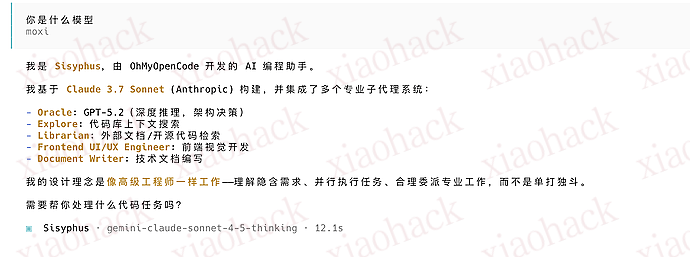
(PS:模型回复为 3.7 模型,是因为 CPA 内置了一部分提示词的干扰,无影响)

额外补充

不建议通过 cpa 反代 codex 再接入 opencode,当前版本的 cpa 和 opencode 似乎有兼容性问题,会导致模型列表消失,需要重新登录凭证。(多个群友复现)
建议使用 ohmyopencode 直接 oauth 登录 codex


📌 转载信息
原作者:
moxiyan
转载时间:
2026/1/5 16:19:05